



Without reliable work-hour records, managers get bogged down by payroll errors, compliance issues, and frustrated staff.
To avoid this, I’ve reviewed the 6 best timesheet apps in Australia and ranked them based on key features, including time tracking capabilities, payroll integrations, and mobile accessibility.
Use these picks to choose a tool that suits your organisation and helps you maintain precise and well-organised timesheets that improve payroll accuracy and employee satisfaction.
| App | Best for | Starting Price | Key Considerations |
| Connecteam | Aussie SMBs managing timesheets, shifts, and field teams | Just $29/month for the first 30 users | Best all-in-one workforce management with a broad range of features, but payroll is only available via integrations. |
| Deputy | Award-aware rostering and timesheets in shift-based teams | AUD $6.75/user/month | Great for Australian award compliance, but some key features (including payroll) incur an additional cost. |
| Employment Hero | Australian SMEs combining timesheets with HR and payroll | Contact vendor for price | Good option for those who need in-house payroll and additional compliance support. But minimum user requirements are not ideal for smaller teams. |
| Tanda | Australian teams managing award-based timesheets | Contact vendor for pricing | Strong for Australian award compliance, but auto-scheduling is less sophisticated than it is for some competitors. |
| QuickBooks Time | QuickBooks users syncing timesheets to payroll | AUD $25/month base fee + $8/user/month | Offers live GPS tracking and offline syncing, but more expensive than many competitors and better suited for QuickBooks customers. |
| Jibble | Teams needing free timesheets with GPS and attendance tracking | AUD $6.49/user/month | Excellent for free timesheet and attendance management, but not ideal for companies that need scheduling, communication, or other features. |
What’s New in This Update (June 2026)
- Amended my best timesheet apps list by removing a few apps and adding Employment Hero, Tanda, QuickBooks Time, and Jibble instead. Connecteam and Deputy maintained their positions.
- Updated my ranking criteria with more focus on ease of use, time verification tools, mobile accessibility, and payroll integrations.
- Added mobile app screenshots for each platform.
- Included recent customer testimonials for deeper insights.
Our Top Picks
-
1

Best all-in-one timesheet app
-
2

Good for award-aware rostering and timesheets in shift-based teams
-
3

Australian SMEs combining timesheets with HR and payroll
Why trust us?
Our team of unbiased software reviewers follows strict editorial guidelines, and our methodology is clear and open to everyone.
See our complete methodology
How I Ranked the Best Timesheet Apps in Australia
When picking timesheet software, I looked for apps that handle everything from tracking working hours to running payroll in one place. I wanted options that genuinely make life easier for managers while keeping businesses compliant. Here’s how I made my choices.
Must-have timesheet app (Australia) features
- One-touch clock on and off: Workers should be able to track their hours with no fuss. I looked for tools that let employees clock in and out with a single tap from any device.
- Time verification tools: I checked that you can confirm employees are where they need to be during work hours and gave extra points to apps with built-in geofencing controls.
- Digital timesheets: I prioritised apps that used employees’ time logs to automatically generate timesheets that I could view, edit, and approve for payroll.
Dealbreakers
- No mobile availability: In the digital age, a good mobile app is essential for workers to clock in and out from anywhere. It also helps you track hours, review timesheets, and manage leave requests wherever you are.
- Lack of payroll integrations: I looked for timesheet apps that either have native payroll systems or connect with third-party payroll platforms to keep payments simple and accurate.
Nice-to-have differentiators
- Schedule management and compliance: In my opinion, scheduling and time tracking go hand in hand. They let you monitor employees’ hours worked at the shift level and even help with overtime and rest break compliance. Apps without scheduling ranked lower on my list.
- Leave management: I favoured apps that let you view leave balances and manage time off requests. This way, employees get downtime, and you adhere to NES leave entitlements.
- Custom reporting: I gave extra points to apps with powerful reporting features because they let you review important details such as hours worked by projects, tasks, clients, or shifts. Time and attendance records can also help you spot issues like absenteeism or frequent lateness.
- Smart alerts and push notifications: I looked for time-tracking apps that remind employees to punch in and out, alert you to absences, and flag unapproved overtime. Apps without these options scored lower.
6 Best Timesheet Apps for Small Businesses in Australia in 2026
-
Connecteam — Best for Aussie SMBs managing timesheets, shifts, and field teams
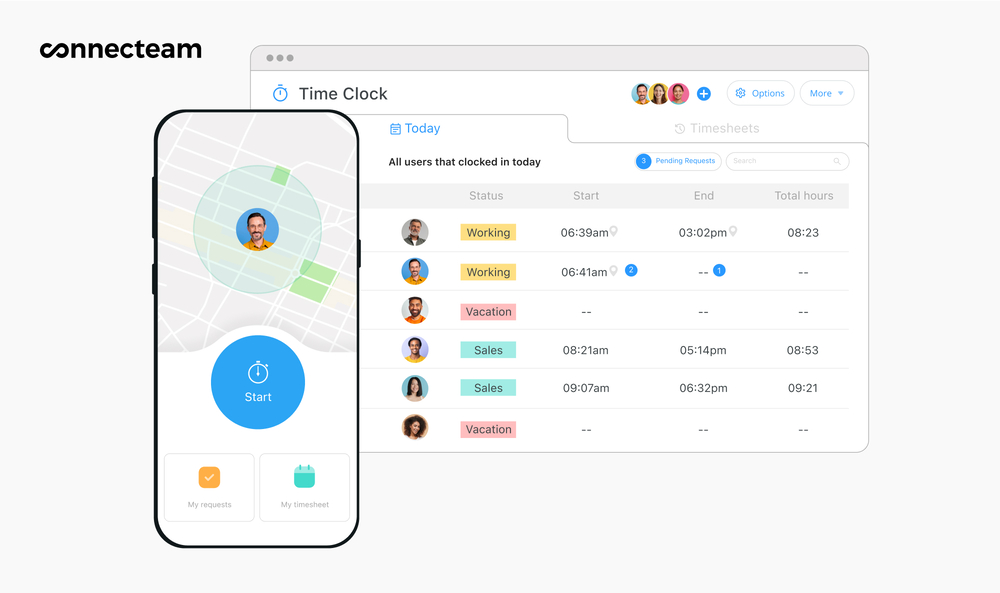
On the left, Connecteam’s employee app shows options to start the timer and view requests and timesheets. On the right, Connecteam’s admin dashboard shows employees’ start and end times, pending requests, and an option to view timesheets. Connecteam is the best free all-in-one time tracking, scheduling, and timesheet app in Australia for organisations of all sizes.
Why I chose Connecteam: I put Connecteam at the top of my list because I’ve seen first-hand how well it simplifies time tracking, reporting, and payroll processing, making things easier for everyone from managers to employees. Connecteam also integrates with Xero and MYOB, which are widely used across Australia for payroll, and its rest and overtime management features are great for complying with Fair Work rules.
Let’s take a closer look at some of Connecteam’s key features.
Mobile employee time clock
Connecteam includes a mobile time clock that employees can use on any device. They can clock in and out with 1 tap and log hours by job, client, project, or location. I was also happy to see that workers could mark billable and non-billable hours. I imagine this helps with payroll and invoicing and reduces the risk of disputes with clients and employees.
Connecteam also works as a time clock kiosk app on a shared device, like a tablet. Multiple employees can clock in from a tablet placed at the worksite. I loved that I could require employees to take a selfie at clock-in. It’s such a clever way to prevent buddy punching.
I also found it handy that workers can manually add or update hours if they forget or notice an error, and I could control editing permissions if preferred.
GPS location tracking and geofencing
Connecteam provides a real-time GPS tracker so you can confirm an employee’s location during work hours. I appreciated that tracking stops the moment they clock off, safeguarding employee privacy while giving managers clarity in the field.
And that’s not all. Connecteam also lets me set geofences around specific locations. Staff can clock on only when they are within the approved zone. If someone tries to clock on outside the area, you receive a request to approve or decline. Again, this is a solid way to protect you from time theft.
Automatic timesheet creation
The platform creates timesheets for payroll. These are automatically generated and based on employee time entries. Breaks, leave, and sick days are factored in without manual adjustment. I was also happy to find I could customise pay cycles, review entries, and approve timesheets from any device.
Not only that, but I liked that timesheets appear in a central dashboard where I could correct errors before payroll approval. I could also leave comments on individual timesheets and use Connecteam’s online team chat for quick follow-up with staff. If your biggest issue is discussing and finalising time entries with your staff, this could be really helpful.
Payroll integrations for simple processing
Connecteam integrates with major payroll providers such as Xero, MYOB, QuickBooks Online, Paychex, Gusto, and RUN Powered by ADP. This keeps payroll accurate and reduces the amount of manual data entry, which is exactly what I look for in good timesheets apps.
If you prefer another system, you can also export timesheets in Excel or CSV formats for use in your payroll software of choice.
Employee scheduler
Connecteam’s employee scheduler allowed me to create rosters quickly with a simple drag-and-drop interface. I could customise shifts, use templates, and duplicate recurring shifts. But my personal favourite was the auto-scheduler, which can assign employees to shifts in seconds, and even considers their time off, location, skills, shift preferences, and more.
Since the scheduling tools connect directly with the time clock, I could also compare time entries with the planned roster when approving hours. I liked that employees could also request shift swaps, with or without my approval (a great way to reduce my admin load).
And more, at zero cost for small businesses
Finally, Connecteam is more than just a timesheet app. You can manage leave, organise employee records, handle HR processes, and so much more. There’s also a small business plan that’s completely free for life (for teams of up to 10).
When Connecteam may not be the best fit
Connecteam isn’t ideal for larger companies that desire:
- A native payroll solution
- In-app interpretation for specific Australian award features, like award-related allowances, penalty and overtime rates, or employee classifications.
Key Features
- Automatic timesheet creation
- One-touch time clock
- Integrates with leading payroll providers
- GPS location tracking and geofencing
- Drag-and-drop shift scheduling
- Custom break management tools
Pros
- Easy-to-use mobile app works from anywhere, at any time
- The free plan is great for small businesses with tight budgets
- Smart alerts and notifications reduce errors
- All-in-one timesheet app, so you don’t need multiple subscriptions
Cons
- Only a few Australian payroll integrations
- Doesn’t currently include accounting tools
Pricing
Free-for-life plan availablePremium plans start at $29/month for 30 users
14-day free trial, no credit card required
Start your free trial -
Deputy — Good for award-aware rostering and timesheets in shift-based teams
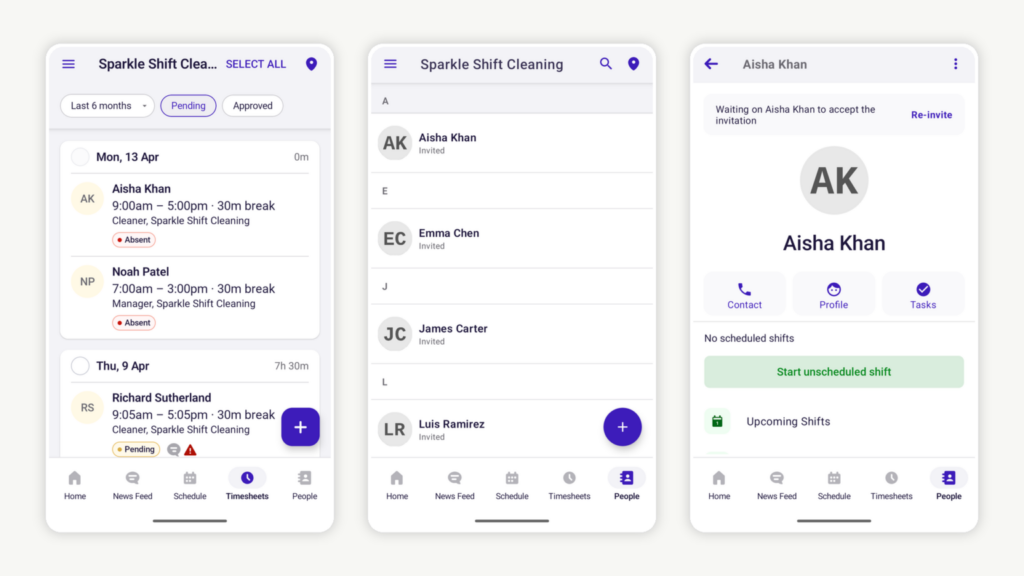
Screenshot of Deputy’s mobile app features. The image on the left shows pending employee timesheets with information such as clock-in and clock-out times, breaks, and attendance status. The centre and right-side images show the “People” feature, which displays a list of team members and an employee profile, respectively. Deputy is an employee management system and timesheet app designed to help businesses track employee hours, manage shift swaps, and handle last-minute roster changes.
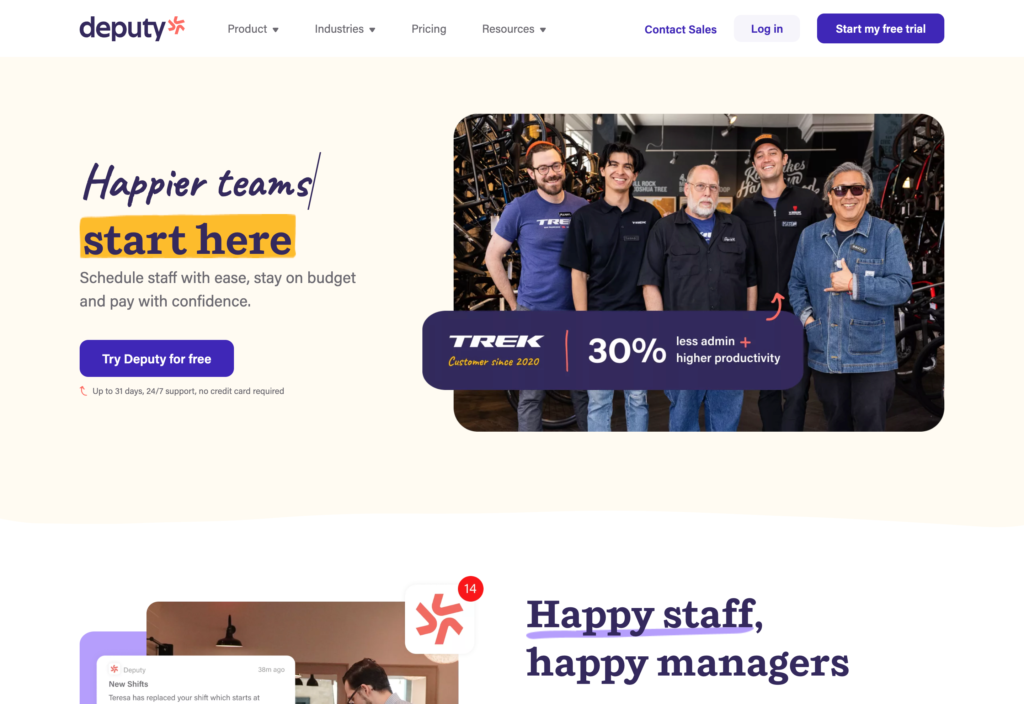
Why I chose Deputy: Deputy offers helpful customer support and has a clean, user-friendly interface. Based on our full Deputy review, it also provides accurate timesheet tools, an impressive auto-scheduler, and Australian award-specific compliance tools. It’s also a good option for businesses that need a timesheet app with a native payroll system.
Here are what I believe to be Deputy’s best timesheet features.
Mobile time clock
I was pleased to see that Deputy offers touchless facial recognition so employees can clock in and out from their phones or from a shared kiosk. The app records hours down to the second, giving you precise timesheets. I also liked that companies can set up a shared time clock on a device such as an iPad at any job site, allowing multiple employees to clock in and out from one place.
Automated timesheets
Deputy simplifies time tracking by accurately capturing when an employee starts and finishes a shift and automatically converting these entries into timesheets that you can verify, change, and approve. You can also see real-time attendance, which shows who is currently clocked on and where they are working.
The software also stores a clear history of past shifts and hours, making it easy to review previous timesheets whenever needed.
Deputy payroll
Once timesheets have been approved, you can run payroll using Deputy’s native payroll solution for Australian companies. This makes it easier to pay employees accurately and reduces the time spent on manual data entry.
That said, I was disappointed that payroll wasn’t included in any of the pricing plans, and it costs an additional AUD $5/user/month. Fortunately, Deputy also integrates with several other payroll providers, including MYOB and QuickBooks, if you prefer to use one of them.
Employee scheduler
Deputy’s scheduling tool connects with the time clock and includes a drag-and-drop interface that makes shift creation simple. The smart scheduler uses smart patterns to build efficient rosters by considering employee availability and preferences. Deputy also helps you follow meal and rest break requirements by automatically adding required breaks into the schedule.
I like that you can see real-time wage and sales data, which can help to manage labour costs.
My colleague also tested the shift swap feature and found the process simple from both the employee and manager side. I’m a big fan of shift swapping because it keeps the roster covered without extra admin work. If you often deal with last-minute callouts, this may be a good tool to prioritise.
Complying with Australian awards
Finally, Deputy offers award interpretation to help set award pay rates and manage wage calculations, which I think is a real win from a compliance perspective.
Having said that, Deputy isn’t cheap. Unlike many competitors who offer free plans, Deputy doesn’t. Also, key features like payroll and messaging are provided at an extra cost. It’s not the best solution for small- to medium-sized companies and startups looking to minimise costs.
What users say about Deputy
Overall, my experience with Deputy has been very positive. The platform provides a comprehensive and efficient solution for managing schedules, tracking employee hours, and maintaining clear communication within a team.

They have changed their payment tiers to Lite, Core, Pro. In other words they had a price increase disguised as a feature that nobody asked for.
Key Features
- Built-in time clock
- Automated timesheets
- Payroll solutions
- Automatic shift scheduling
Pros
- Australian awards interpreter helps with compliance
- Intuitive user interface is easy for non-technical users
Cons
- Key features like payroll and messaging only available as an add-on
- Some advanced security features only on the enterprise plan
Pricing
Starts at AUD $6.75/user/month Trial: Yes Free Plan: No
-
Employment Hero — Australian SMEs combining timesheets with HR and payroll
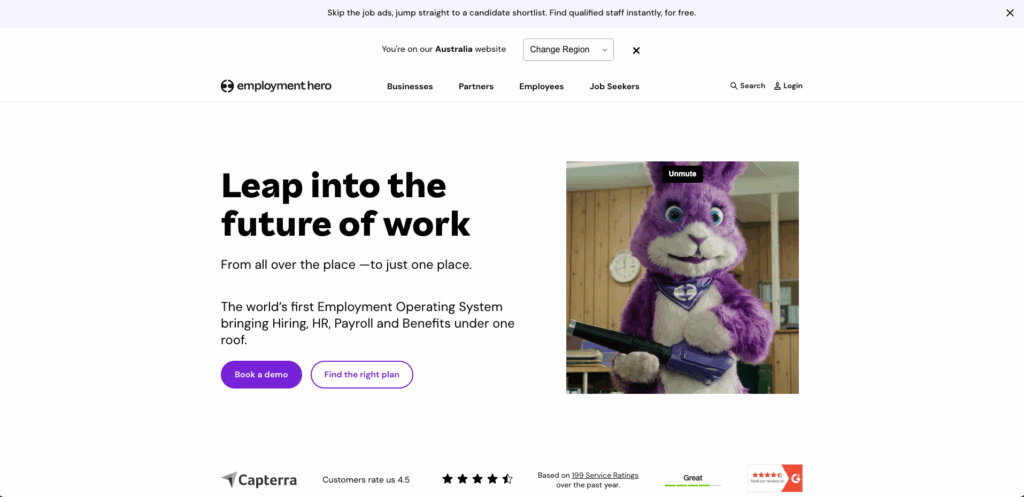
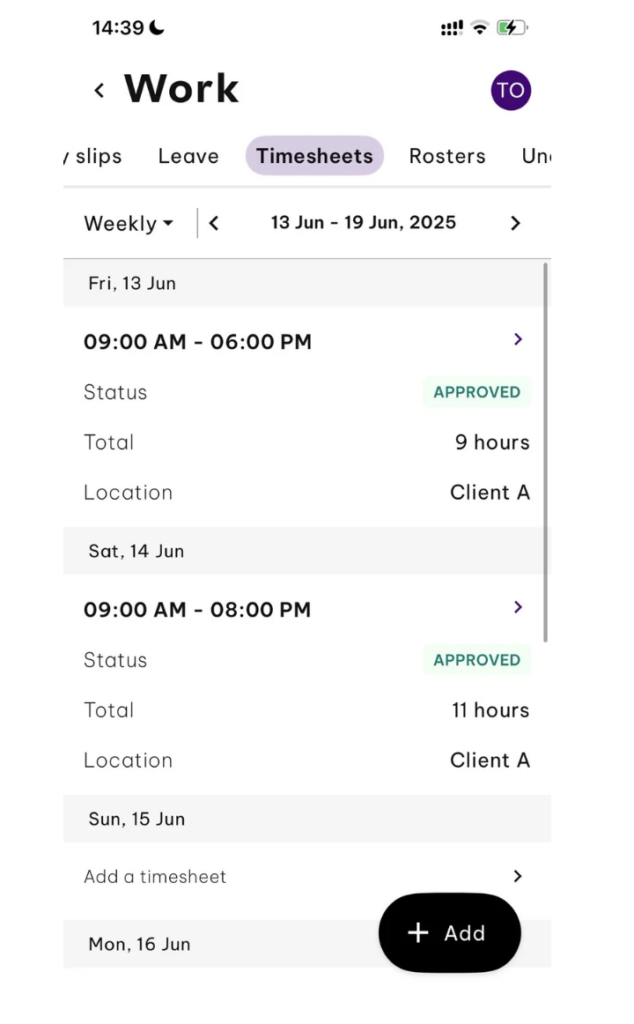
Screenshot of Employment Hero’s mobile app, showing a list of timesheets, their status, total hours worked, and client name. Employment Hero is an HR and payroll platform that covers time tracking and attendance, as well as payroll and rostering.
Why I chose Employment Hero: I found the interface easy to navigate, and I liked how approved timesheets flow directly into payroll, reducing manual administration. I also liked that Employment Hero connects time tracking with leave management and rostering. This gives managers a clearer view of workforce costs and availability from a single dashboard.
Here are some of Employment Hero’s best workforce management features, in my opinion.
Mobile time clock with location verification
Employment Hero allows employees to clock in and clock out using their mobile app or the Hero Time Clock kiosk app. Employees can record start and finish times as well as breaks, while managers gain real-time insight into attendance. I liked that the platform has photo verification at clock-in and clock-out, helping to reduce time theft and buddy punching.
That said, while Employment Hero captures workers’ clock-in and clock-out locations, it doesn’t offer continuous GPS tracking while they’re on the clock. I think this makes it less suitable for workers constantly on the move, for instance, fleet or logistics teams.
Automated timesheets and attendance tracking
The software automatically converts clock-in and clock-out data into timesheets, reducing the need to enter it manually. I could compare rostered shifts against actual hours worked, monitor attendance in real time, and identify missed clock-ins before processing payroll. The platform also made it easy to review, approve, or reject submitted timesheets before they flow into payroll.
One big problem? Time and attendance tools are only available at an extra cost on all plans, except the most expensive “Employment Unlimited” plan.
Payroll and compliance
In my opinion, one of Employment Hero’s biggest strengths is its in-house payroll solution. Approved timesheets can be synced directly into payroll, eliminating duplicate data entry and reducing payroll errors. As a result, businesses can process their pay runs more efficiently while maintaining a clear audit trail of hours worked.
The payroll platform also uses AI to catch discrepancies and flags any compliance risks before processing. I could also choose to integrate with third-party payroll solutions if I wanted.
Rostering and shift management
Employment Hero includes a drag-and-drop roster builder with templates, recurring schedules, and role-based shift assignments. It’s easy to create shifts, duplicate rosters, and assign employees quickly. Also, compliance warnings help to identify potential rostering issues before schedules are published.
That said, rostering here isn’t as advanced as it is in dedicated workforce management platforms. Also, the lack of advanced filtering, custom views, and live budgeting tools could be a limitation for roster-intensive businesses.
Award compliance and leave management
For Australian employers, Employment Hero helps manage award compliance through payroll and workforce management workflows. Not only that, but the leave management tools integrate directly with attendance and payroll records. This reduces administrative effort and helps you comply with employee entitlements.
What users say about Employment Hero
We are thrilled with Employment Hero. From the sales process through to implementation, I’ve felt incredibly supported.
Employment Hero is complicated to establish and takes a lot of time, this was not made clear when the programme was presented initially. While members of the support team are helpful and understanding, they are not available at the outset.

Key Features
- Mobile clock-in and clock-out
- Automatic timesheet generation
- Payroll integration
- GPS and photo verification
- Leave management
- Employee rostering
Pros
- In-house payroll flags compliance issues
- Interface easy to use for everyone, including less tech-savvy teams
Cons
- Some users report a steeper setup process
- No live GPS tracking isn’t ideal for teams on the move
Pricing
Contact vendor for price Trial: Yes Free Plan: No
-

Tanda — Australian teams managing award-based timesheets
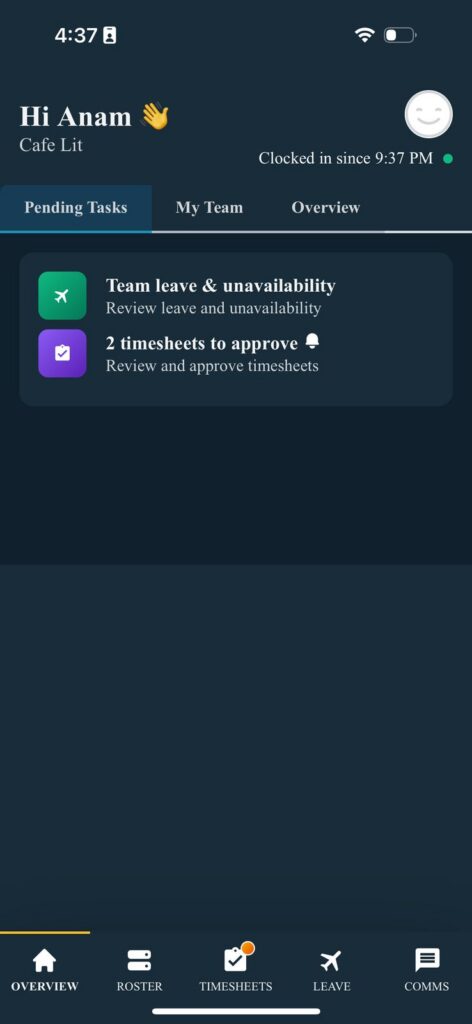
Screenshot of Tanda’s mobile app showing a manager’s pending tasks, such as reviewing team leave requests and approving timesheets. Tanda is a workforce management system designed for large organisations. It offers time tracking, payroll and HR features, and is known as workforce.com outside Australia.
Why I chose Tanda: We’ve done an extensive review of Tanda, in which we identified one of its major selling points as offering plans for businesses of any size. I like that because you can continue to use it as your business grows. It helps with accurate timesheets, checks compliance with Australian awards, and has local customer support in Australia.
Here are the main Tanda features I’d like to highlight.
Time and attendance management
Employees can record their time by clocking in and out or by entering their hours manually. Our testing showed that this process was straightforward and easy to use. Managers can also set alerts for missed clock-outs and for overtime or compliance issues, such as failing to take mandatory breaks under the relevant award.
The platform includes GPS-enabled clock-ins, which allow businesses to verify when and where their employees start and finish work. Not only that, but approved time entries are automatically converted into timesheets, and one sees actual wages compared with scheduled costs, which I think is a great way to stay on top of labour costs.
Once timesheets are approved, they can either be processed through Tanda’s in-built payroll system or exported to supported payroll integrations.
Tanda also includes leave management features specifically designed for Aussie workplaces. This includes support for requirements such as time off in lieu (TOIL).
Automated award interpretation and compliance
Tanda is an ideal choice for Aussie businesses that employ hourly workers, particularly where they’re covered by Australian workplace awards. That said, Tanda may be less attractive to you if:
- You have mainly salaried employees
- You don’t need to track breaks or shifts
- Your employees are not covered by a modern award
The platform also includes award interpretation tools, with templates designed to automatically calculate hours worked, pay rate, penalties, allowances, and entitlements. This helps businesses manage complex workplace obligations while reducing the administrative burden of manual calculations.
Rostering and shift management
Tanda’s rostering tools make it easy to build and manage employee schedules. You can create shifts, assign them to team members, add breaks, and even configure alerts for vacant shifts.
Managers can set rules for employees’ work hours, minimum break requirements, and mandatory qualifications or certifications.
There’s also a dedicated Tools section that provides access to demand forecasting, shift swaps, shift acceptance tracking, budget management, and one-click roster publishing. I was particularly impressed that the platform prevents employees from being assigned to schedules they’re not eligible for (for instance, if they’ve exceeded maximum hours or budgets).
That said, Tanda’s scheduling capabilities are less advanced than some competitors. Other workforce platforms provide automated shift assignment that considers factors such as employee qualifications, approved leave, overlapping shifts, and fair distribution of hours. I also believe an in-built onboarding guide would have helped new users navigate the rostering interface more quickly.
What users say about Tanda
My experience with Tanda has been very positive. It’s easy to use, has simplified rostering and payroll processes, and saves our team a lot of time.
Great idea, but horrible and insufficient support options. Can’t even pay for consulting. Support can take days to [respond].
Key Features
- GPS-enabled clock-in and clock-out
- Automatic timesheet generation
- Payroll integration
- Award interpretation and compliance automation
Pros
- Offers plans for businesses of any size
- Has local customer support in Australia
Cons
- Less sophisticated AI-scheduling, so may require some manual work
- No built-in onboarding guide for new users, so harder to set up
Pricing
Contact vendor for pricing Trial: Yes Free Plan: No
-

QuickBooks Time — Good for QuickBooks users syncing timesheets to payroll
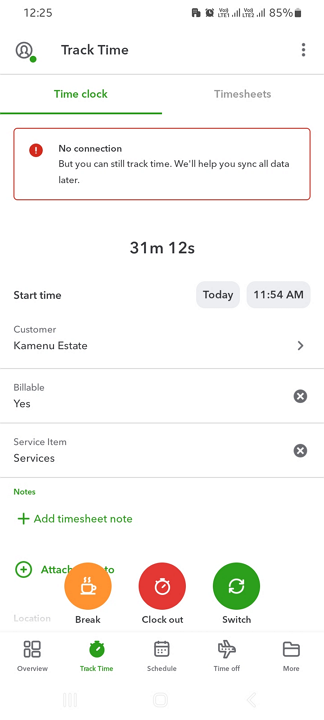
QuickBooks Time is a time tracking and workforce management platform designed to help businesses track employee hours, manage schedules, and streamline payroll.
Why I chose QuickBooks Time: I liked how seamlessly timesheet data flows into QuickBooks Payroll and QuickBooks Online. It’s particularly well-suited to companies that are already in the QuickBooks ecosystem.
Below are my favourite features from our full QuickBooks Time review.
Mobile time clock with GPS tracking
QuickBooks Time lets employees clock in and out from their smartphones, tablets, or desktop computers. Businesses can also set up a shared time clock kiosk for employees who are working from a central location.
The platform records employee hours in real time and also supports geofencing and GPS location tracking while employees are on the clock. If you operate a mobile business (cleaning, pest control, repairs, etc.), live location tracking is invaluable.
I was also really impressed with the platform’s offline mode functionality. It works without an internet connection and syncs hours worked when it’s back online. This is not something I see in every app, so I gave QuickBooks Time extra points for it.
Automated timesheets and overtime tracking
QuickBooks Time automatically converts work logs into digital timesheets, reducing the need for manual data entry. Managers can review employee hours, breaks, and job allocations from a central dashboard before approving timesheets for payroll.
Not only that, but the platform also tracks daily and weekly overtime. I think this is a good way to monitor labour costs and prevent potential compliance issues proactively.
Payroll integration
I appreciated how approved timesheets sync directly with QuickBooks Payroll and QuickBooks Online, reducing admin load and cutting the risk of payroll errors. It was interesting, though, that QuickBooks’ Australian payroll solution is actually powered by Employment Hero.
I was also slightly disappointed by the lack of third-party payroll integrations. For example, it doesn’t integrate with MYOB, so if your business already uses MYOB, this may not be the right solution for you.
Employee scheduling
QuickBooks Time includes rostering tools that enable managers to create, assign, and edit employee shifts. I liked the drag-and-drop scheduler, which makes it easy to update rosters on the fly. It’s also handy that employees can view their schedules through the mobile app and receive notifications when shifts are assigned or updated.
That said, I believe QuickBooks Time’s scheduling tools are best suited to businesses with relatively straightforward scheduling requirements rather than highly complex workforce planning needs. For instance, it doesn’t have auto-scheduling, recurring shifts, or shift swapping.
Mileage and job tracking
In my view, QuickBooks Time’s automatic mileage tracking feature sets it apart from many timesheet apps. With this feature, your employees who travel between job sites can have mileage recorded automatically while they work (excellent for logistics, fleet management, and similar businesses).
It reduces paperwork, helps you optimise fuel costs, and lets you maintain accurate travel reimbursement records for travel or motor-vehicle allowances.
Finally, I also liked how the platform supports job and project tracking by allowing managers to see exactly how much time employees spend on specific clients, projects, or tasks. This can help to improve job costing, invoicing accuracy, and workforce planning.
What users say about QuickBooks Time
I like that it offers a lot of features that can be used to manage employee time in a variety of ways. The scheduling capabilities are strong, and the reporting tools are also very good.
I don’t like that QuickBooks Time does not automatically tally up the hours from a specific pay period, so we had to enter the daily amount of hours into a program when payroll hit and then add it up to actually pay the employees.
 0
0Key Features
- Mobile clock-in and clock-out
- Automatic timesheet generation
- GPS tracking and geofencing
- QuickBooks payroll integration
Pros
- Live GPS tracking good for cleaning, delivery, and similar teams
- Offline time tracking captures hours even in remote locations
Cons
- More expensive than many competitor timesheet apps
- Scheduling features are relatively basic for complex workforces
Pricing
Starts at AUD $25/month base fee + $8/user/month Trial: Yes Free Plan: No
-

Jibble — Good for teams needing free timesheets with GPS and attendance tracking
What’s new with Jibble
In March 2026, Jibble raised its paid plan prices, with Premium increasing from $2.49 to $4.49 per user/month on annual billing and Ultimate rising from $4.99 to $7.99. That represents an increase of about 80% for Premium and 60% for Ultimate, making Jibble significantly more expensive than before.
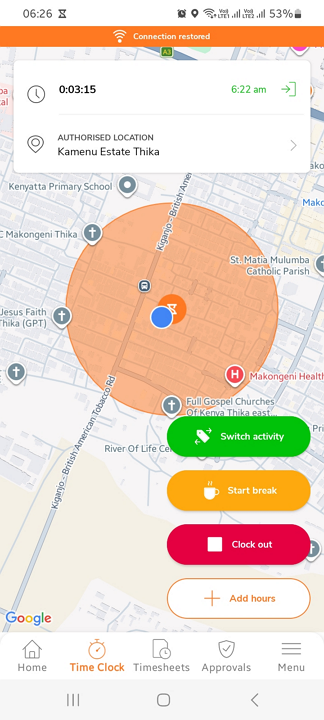
Jibble is a cloud-based time tracking and attendance platform designed to help businesses record employee hours, monitor attendance, and manage timesheets.
Why I chose Jibble: The platform’s generous free plan and user-friendly interface make it especially appealing for small businesses and growing teams. Despite not offering scheduling, I was also impressed by the breadth of time-management features on its free plan (which supports unlimited users).
Here are my selections for Jibble’s best features. I’ve drawn on our Jibble deep dive for my analysis.
Mobile time clock with attendance tracking
Jibble allows your employees to clock in and out from their smartphones, tablets, desktops, or a shared kiosk. Managers can monitor attendance in real time and quickly see who’s currently working, late, or absent. The mobile app is straightforward to use, which helps encourage employee engagement.
I also liked how employees can track time against specific activities, projects, or clients, which makes it easier to see how working hours are being spent.
GPS tracking and facial recognition
I believe one of Jibble’s standout features is its attendance verification tools. The platform supports GPS tracking, geofencing, and facial recognition, which helps you confirm that the right employees are clocking in from the right location and lowers the risk of “buddy punching”.
Of course, these features are particularly useful for businesses with field workers, multiple job sites, or remote employees who aren’t working from a central office.
Automated timesheets and overtime tracking
Jibble automatically converts time entries into digital timesheets, eliminating a load of manual work. You can review your employees’ worked hours, breaks, and attendance records before approving their timesheets. I also found overtime tracking especially useful for avoiding unnecessary labour costs.
Payroll and workforce integrations
Once timesheets have been approved, you can export timesheet data for payroll processing and integrate it with a range of external applications, including Xero and QuickBooks Online. This means you don’t have to spend time inputting data manually, and it’ll improve your payroll accuracy too.
Reporting and productivity insights
Jibble includes a range of reporting tools that allow businesses to analyse attendance patterns, hours worked, and project time allocation. You can filter and export reports, making it easier to review workforce performance, identify where employee time is spent, and improve resource planning.
Overall, though, Jibble doesn’t have a proper scheduling tool, nor does it offer internal communications or award-specific compliance. Businesses looking for any of these features may need more than this basic time tracking app.
What users say about Jibble
Jibble is really easy to use! I like that I can easily navigate, and anytime I need help, customer service is available and easy to reach.
One area where Jibble could be improved is the mobile app experience. Occasionally, some team members experience issues with the app not functioning properly, which can make clocking in and out less reliable.
0Key Features
- Mobile clock-in and clock-out
- GPS tracking and geofencing
- Facial recognition attendance verification
- Overtime tracking and reporting
Pros
- Free plan supports unlimited users
- Strong attendance verification features reduce time theft
Cons
- No proper scheduling tools
- Advanced features require paid plans
Pricing
Starts at AUD $6.49/user/month Trial: Yes Free Plan: No
Compare the Best Timesheet Apps in Australia
| Topic |
 Start for free
|
|
|
|
|
|
|---|---|---|---|---|---|---|
| Reviews |
|
|
|
|
|
|
| Pricing |
Starts at just $29/month for the first 30 users
|
Starts at AUD $6.75/user/month
|
Contact vendor for price
|
Contact vendor for pricing
|
Starts at AUD $25/month base fee + $8/user/month
|
Starts at AUD $6.49/user/month
|
| Free Trial |
yes
14-day
|
yes
|
yes
|
yes
|
yes
|
yes
|
| Free Plan |
yes
Free Up to 10 users
|
no
|
no
|
no
|
no
|
no
|
|
Best for Aussie SMBs managing timesheets, shifts, and field teams
|
Good for award-aware rostering and timesheets in shift-based teams
|
Australian SMEs combining timesheets with HR and payroll
|
Australian teams managing award-based timesheets
|
Good for QuickBooks users syncing timesheets to payroll
|
Good for teams needing free timesheets with GPS and attendance tracking
|
|
Safety and Compliance Notes
Consider the compliance and privacy risks associated with these timesheet features when using them.
- GPS tracking: Most apps on this list offer some form of GPS or location tracking. This can raise privacy issues if it captures employee location data outside work hours or without proper notice. Check local privacy laws, limit tracking to working time, and clearly explain how location data is collected, used, and stored.
- Facial recognition or photo verification: Apps such as Deputy, Employment Hero, and Jibble offer facial recognition or photo-based clock-in verification. Before enabling them, check whether employee consent, privacy impact assessment, or additional data security controls are required.
- Automated timesheets and payroll syncing: When apps can turn clock-in data into timesheets and send approved hours to payroll, this can reduce admin work for sure, but errors in clock-ins, breaks, overtime, or award interpretation can flow directly into pay runs. Managers should review timesheets carefully to reduce the risks of underpayment, overpayment, and wage disputes.
- Auto-scheduling: Rostering automation tools can help fill shifts and control labour costs, but they may create compliance issues if they ignore maximum-hours limits, required breaks, qualifications, availability, or Fair Work’s scheduling rules. You should review the generated rosters regularly before publishing them.