


Manual rostering can quickly lead to shift overlaps, missed updates, payroll errors, and award compliance issues, especially for teams working across different sites or changing rosters week to week.
I reviewed 6 employee scheduling apps for Australian businesses, comparing scheduling tools, mobile access, time tracking, payroll integrations, compliance support, and real-time updates.
This guide will help you choose the app that best fits how your team works.
| App | Best for | Starting Price | Key Considerations |
| Connecteam | Shift-based teams that need easy scheduling, mobile time tracking, and payroll-ready timesheets | Just $29/month for the first 30 users | Drag-and-drop shift scheduler, Time clock with GPS and geofencing, Time off management, Timesheets and payroll integrations. |
| Deputy | Growing teams needing compliance-based shift scheduling | AUD $6.75/user/month | AI-powered automated scheduler, Drag-and-drop features, Time tracking, Dozens of integrations. |
| Tanda | Larger teams needing advanced customisations and compliance | Contact vendor for pricing | Auto-scheduling, Time tracking, Labour forecasting, Australian awards compliance. |
| 7shifts | Hospitality teams needing demand-based rostering | ~A$43.55/month/location, up to 30 employees | Scheduling by template, Time tracking, Availability management, Tip management. |
| RotaCloud | Small teams needing reliable, user-friendly leave tracking | ~A$19/month (GBP 10) | Manual roster builder, Leave policies and tracking, GPS-enabled time clock, Geofencing. |
| RosterElf | Small teams needing quick and basic compliance support | $6AUD/employee/month | AI rostering, Time tracking, Leave management, Award interpretation. |
Our Top Picks
-
1

Best for shift-based teams that need easy scheduling, mobile time tracking, and payroll-ready timesheets
-
2

Growing teams needing compliance-based shift scheduling
-
3

Good for larger teams needing advanced customisations and compliance
Why trust us?
Our team of unbiased software reviewers follows strict editorial guidelines, and our methodology is clear and open to everyone.
See our complete methodology
How I Ranked the Best Employee Scheduling Apps
The best app for scheduling staff lets managers create quick, detailed, and error-free schedules. Here’s what I looked for when picking my top apps.
Must-have scheduling app features:
- User-friendly scheduler: I prioritised time-saving apps that offered drag-and-drop scheduling, shift templates, recurring shifts, and or other time-saving tools.
- Employee tools: Some of the best apps let employees pick from open shifts or trade shifts when needed. I gave these apps extra points for empowering workers to take accountability and preventing last-minute absences.
- Time and location tracking: I looked for apps that let employees clock in and out on their phones or on on-site devices. This way, managers can cross-check that workers are getting paid correctly for their shifts. Apps that offered even stronger verification through GPS tracking and geofencing earned even higher marks.
- Time off management: Good apps also let you track absences and availability, and manage employees’ leave so you can account for time off when creating schedules. Software that didn’t offer this feature scored lower in my rankings.
Deal-breakers for this category:
- Mobile functionality: If an app doesn’t let you create and edit schedules, approve timesheets, or manage time off from a mobile device, it didn’t make it to my list.
- Payroll integrations: I immediately rejected all apps that didn’t offer built-in payroll or payroll integrations to help tackle everything in one place.
- A bang for your buck: When compiling my list, I left off apps that didn’t offer a fair price for the features offered.
Nice-to-have differentiators:
- Auto-scheduling: Apps that offered AI-based or automatic shift assignments based on availability, preferences, labour laws, and business needs scored much higher in my rankings.
- Task tracking: Some of the most standout apps let you assign and track shift tasks, with due dates and live status reports, so you can stay on top of shifts and projects in real time.
- Advanced reporting: I was especially impressed by apps that offered a wide range of reports, including employee attendance and labour cost tracking, to help managers make better business decisions.
- Australia labour and industry award compliance: I gave preference to apps that offer support to comply with Australian awards and regulations, like automated updates and non-compliance warnings, so I can minimise these risks.
- Australia-based support: Australian businesses should have high-availability customer support in their timezone, ideally locally based. Having Aussie-based support bumped shortlistees’ scores.
The 6 Best Employee Scheduling Apps of 2026
-
Connecteam — Best for shift-based teams that need easy scheduling, mobile time tracking, and payroll-ready timesheets
Key Features
- Drag-and-drop shift scheduler
- Time clock with GPS and geofencing
- Time off management
- Timesheets and payroll integrations
- Break and overtime rules
- Team and 1-to-1 chat
Pros
- Intuitive and bug-free mobile app works on the go
- Low per-user price great for teams on a budget
- Very quick AI auto-scheduling saves time and reduces errors
- One-click shift swapping minimises last-minute no-shows
Cons
- No in-app payroll runs
Connecteam is an all-in-one employee scheduling app that gives small and medium-sized teams intuitive scheduling tools, quick approval processes, automated timesheets, and more.
Why I chose Connecteam: Connecteam got my top spot since it offers a superior user experience, highly customisable schedules, GPS time tracking, compliance settings, and popular payroll integrations. I tested its web and mobile apps and found them quick, reliable, and bug-free —which, in my experience, isn’t the norm among scheduling apps.
Here’s a closer look at Connecteam’s key features.
Job scheduling
Connecteam offers an intuitive drag-and-drop employee scheduler. I could easily assign shifts by dragging and dropping them into employees’ fields or across teams. I was also able to copy shifts from a previous period, duplicate existing ones, set shifts as recurring, and use customisable templates for a specific job, shift, or entire week. If your business has repetitive coverage needs, these are excellent tools to prioritise.
I love that Connecteam provides read-only schedules with clients through a shareable link. This way, you can inform external stakeholders about project timelines and worker assignments without giving them full system access.
Connecteam’s automatic shift conflict alerts immediately point out scheduling errors. This helps you reduce labour costs by preventing double scheduling, assigning underqualified employees to a shift, or assigning employees out on leave.
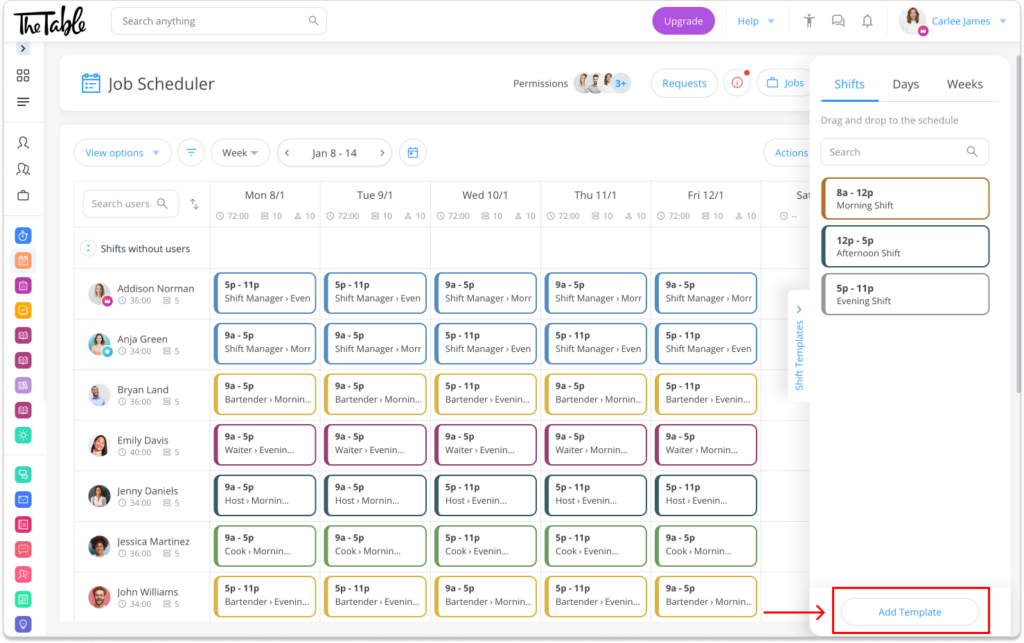
Connecteam’s shift templates and drag-and-drop builder are easy to use. AI-powered auto-scheduling
I think AI auto-scheduling is one of Connecteam’s most useful tools. It allowed me to create employee schedules in seconds rather than minutes or hours.
You first add unassigned shifts to your roster. Then, the AI scheduler fills the roster for you, taking into consideration employee availability, preferences, certifications, and custom compliance settings. If you’re constantly dealing with errors and burnout from manual scheduling, this feature is definitely worth prioritising.
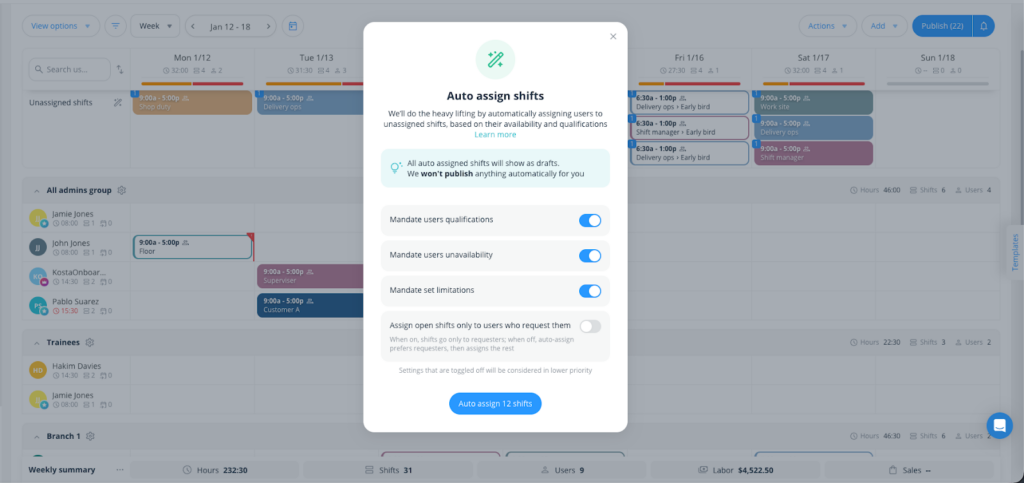
If you have lots of team members or lots of shifts to assign, auto-scheduling saves precious time. GPS time clock and geofencing
Connecteam’s GPS employee time clock lets team members clock in and out on their mobile phones, wherever they’re working. I particularly like the Switch Jobs capability, which allows employees to transition between different jobs without requiring them to clock out and then clock back in.
I enabled the GPS tracker, and it pinned down employees’ exact locations while they were clocked in (an invaluable way to check that everyone is working their shifts).
Safety and compliance note: Tracking employees’ live locations outside of work hours can be a data privacy issue. I appreciated that Connecteam doesn’t record employees’ locations when they’re clocked out.
Geofencing, meanwhile, allowed me to draw digital borders around job sites, restricting clocking in and out to particular areas.
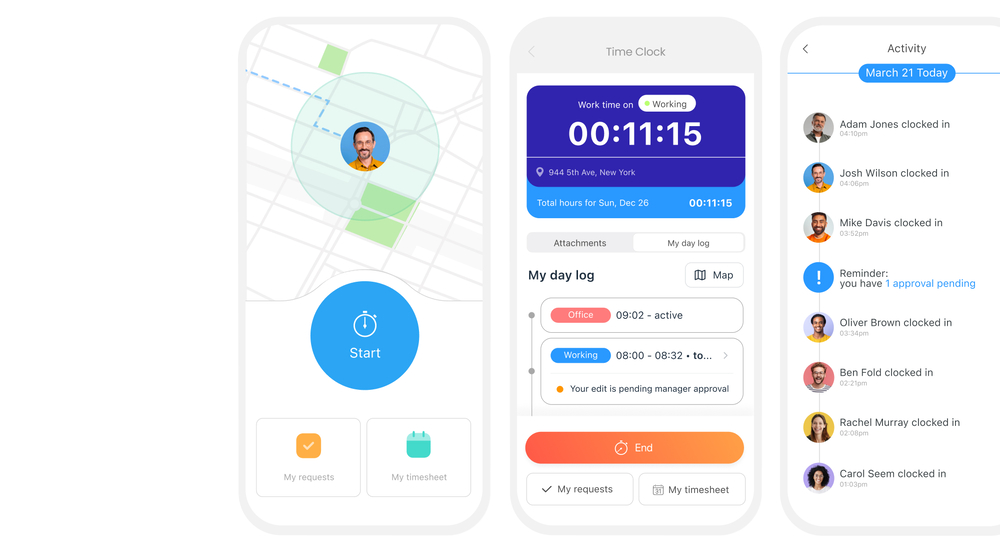
You get employees’ work hours and GPS location history while they’re punched in for a job Breaks and overtime rules
I found it easy to set up paid and unpaid breaks, and Connecteam also automatically alerts employees when they need to take a break. I was pleased that I could set overtime alerts as well, which is great for controlling labour costs.
Time off tracking, integrations, team chat, and more
Connecteam’s time off management lets me view leave allowances, respond to requests in the app, and get a clear view of my team’s time off in the scheduler (great for avoiding errors).
Connecteam comes with many payroll integrations, including several commonly used in Australia, including MYOB, Xero, QuickBooks, and more.
Finally, scheduling tools have their place, but sometimes you just need to message a colleague to sort out a last-minute issue, and Connecteam solves for that with its online team chat. On top of that, it provides many other operations, HR, and communication tools.
When Connecteam may not be the best fit
Connecteam may not be the best fit if you need built-in Australian award interpretation that automatically calculates complex penalty rates, allowances, or award-specific pay conditions inside the scheduler.
Connecteam also offers a free for life plan – Try Connecteam here!
Pricing
Free-for-life plan availablePremium plans start at $29/month for 30 users
See Connecteam’s Scheduling App in Action
Request a Free Demo -
Deputy — Growing teams needing compliance-based shift scheduling
Key Features
- AI-powered automated scheduler
- Drag-and-drop features
- Time tracking
- Dozens of integrations
Pros
- Specific support for Australian award entitlements
- User-friendly interface, easy to navigate
Cons
- Offline clock-ins are limited to the iPad Kiosk app.
- No free-forever plan for small businesses
Deputy is a workforce management software that streamlines employee scheduling, time tracking, and workplace communication.
Why I chose Deputy: It’s a well-rounded, well-designed scheduler with time tracking, auto-scheduling, and payroll features.
Based on our full Deputy review, I was impressed to find that Deputy comes with compliance tools that help you stick to fair scheduling practices and laws. It also offers multiple plans that let you add on advanced features as your business grows, and it has 24/7 customer support, including Australian business hours.
Here are Deputy’s scheduling highlights.
AI scheduling
Deputy offers both manual rostering and auto-scheduling, allowing you to publish schedules instantly, notify employees of their shifts, and manage last-minute shift changes.
The AI scheduler automatically assigns shifts based on your staff’s location, availability, skills, and more.
But I also liked Deputy’s user-friendly manual scheduler, which helps create schedules in less time than some other competitors. You can add all the information you need for each employee and shift, including notes, start and end times, plus attach important documents. You can also schedule meal and rest breaks, colour-code roles, and add specific task assignments with the Shift Action button.
Employee time clock
With Deputy’s time clock, employees can clock in from web browsers, smartphones, and tablets. I really like that Deputy offers facial recognition and PIN codes as clock-in options, which I found useful for both accessibility and security.
Safety and compliance note: Check your state or territory’s laws around biometric data collection. You may need employee consent and a clear data storage and handling policy before activating this feature.
The Deputy Kiosk app stands out against some competitors by having offline functionality (the app stores clock-in data for up to 24 hours until the connection is restored). If your job sites are in areas with limited connectivity, this feature could be invaluable. However, this feature only works for the iPad version of the tool.
Once an employee clocks in, Deputy tracks their work hours, breaks, and end times, automatically generating employee timesheets. During our testing, editing and approving timesheets were both pretty straightforward.
Deputy also offers live attendance updates, showing real-time information on who has arrived at work, who is on break, and who has clocked out for the day. That said, it’s not ideal for teams with an inconsistent internet connection since it doesn’t allow offline time tracking other than through the Kiosk app. The time clock button on mobile also takes a minute to locate—it’s labelled “Start shift”.
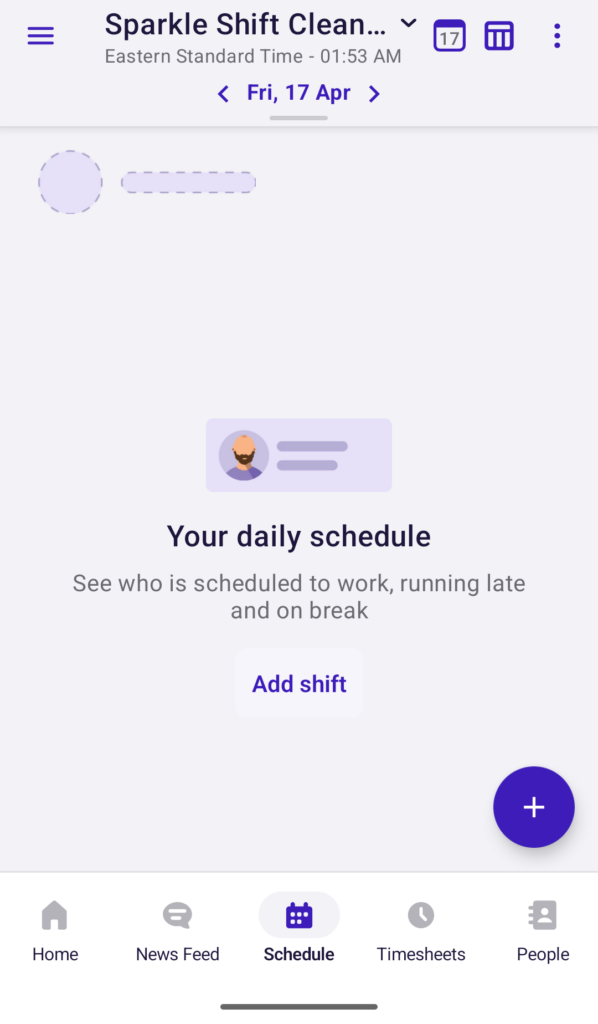
Screenshot of Deputy’s mobile app showing a manager’s dashboard. Once a schedule is published, it’ll show real-time worker statuses, such as who is scheduled to work, running late, or on a break. Australian award compliance
Great news for Aussies—Deputy offers award interpretation so you keep your labour compliance in check. The app syncs with the latest Fair Work rules and auto-fills employees’ award entitlements, including allowances and overtime pay.
Its wage calculator also takes care of award calculations, and you can integrate final entitlements and timesheets with third-party payroll providers, like Xero, MYOB, and ADP. There are other ways Deputy helps you stay compliant, even outside Australia. For instance, our reviewers were able to mandate shift-based breaks and work limits. Warning messages let you know when you’re about to break a compliance rule.
What users say about Deputy
It’s so easy to use on both a manager and employee POV. It’s so user friendly! I love that you can assign shifts, remove shifts, swap and edit shifts easily.

Since their major update the application is now terrible (prior to this it was fantastic). Slower, clunkier and now very expensive when compared to other platforms.

Pricing
Starts at AUD $6.75/user/month Trial: Yes Free Plan: No
-
Tanda — Good for larger teams needing advanced customisations and compliance
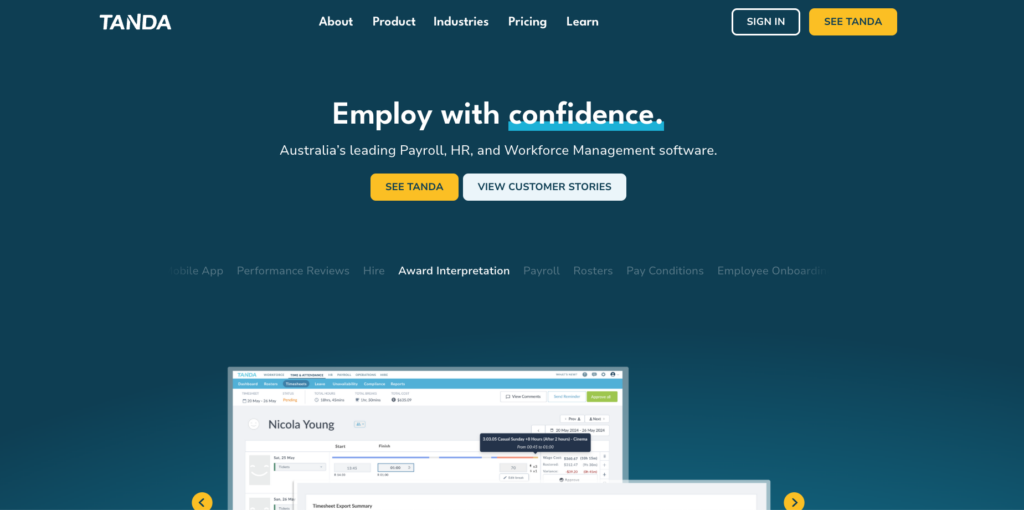
Tanda is an enterprise-grade workforce management system with time tracking, HR, and payroll features. It’s worth noting that outside of Australia, Tanda goes by the brand name workforce.com.
Why I chose Tanda: Our team has reviewed Tanda in depth. Its scheduling tool is advanced, featuring auto-scheduling and labour forecasting. Plus, you get accurate timesheets with time tracking and can run payroll with Australian award compliance. Tanda lets you mix and match workforce, HR, and payroll modules, and has local Australian customer support.
Here are its scheduling highlights based on our team’s trial run and research.
Scheduling
The platform’s scheduling module looks pretty advanced. You can drag-and-drop shifts, reuse shift templates, and set automatic alerts to notify assigned employees of their shifts. You can also build breaks into shifts, enable shift swaps to minimise no-shows, and let staff bid for open shifts (which I think is great for employee satisfaction).
You can easily create, approve and reject time off requests, as well as see leave and availability directly in your team schedule. Separately, task tracking will help you stay productive on Tanda.
Tanda also offers some advanced scheduling tools:
- Use AI to schedule jobs in seconds based on customisable factors, including employee availability, skill sets, and previous shift patterns.
- Forecast labour needs by integrating or uploading demand data (such as bookings or sales data from a different software). I like that Tanda also counts weather and foot traffic patterns, which is great for brick-and-mortar businesses.
Usability-wise, the web app has old-school graphics compared with its close competitors. Plus, many verified user reviews, like this one, mention that the Tanda mobile app isn’t very intuitive for team members. So if your company has workers who are less tech-savvy or you prefer a modern design, you may be better off with a different app.
Time and attendance
Staff members can track their time to the second, either by punching in and out or adding time manually. From our in-depth testing, I sense this is a quick and easy task. You can set notifications for when individuals forget to clock out of their shifts, dip into overtime, and trigger compliance risks (for instance, not taking award-mandated breaks).
The app also features GPS tracking, so you can see in real-time when and where workers clock in. And, it turns approved time into timesheets automatically, giving you differentials between tracked and scheduled labour costs. Useful! Once approved, you can sync timesheets with Tanda’s built-in payroll or run payroll via a third-party integration.
Finally, you get leave management specific to Australia that automatically accounts for things like time off in lieu (TOIL).
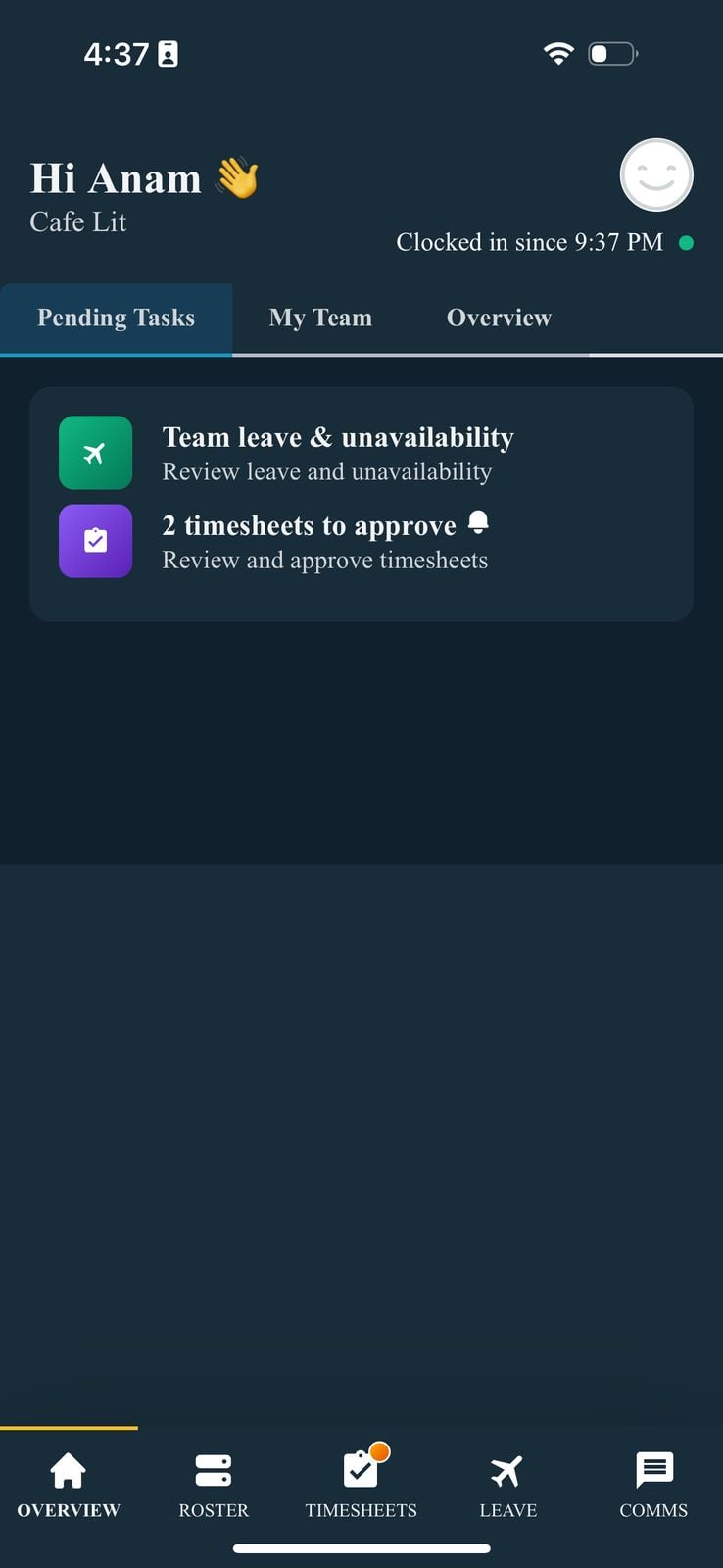
Screenshot of Tanda’s mobile app showing a manager’s pending tasks, such as a pending leave request and 2 timesheets pending approval. Australian award compliance
A big Tanda selling point for Aussie businesses is its award interpretation module, which caters to hourly workers. During our trial, our reviewer tested compliance features, including setting max hours, mandatory employee certifications, break times, and other rules. Once set, you can’t schedule in workers or shifts that don’t match requirements, which saves you manual checks.
But what’s perhaps more helpful is Tanda’s automatic base rate calculations based on conditions such as industry and employment type (e.g., casual). You still need to ensure you fulfil your legal obligations, but the Tanda software builds in complex award interpretation into your scheduling and payroll.
What users say about Tanda
Business Development Officer” rating=5]Before Tanda, covering sick calls or last-minute gaps was a pain – lots of phone calls, group chats, and manual shuffling[…] It’s saved us tons of admin time and pretty much eliminated our short-staffing issues.
The lack of support that is provided onsite by a specialist.

Key Features
- Auto-scheduling
- Time tracking
- Labour forecasting
- Australian awards compliance
Pros
- Great if you need broader HR functionality
- In-depth scheduling rules and automation cut errors
Cons
- Less modern interface than competitors
- No free-forever plan for smaller companies
Pricing
Contact vendor for pricing Trial: Yes Free Plan: No
-

7shifts — Hospitality teams needing demand-based rostering
Key Features
- Scheduling by template
- Time tracking
- Availability management
- Tip management
Pros
- Free trial and free plan work well for businesses on a budget
- Track time on POS devices
Cons
- Native payroll available in the US only
- Scheduling could be more beginner-friendly
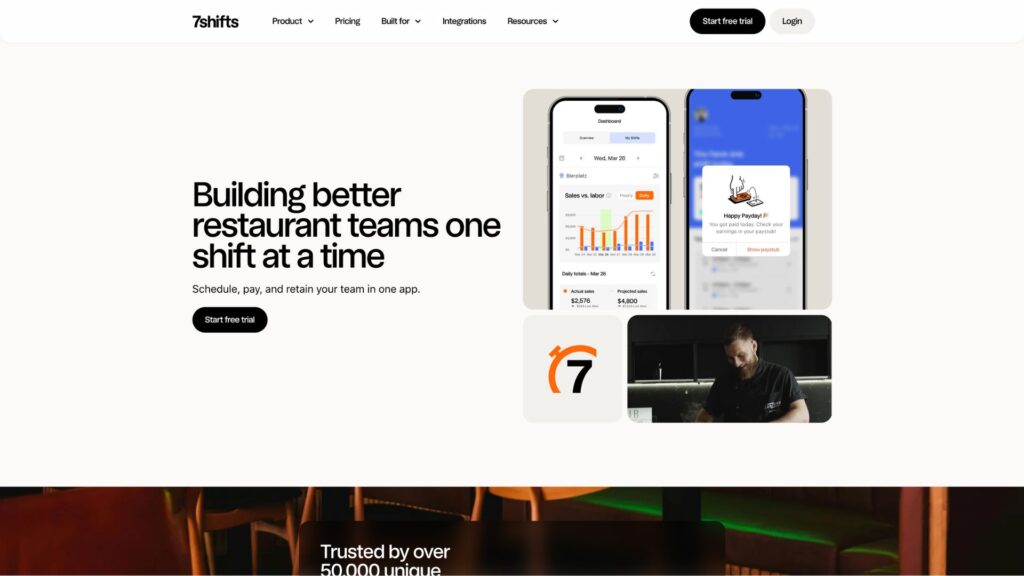
7shifts is a scheduling platform with hospitality-specific features.
Why I chose 7shifts: My colleague tested 7shifts first-hand and found it was very easy to set up and was accessible for first-time schedulers. I included it in my list because it offers extra features like tip management and POS-based time tracking for restaurants and hospitality businesses.
Here are some of 7shift’s key features.
Compliant scheduling
You start scheduling by importing, using a schedule template, or adding shifts from scratch. We tried the template option on the free trial and just had to confirm the number of shifts per role (e.g., for cooks, servers, etc.). The app then spread shifts across my working week. You can set shift tasks (with the Task Management module), mandate breaks, and let employees shift-swap.
The ‘Fix warnings’ tool flags schedule issues such as shift conflicts, overtime, unassigned shifts, and potential regulation clashes (e.g., clopening shifts). And the app automatically resolves the issues it can resolve, such as removing workers from clopening shifts, so you don’t have to.
That said, publishing or assigning shifts wasn’t very intuitive. You also can’t seem to drag-and-drop unpublished shifts. This is a downside for extremely busy or non-tech-savvy managers.
Once shifts are published, employees are notified immediately via email.
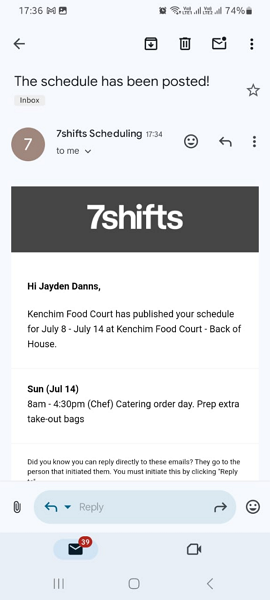
Screenshot of 7shifts notifying an employee when their schedule has been published. Time tracking and availability
I was surprised to see that 7shifts doesn’t let workers track time on a desktop web app (negative points), but they can do it on the mobile app, an on-site tablet, and even on your point-of-sale (POS) device.
7shifts also offers geofencing, so you can prevent workers from clocking in or out beyond designated locations. You also get auto-notifications when someone goes into overtime, so if you’re worried about unnecessary overtime or rising labour costs, this could be a good choice for you. But 7shifts’ payroll is US-only, so Australian companies will need to use a third-party integration to pay workers.
With 7shifts, you also get a handle on your team’s availability and time off. You can quickly approve or deny when employees request leave, and team members can also set their availability (for instance, that they’re not available on Sundays).
Extra features
Finally, here are some extra features that differentiate 7shifts.
- Logbook: Lets managers add basic notes in categories such as employee performance, customer feedback, maintenance, and shift issues.
- POS integration: 7shifts connects to a number of POS systems, allowing you to use sales and labour data to create more accurate and efficient schedules.
- Tip management: You can customise tip distribution rules and pay out tips automatically or manually.
Finally, 7shifts also includes some basic, easy-to-use hiring and engagement tools. You can post jobs, accept applications, screen candidates, and more. Plus, you can track performance metrics and staff satisfaction with the engagement module.
Overall, the app is solid, but if you’re not a restaurant or hospitality company, you might want to consider other options.
What users say about 7shifts
The system effectively solves scheduling issues, enabling me to easily manage a large group of employees with different personal and professional commitments such as work, school, and personal life.
The billing model feels designed to trap you into recurring charges, and the “support” team seems more interested in hiding behind policy than supporting customers.
0Pricing
Starts at ~A$43.55/month/location, up to 30 employees Trial: Yes — 14 days Free Plan: Yes — Up to 1 location & 15 employees
-

RotaCloud — Good for small teams needing reliable, user-friendly leave tracking
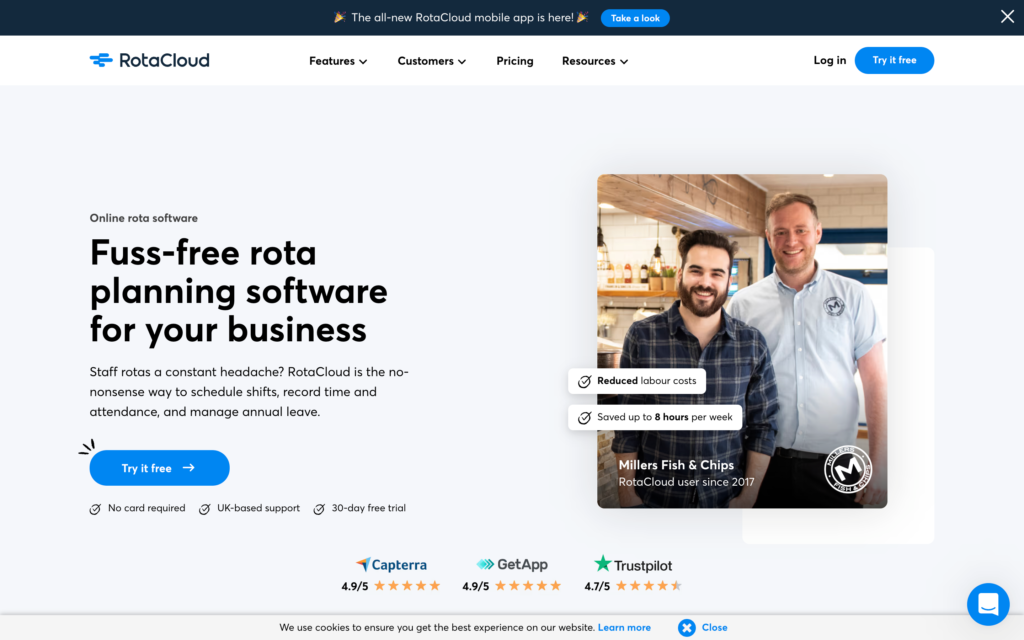
RotaCloud is a beginner-friendly scheduling app with time tracking and time off management.
Why I chose RotaCloud: Not every team needs high-tech schedule customisations. I chose RotaCloud because it offers basic roster management, time tracking, and leave tracking in a user-friendly and cost-effective way (perfect for tech-newbie teams). Based on our full RotaCloud review, I particularly liked its leave policy customisation and employee-facing availability settings.
Let’s dive into its core features.
Rostering
You can save and reuse shift templates, drag-and-drop shifts in your team calendar, and quickly duplicate existing schedules. During our RotaCloud test-drive, my colleague found it was intuitive and beginner-friendly. You can add a fair bit of detail into your shifts (including role types and pay rates) and manually assign team members.
I also like that you can activate mandatory shift reminder notifications (which workers can’t turn off) and customise the minimum notice time for shift swaps and cancellations.
But unlike some competitors, RotaCloud doesn’t currently offer auto-scheduling, which can be a deal-breaker, especially today when many teams now expect some level of automation.
It’s also not ideal for compliance management. You can’t enforce work hour limits or customise overtime rules. So, I don’t recommend using RotaCloud in Australia if you need built-in labour compliance.
Time off
Employees can request time off in a few clicks. Managers receive request notifications and approve or deny with 1 click. Users can also add their available days and times in RotaCloud. I appreciate that you can optionally show time off and unavailability on the team roster, which makes it much easier to avoid scheduling someone who’s on leave.
You can also customise employee time off settings. Not only can you set minimum advance notice requirements, but you can also set holiday accrual rates and whether different leave types (e.g., parental, holiday) are paid or unpaid. You can also activate time off in lieu (commonly allowed in many modern awards). Overall, I was happy with this functionality level.
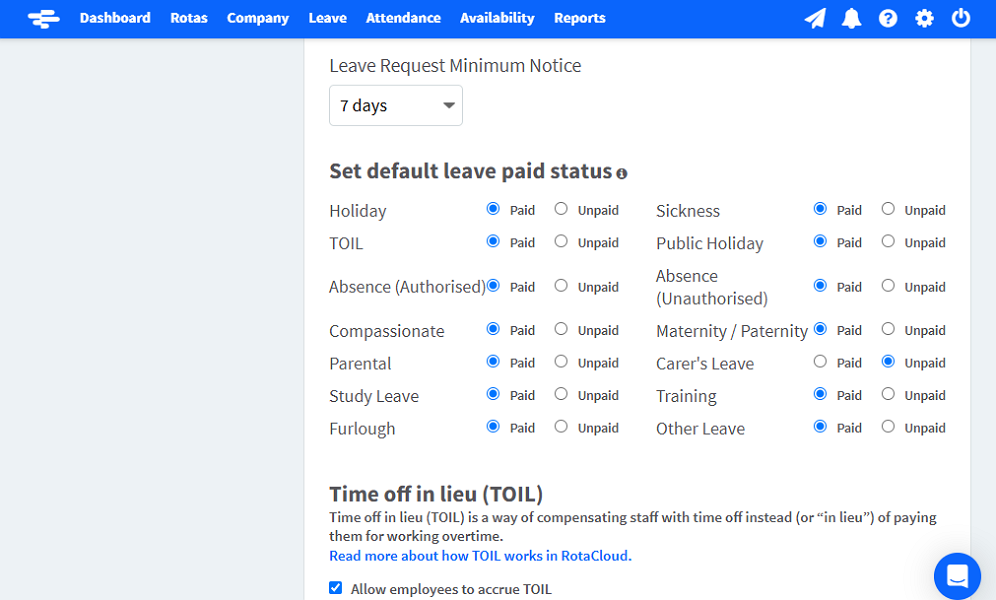
RotaCloud is a beginner-friendly, affordable scheduler—but with really in-depth leave management tools! Time tracking
RotaCloud includes time tracking, but you pay for it as a separate module. Still, our team tested it, and it works well. Employees punch in on their devices or on onsite tablets, with optional photo identification. You can restrict clock-ins to scheduled shifts and geofencing areas, track workers’ GPS location while on the clock, and customise the time limit when the app records late clock-ins.
Your team can track breaks, but you can’t make them mandatory or set employee break reminders. This lack of functionality can put you at risk of labour violations in certain jurisdictions. Another thing to note is that RotaCloud is a UK-based product. While Australian companies can use its features, its payroll partners (Sage, Staffology, and PayCaptain) aren’t popular providers in Australia.
What users say about RotaCloud
Working in construction things often change at the last minute and RotaCloud allows us to make changes at the drag of the mouse.
There were initially some teething issues with our business as we are a Private Charity Nursing Home with very specific staffing needs. This made fitting into RotaCloud take some getting used to rather than buying a bespoke product.
Key Features
- Manual roster builder
- Leave policies and tracking
- GPS-enabled time clock
- Geofencing
Pros
- Beginner-friendly design and pricing
- Photo identification adds another layer of clock-in verification
Cons
- Integrates with mostly UK payroll providers
- No auto-scheduling could be a problem for some businesses
Pricing
Starts at ~A$19/month (GBP 10) Trial: Yes — 30 days Free Plan: No
-

RosterElf — Good for small teams needing quick and basic compliance support
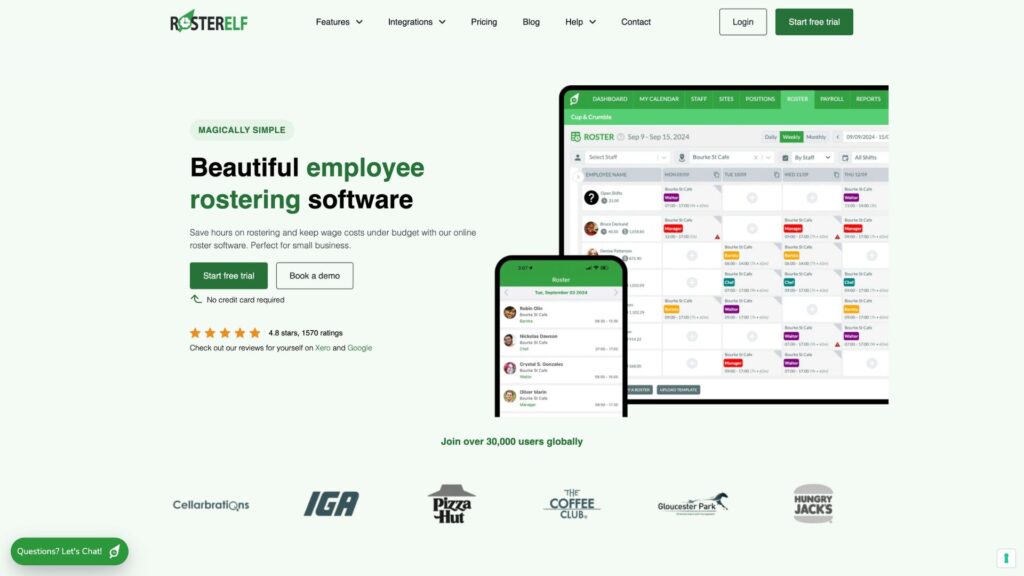
RosterElf is a multi-site rostering and time tracking app with an AI compliance assistant.
Why I chose RosterElf: RosterElf is a straightforward and easy-to-use rostering app. You can track labour costs, view live attendance, and approve staff leave as well. It’s especially useful for Australian businesses since it includes Fair Work adherence checks, an Australia-focused AI compliance assistant, and customer service for clients in Australia.
Let’s look at the app’s key features based on our full RosterElf review.
AI-assisted rostering
RosterElf lets you roster employees across multiple sites. You can build schedules from scratch by dragging and dropping shifts across days or users, copying last week’s schedule, or adjusting saved templates to specific shifts.
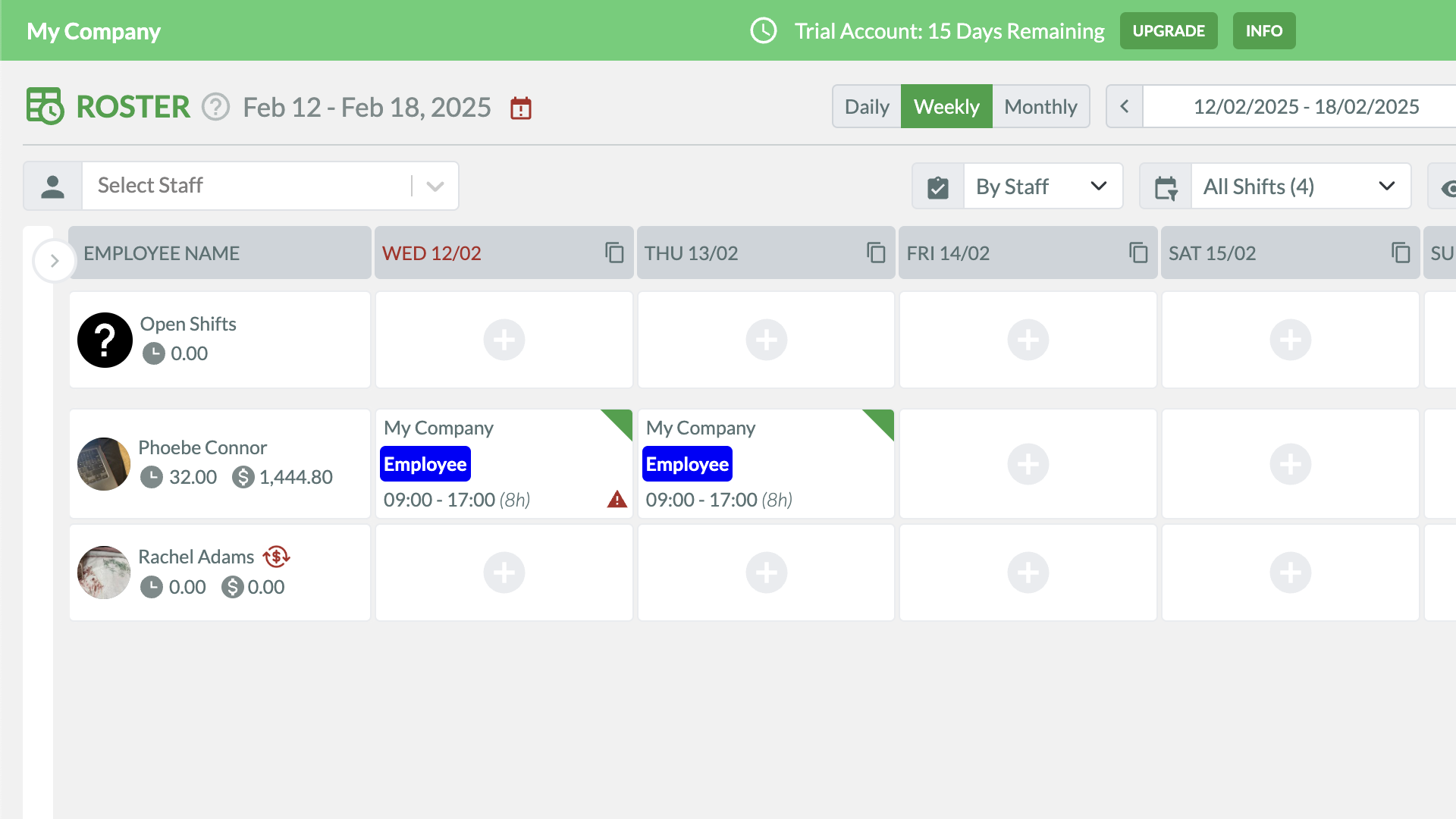
RosterElf’s Rostering feature lets you view schedules in a calendar format by employee, site, or position. I like that employees can apply for open shifts and managers can review and select the best fits. Similarly, workers can swap shifts, and you can give the final thumbs up. You can also auto-approve open and swapped shifts based on pre-set conditions (like qualifications and overtime).
Finally, you can also use the Perfect Match™ AI tool to auto-assign workers to shifts based on workers’ skills, qualifications, availability, workload, and award compliance. Overall, I found this a strong scheduling feature, though our reviewing team felt the interface is much stronger on mobile than on web. Desktop-based managers may struggle as a result.
Time and attendance
Once scheduled, workers can track time with RosterElf’s time clock. It’s GPS- and geofencing-enabled, which means you can restrict clock-ins to specific perimeters and double-check that mobile workers are in the correct locations. You can also restrict time tracking to scheduled shifts only.
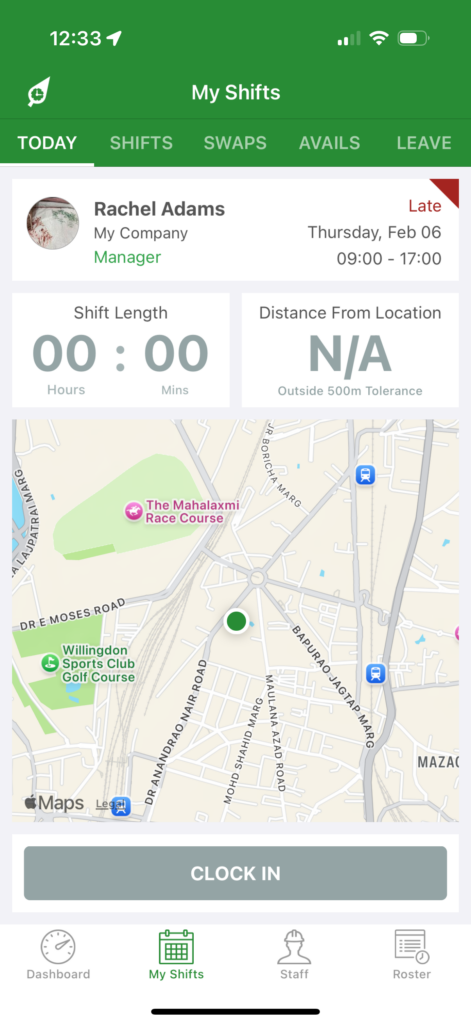
RosterElf’s GPS time tracking is especially useful for managing frontline staff. Unlike many competitors, RosterElf lets users track time (and other data, such as shift notes) offline. If your business operates in areas with low connectivity, offline tracking is a must-have.
With RosterElf, Aussie businesses also get built-in Fair Work award interpretation, minimising manual work in the lead-up to payroll. The tool also has payroll integrations with 2 software providers, Xero and MYOB. While both are common in Australia, some employee schedulers have larger integration libraries.
Leave tracking and AI compliance
You can track time off on RosterElf, but the feature is fairly limited. For instance, employees can request time off, add a leave type, and fill a text box. But they can’t add files such as doctor’s notes. Managers can approve leave requests quickly, but can’t add reasons for rejecting leave.
In my opinion, RosterElf’s strongest HR offering is its Workwise AI compliance assistant. This is a conversational chatbot that can answer questions about general Fair Work regulations, award interpretations, pay rates, and more.
Safety and compliance note: AI isn’t always accurate. I was glad to see a RosterElf statement which explains that “AI tools can make mistakes and may not reflect the most current information.” If you’re using the tool, I’d definitely recommend a human check its responses.
What users say about RosterElf
So far so good, happy with my experience. Ease of use, and customer service so far is wonderful.
The rota system mainly works, but it is slow to use, with a 2-second delay by auto-saving every amendment made. Staff are always having problems signing in/out due to GPS issues.
Key Features
- AI rostering
- Time tracking
- Leave management
- Award interpretation
Pros
- Offline time tracking great for remote job sites
- AI compliance assistant supports Fair Work compliance
Cons
- Time off management tool has limited capabilities
- Limited payroll integrations
Pricing
Starts at $6AUD/employee/month Trial: Yes — 15 days Free Plan: No
Compare the Best Employee Scheduling Apps
| Topic |
 Start for free
|
|
|
|
|
|
|---|---|---|---|---|---|---|
| Reviews |
|
|
|
|
|
|
| Pricing |
Starts at just $29/month for the first 30 users
|
Starts at AUD $6.75/user/month
|
Contact vendor for pricing
|
Starts at ~A$43.55/month/location, up to 30 employees
|
Starts at ~A$19/month (GBP 10)
|
Starts at $6AUD/employee/month
|
| Free Trial |
yes
14-day
|
yes
|
yes
|
yes
14 days
|
yes
30 days
|
yes
15 days
|
| Free Plan |
yes
Free Up to 10 users
|
no
|
no
|
yes
Up to 1 location & 15 employees
|
no
|
no
|
|
Best for shift-based teams that need easy scheduling, mobile time tracking, and payroll-ready timesheets
|
Growing teams needing compliance-based shift scheduling
|
Good for larger teams needing advanced customisations and compliance
|
Hospitality teams needing demand-based rostering
|
Good for small teams needing reliable, user-friendly leave tracking
|
Good for small teams needing quick and basic compliance support
|
|
What is an Employee Scheduling App?
An employee scheduling app is a software application that helps businesses efficiently create, manage, and communicate work schedules for their employees. It replaces manual scheduling methods like spreadsheets or pen and paper, drastically streamlining the scheduling process.
These apps allow managers to create and customise schedules based on factors like shifts, availability, and employee preferences. Employees can view their schedules directly from their smartphones and even request time off, swap shifts, and receive notifications about schedule changes.
The app facilitates open communication between managers and employees with in-app chat and real-time updates, too. Usually, employee scheduling apps also include reporting features and integration capabilities, which improve productivity and help reduce labour costs.
How Do Employee Scheduling Apps Work?
Employee scheduling apps work by providing a digital platform for managers to create and share work schedules for their employees. Managers can input employee availability, assign shifts, and handle time-off requests through the app.
Employees can access their schedules, clock in and out of work, submit availability preferences, request time off, and receive notifications about any changes. The app streamlines the scheduling process, automates tasks, and ensures real-time updates. It may also offer reporting and analytics features to track employee hours, optimise schedules, and improve overall workforce management.
Benefits of Using an Employee Scheduling App
Workforce scheduling software can save you significant time and money, and improve client relationships. Expect these key benefits from employee scheduling apps.
Increased productivity and efficiency
Managers can quickly and easily create schedules, find substitutes for last-minute absences, and use tools to manage shift availability for multiple locations or teams. This helps reduce absenteeism and maximises productivity.
Reduced labour costs
Employee work scheduling software helps businesses save money by reducing costs associated with manual scheduling. They also help managers optimise shifts scheduling, which decreases overstaffing and overtime pay.
Streamlined communication
In-app chats and updates features ensure all employees remain up to date with company happenings. These features also make it easy for employees to chat with each other and ask and answer questions in real time.
Accurate scheduling
Software for job scheduling can help businesses create accurate schedules each week. By using automated tools to consider employee availability and skill sets, businesses can ensure that the right people are working at the right times, as well as make sure that labour costs remain within budget.
Compliance with labour laws
Scheduling apps often include features to help businesses comply with labour laws and regulations. They can track employee hours, ensure proper breaks and rest periods, and monitor overtime, helping businesses avoid legal issues and penalties.
Real-time updates and accessibility
Employee scheduling software provides real-time updates, ensuring that employees have access to the most current schedule information. This helps reduce confusion and ensures that employees are always aware of any changes or updates to their shifts.
Integration with other software
Many scheduling apps integrate with other software or tools, such as payroll systems or time-tracking software. This integration streamlines processes, reduces duplication of effort, and improves overall efficiency.
How Much Do Employee Scheduling Apps Cost?
Some employee scheduling apps charge per user, while others charge a flat fee for a set number of users. Deputy, for instance, starts at just AUD $5/user/month for its most basic paid plan. While this seems inexpensive, though, costs can add up as you scale and grow your employee base.
Flat-fee pricing models work better for a wider user count. 7shifts starts at approx. AUD 42/month for up to 30 employees. Connecteam is similarly priced at approx AUD $40/month for the first 30 users, but can be used by a wide range of shift-based businesses (not just hospitality). It also offers a free small business plan for fewer than 10 users and a free trial to get started.
FAQs
It depends on the size of your team and your operational needs. Some free plans, like Connecteam’s Small Business Plan for up to 10 users, offer full-featured scheduling along with time tracking, task management, and internal chat—ideal for very small teams. Other free personnel scheduling software may limit the number of schedules, users, or integrations. Always review what’s included in the free version and whether it fits your current and future requirements. Free trials and demos are a great way to test an app before upgrading.
To build schedules for free, you can use staff scheduling software that offers no-cost plans for small teams. These typically include drag-and-drop shift creation, basic availability tracking, and mobile access. Connecteam, for instance, offers a free plan for up to 10 users with built-in scheduling and communication tools—ideal for small businesses or startups. Just keep in mind that most free plans come with user or feature limits, so review what’s included carefully before relying on them long-term.
Yes, most employee scheduling apps are mobile-friendly and allow both managers and employees to manage schedules from their phones. Managers can optimise scheduling by assigning shifts, approving time-off requests, and making last-minute changes on the go. Employees can view schedules, swap shifts, or clock in and out directly from the app. This is especially useful for deskless teams or businesses with mobile staff. Apps like Connecteam, Deputy, and RotaCloud all offer mobile apps to simplify schedule management from anywhere.
While free plans can be useful for very small teams, they often come with trade-offs:
- Limited number of users or schedules
- No access to integrations (e.g., payroll or HR tools)
- Lack of advanced features like shift conflict warnings, templates, or GPS tracking
- Basic or no customer support
- Branding or ads in the app interface
As your team grows or your scheduling becomes more complex, you may need to upgrade to a paid plan to unlock automation, compliance tools, or reporting features.
Yes. Most staff scheduling programs offer demos or free trials so you can explore features before committing. Connecteam offers a self-guided demo and a personalised walkthrough with a product expert. Other platforms, including Deputy and Tanda, also offer demos with product experts.
Scheduling apps can help with compliance, but they don’t guarantee it. You’re still responsible for following labour laws—like rest periods, overtime, and fair scheduling rules. The best employee work schedule software helps by:
- Tracking actual hours worked
- Sending alerts for potential overtime or double shifts
- Maintaining time-off and break logs
- Storing shift history for audit purposes
Some platforms, like Connecteam, support location-specific settings and allow you to set shift rules that align with legal requirements. Always double-check that the tool you use allows for the customisation you need based on your industry and region.
The Bottom Line on Employee Scheduling Apps
The best employee scheduling app depends on how much compliance support your business needs.
Deputy, Tanda, and RosterElf are strong options if Australian award interpretation is your main priority, while 7shifts and RotaCloud serve more specific hospitality or leave-management use cases.
Connecteam is the strongest overall pick for shift-based teams that want easy scheduling, mobile time tracking, team communication, and payroll-ready timesheets in one app.