
Timesheet apps make it simple to track your employees’ hours and keep payroll accurate. Below is my detailed review of the seven best timesheet apps available in Australia.
Tracking employees’ hours is essential for accurate payroll and compliance. Doing it manually can be slow and frustrating because you need to monitor hours worked, enter them into a timecard, and check everything for mistakes.
Manual tracking is also prone to errors and increases the risk of time theft, buddy punching, and other issues that affect your bottom line.
A dependable timesheet app can fix these problems. These apps let workers record their time accurately, including rest breaks, leave, and overtime. The app then brings everything together into clear digital timesheets.
Employees can spot and correct any mistakes before submitting them, and approved timesheets can be exported to your payroll provider for smooth processing.
To help you find the right option for your business, I’ve put together a list of the seven best timesheet apps in Australia.
Our Top Picks
-
1

Best all-in-one timesheet app
-
2

Good for last-minute schedule changes
-
3

Good for in-field tradespeople
Why trust us?
Our team of unbiased software reviewers follows strict editorial guidelines, and our methodology is clear and open to everyone.
See our complete methodology
How I Chose the Best Timesheet Apps for Australian Businesses
There are many timesheet apps available, but these are the key features I focused on when selecting my top picks.
- One-touch clock on and off: Workers should be able to track their hours with no fuss. I looked for tools that let employees clock on and off with a single tap from any device.
- Smart alerts and push notifications: You should be able to set reminders for employees to clock on and off, receive alerts about absences, and be notified if someone enters unapproved overtime. Location-based reminders are also useful for flagging when someone forgets to clock on or off.
- GPS location tracking: I checked that you can confirm employees are where they need to be during work hours.
- Payroll integrations: I looked for timesheet apps that connect with your existing payroll system to keep payroll simple and accurate.
- Custom reporting: Reporting features matter because they let you review important details such as hours worked by project, task, or shift. Time and attendance records can also help you spot issues like absenteeism or frequent lateness.
- Employee scheduling tools: Drag-and-drop scheduling tools are the easiest to use and let you assign workers to shifts in minutes. You should also be able to see your team’s availability, manage time off, and handle break times within the roster.
- Break and overtime management: The apps I chose let you set your own rules around breaks and overtime for better compliance, and they can automatically add break and overtime hours to employees’ recorded time.
- Leave management: These features support staff when they request time off and allow you to review and approve requests straight away.
- Mobile app: A mobile app is essential for workers in the field so they can clock on and off from their phones. This makes it easy to track hours, review timesheets, and manage leave requests wherever you are.
The 7 Best Timesheet Apps in Australia for 2026
-
Connecteam — Best all-in-one timesheet app
Connecteam is the best free timesheet app in Australia for small businesses and for organisations of all sizes.
Why I chose Connecteam: I chose Connecteam because I use it every day and have seen firsthand that it includes all the tools needed to manage team hours with accuracy. It supports time tracking, automatic timesheet creation, payroll processing, shift scheduling, and other essential functions.
Connecteam also integrates with Xero and MYOB, which are widely used across Australia for payroll. This makes it simple for companies already relying on this software to keep payroll running smoothly. The platform has an intuitive design and helpful customer service, which puts it ahead of many alternatives.
Here is a closer look at some of Connecteam’s key features.
One account for your entire team
Connecteam lets you manage your whole team under a single account, regardless of their location.
All staff members can clock on within the same system, giving you a complete overview of active shifts across your business. All timesheets sit in one central place where you can edit entries, review total hours, or export data directly to payroll.
Automatic timesheet creation
The platform creates timesheets automatically based on employee time entries. Breaks, leave, and sick days are factored in without manual adjustment. You can customise pay cycles, review entries, and approve timesheets from any device.
Timesheets appear in a central dashboard where you can correct errors before payroll approval. This automated process helps you track billable and non-billable hours with accuracy and reduces the risk of disputes.
You can also leave comments on individual timesheets and use Connecteam’s built-in team chat for quick follow-up with staff.
Payroll integrations for simple processing
Connecteam integrates with major payroll providers such as Xero, MYOB, QuickBooks Online, Paychex, Gusto, and RUN Powered by ADP. This keeps payroll accurate and reduces the amount of manual data entry.
If you prefer another system, you can export timesheets in Excel or CSV formats for use in your payroll software of choice.
Mobile employee time clock
Connecteam includes a mobile time clock that employees can use on any device. They can clock on and off with one tap and log hours by job, client, project, or location.
The app also works as a time clock kiosk on a shared device. Multiple employees can clock on from a tablet placed at the worksite. You can require a selfie at clock on to prevent buddy punching.
Employees can update hours when they notice an error, and you can control editing permissions for accuracy.
GPS location tracking and geofencing
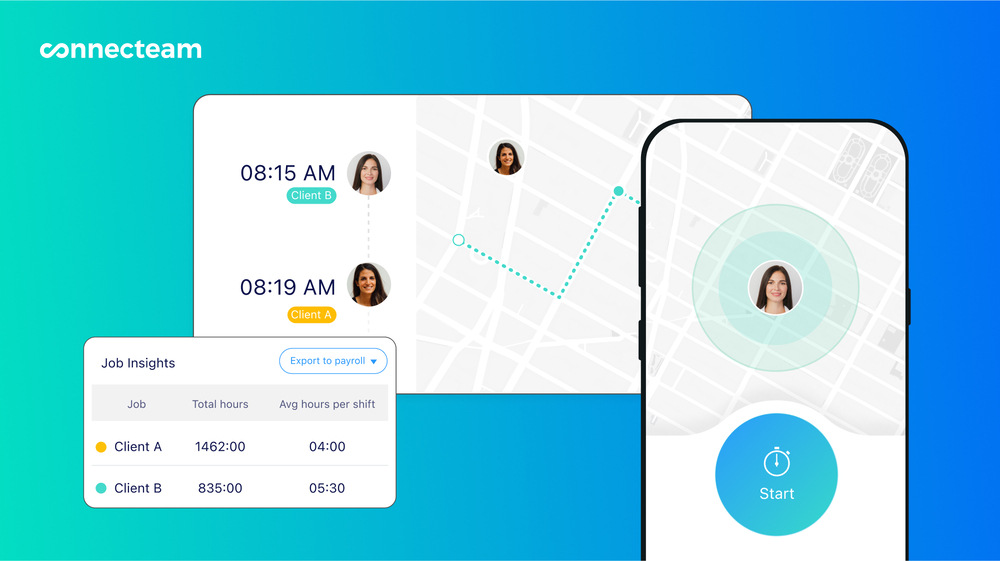
Connecteam provides real-time GPS tracking so you can confirm an employee’s location during work hours. Tracking stops the moment they clock off. This safeguards employee privacy and gives managers clarity in the field.
You can also set geofences around specific locations. Staff can clock on only when they are within the approved zone. If someone tries to clock on outside the area, you receive a request to approve or decline. This protects you from inaccurate timesheets and time theft.
Employee scheduler
Connecteam’s employee scheduler lets you create rosters quickly with a simple drag-and-drop interface. You can customise shifts, use templates, or duplicate recurring shifts. The auto-scheduler can also build a roster for you in seconds.
Since the scheduling tools connect directly with the time-tracking features, you can compare time entries with the planned roster when approving hours. Employees can also request shift swaps, and you can approve them as needed.
And more, at zero cost for small businesses
Connecteam includes features for break and overtime management, staff rewards, surveys, polls, internal communication, and other tools that help teams stay organised.
The best news for small businesses? Connecteam offers a Small Business Plan that’s completely free for life for teams of up to 10.
Premium plans start from $29 USD ($43.35 AUD) per month for up to 30 users. There’s a 14-day free trial you can take advantage of, too.
Integrations
Connecteam comes with several integrations, including:
- Gusto
- Paychex
- RUN Powered by ADP®
- Quickbooks
- Xero
- Zapier
The amount of innovation, customer service, and absolute quality in their product is the reason we will never leave Connecteam.
Key Features
- Automatic timesheet creation
- Accurate one-touch time clock
- Integrates with leading payroll providers
- GPS location tracking and geofencing
- Drag-and-drop shift scheduling
- Custom break management tools
Pros
- Easy-to-use mobile app
- Free plan for up to ten users for life
- Free trial available
- All-in-one workforce management solution
Cons
- Currently no video conferencing tools
Pricing
Free-for-life plan availablePremium plans start at $29/month for 30 users
14-day free trial, no credit card required
Start your free trial -
Deputy — Good for last-minute schedule changes
What’s new with Deputy
Deputy recently raised its base price from A$5 per user/month to A$6.75 per user/month with a minimum monthly spend of A$30 (on monthly plans) starting September 1, 2025.
Deputy is an employee management system and timesheet app designed to help businesses manage shift swaps and handle last-minute roster changes. It is especially useful when a staff member is running late or calls in sick.
Why I chose Deputy: Deputy offers helpful customer support and has a clean, user-friendly interface. It includes accurate timesheet tools, a drag-and-drop shift scheduler, and an AI scheduler that can build rosters automatically.
Keep track of employee time and attendance with the mobile time clock
I was pleased to see that Deputy offers touchless facial recognition so employees can clock in and out from their phones or from a shared kiosk. The app records hours down to the second, giving you precise timesheets. You can also set up a shared time clock on a device such as an iPad at any job site, which lets multiple employees clock in and out from one place.
I tested the shift swap feature and found the process simple from both the employee and manager side. Staff can swap shifts with each other, which keeps the roster covered without extra admin work. The software also stores a clear history of past shifts and hours, making it easy to review previous timesheets whenever needed.
Automated timesheets
Deputy simplifies time-tracking by accurately capturing when an employee starts and finishes a shift and automatically converting these entries into timesheets.
A useful feature is its automated wage calculation. Deputy takes the recorded hours and applies each employee’s wage rate to calculate pay correctly.
You can also see real-time attendance, which shows who is currently clocked on and where they are working.
Verify timesheets and export them to payroll
Once timesheets have been captured, you can edit or approve them with only a few clicks. This step ensures all hours are correct before payroll is processed.
Timesheets can then be exported directly into your payroll system. This makes it easier to pay employees accurately and reduces the time spent on manual data entry.
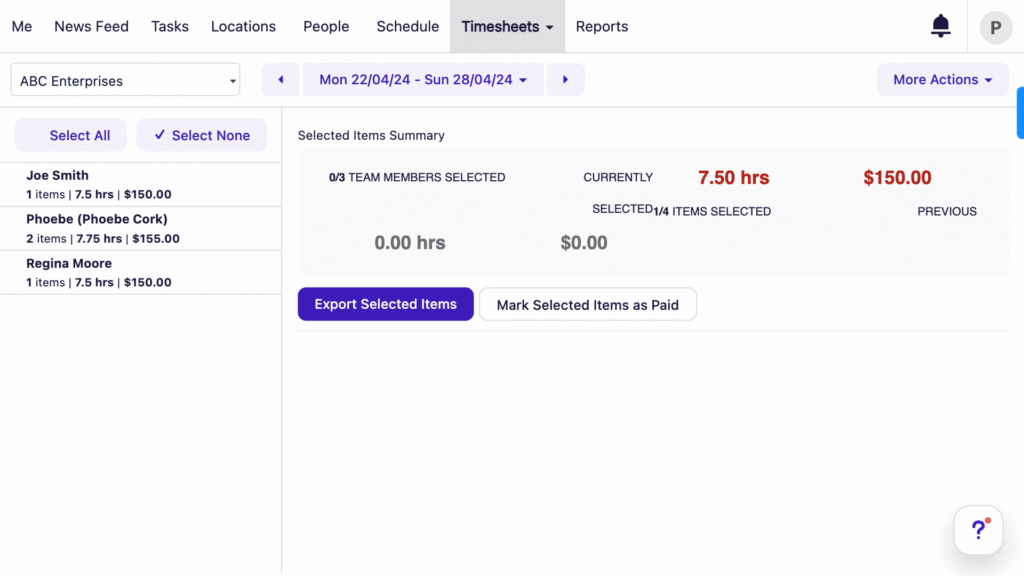
Exporting employee timesheets to an external payroll system is fairly easy and straightforward. User-friendly employee scheduler
Deputy’s scheduling tool connects with the time clock and includes a drag-and-drop interface that makes shift creation simple. You can move shifts around easily to fit your staffing needs. The scheduler also provides real-time wage and sales data so you can see how much you are spending and earning, helping you manage labour costs.
The smart scheduler uses smart patterns to build efficient rosters by considering employee availability and preferences. Deputy also helps you follow meal and rest break requirements by automatically adding required breaks into the schedule.
Integrations
- ADP
- Key2Act
- JobAdder
- Paychex
- Kallidus
- OnPay
- Revel
- Quickbooks
- Shopify
- And more
As the person in charge, I not only had to learn this product, but I had to train everyone else on this product…and sell them on why it was better than what we were using. Luckily, Deputy is so complete, it was easy. They haven’t forgotten a single step.
Key Features
- In-app chat feature
- Automatic payroll calculations
- Built-in time clock
- Automatic shift scheduling
- Labor compliance tools
- Leave management
Pros
- Good customer support
- Intuitive user interface
Cons
- No digital organisation tools
- No free plan
Pricing
Starts at $6.75/user/month Trial: Yes — 31 days Free Plan: No
-
Tradify — Good for in-field tradespeople
Available on
- Web
- iOS
- Android
- Windows
- Mac
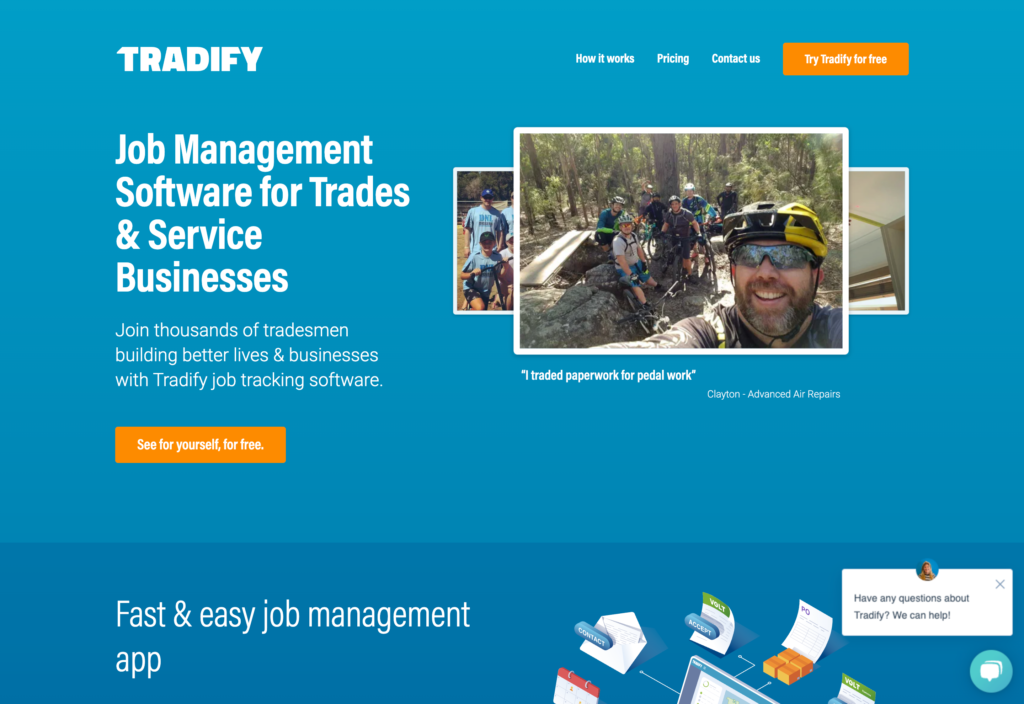
Tradify is a job management software for tradespeople. It offers tools for timesheet management, quoting jobs, and employee scheduling.
Why I chose Tradify: The software allows employees to clock in and out, track time spent on tasks, and record break times.
Employee time clock
I like that the mobile time clock is user-friendly and provides a convenient way to monitor everyone’s hours. You can keep track of everyone’s time and labour cost per employee from anywhere, giving you real-time oversight of your team’s activities. The mobile app allows employees to clock in and out from their phones or tablets, capturing the exact hours worked to the second.
The time clock also supports tracking time for specific jobs and tasks. This means that employees can allocate their hours to particular projects or assignments, helping to break down where time is being spent. The system logs all this information, creating a detailed record of work hours by job or task so you can understand how much time is dedicated to each project. This is particularly helpful when it comes to billing and cost tracking.
Streamlined payroll and invoicing
The app also integrates with popular accounting software like Xero and QuickBooks, so you can easily send your employee timesheets to payroll without having to do any manual calculations.
Tradify has really useful financial management tools for those working in specific trades, like HVAC and renovations. One key feature is invoicing, which allows you to create and send invoices directly from the software. You can customize invoices with your company’s branding and details, too.
Expense tracking and budgeting
While testing Tradify, I tested the expense tracking feature, which I was happy to see is incredibly useful. This feature allows you to record and categorise business expenses, as well as detailed financial reporting, generating reports on revenue, expenses, and profitability.
Another standout feature is the ability to manage quotes and estimates. You can create and send quotes to clients, track their status, and convert them into jobs or invoices when approved. Tradify’s accounting features also include payment tracking, which helps you monitor which invoices have been paid and which are still outstanding.
Integrations
- Xero
- Sage
- Quickbooks
- MYOB
As the person in charge, I not only had to learn this product, but I had to train everyone else on this product…and sell them on why it was better than what we were using. Luckily, Deputy is so complete, it was easy. They haven’t forgotten a single step.
Key Features
- Timesheets
- Track time spent on individual jobs
- Built-in job quoting
- Employee scheduling tools
- Job tracking
- Online payments
Pros
- Free set-up and training
- Automatic shift scheduling
Cons
- No digital organisation tools
- No in-app chat feature
Pricing
Starts at $34/month Trial: Yes Free Plan: No
-

Timecamp — Good for teams or managers who work from computers
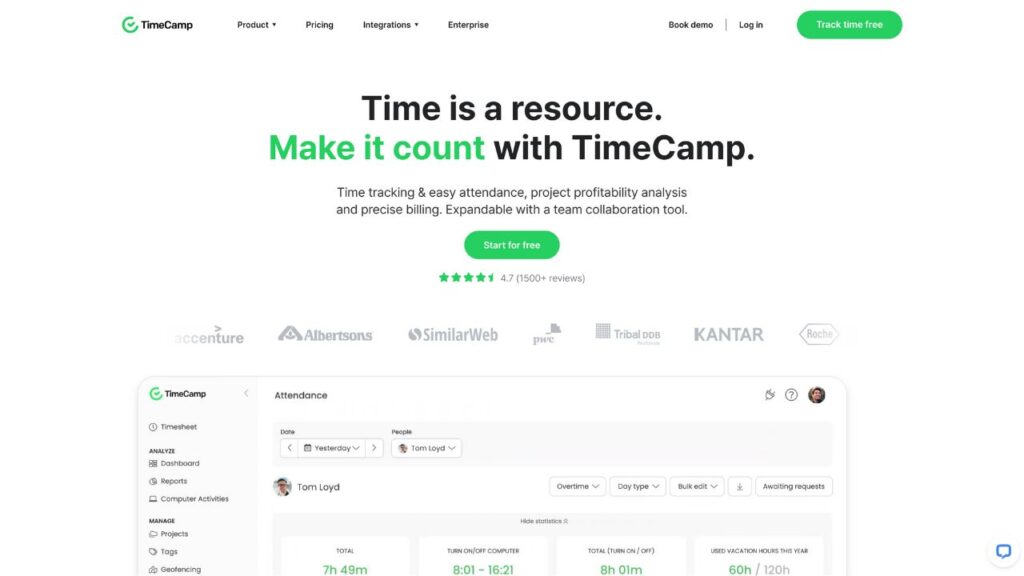
TimeCamp is a time tracking and timesheet platform designed to help both office-based and remote employees manage the time they spend on their computers.
Why I chose TimeCamp: TimeCamp works well for individual freelancers and small teams. It provides a reliable way to track and manage work hours and includes useful tools such as custom calendars where employees can add their assigned tasks.
Tracking time for tasks and projects
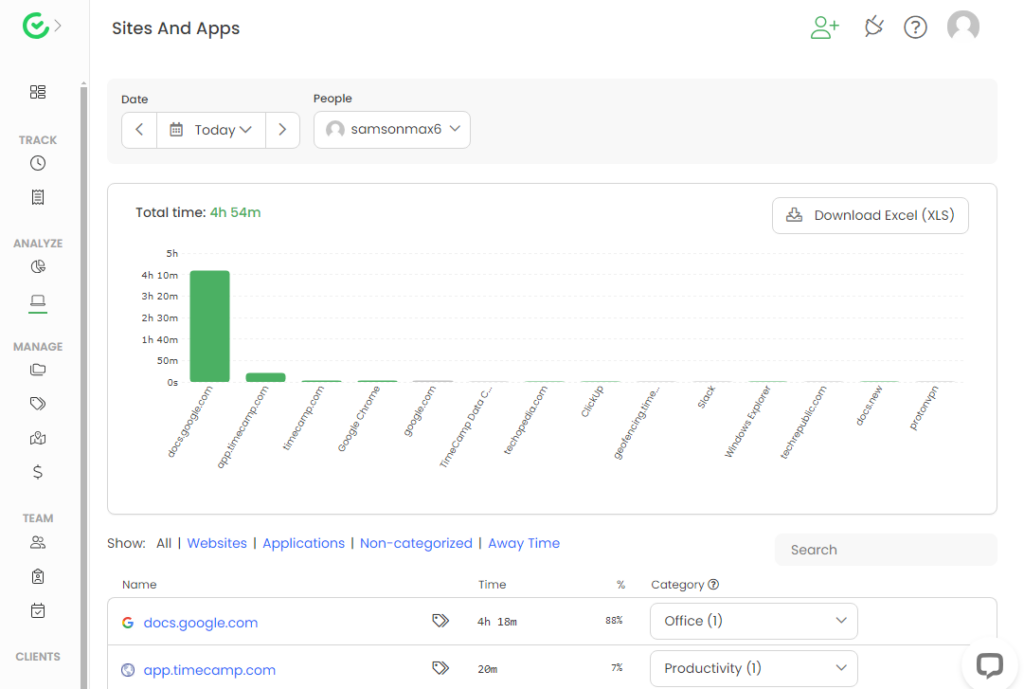
TimeCamp’s core function is its time tracking tool, and I found it impressive. Once set up, it runs quietly in the background, recording how long you spend on tasks and applications without needing to start or stop a timer. This is helpful for anyone who forgets to track their time manually.
The tool is flexible because it lets you track time by project, client, or task. This provides detailed insights into where work hours are going. With both a desktop app and mobile access, you can record hours from anywhere, which helps you stay consistent whether you’re in the office or working remotely.
I also found the keyword-based time tracking feature useful. You can assign specific keywords to a task or project, and TimeCamp will automatically begin tracking whenever those keywords appear in document titles, websites, or applications the employee is using.
Employee timesheets
While testing the software, I found TimeCamp’s timesheet feature clear and easy to use. All tracked hours appear in one organised view, and you can review or edit entries when needed.
I generated several reports to test how the data appears. Attendance reports, billing reports, and custom reports all came out accurate. The custom reporting tool allows you to filter by date range, project, user, or task to create tailored insights.
TimeCamp does have a few drawbacks. I experienced occasional glitches, and some parts of the interface felt confusing.
Integrations
Some of TimeCamp’s integrations include:
- ActiveCollab
- Breeze
- Xero
- Fibery
- Freshdesk
- Odoo
- MiniCRM
- LiveAgent
- GitLab
Seeing how long tasks are taking allows constant evaluation and improvement…TimeCamp allows me to keep everything elegantly in one place. Time is money! Track them both in TimeCamp.
Key Features
- Data and analysis tools
- Time tracking for individual jobs
- Personal calendar creation
- Built-in invoicing tools
- Keyword-based time tracking
- Customisable timesheet reports
Pros
- Integrates with popular team management apps
- Mobile app
Cons
- May not be useful for non-desk teams
- No built-in chat tools
Pricing
Starts at $2.99/user/month Trial: Yes Free Plan: Yes
-

Sling — Good for its one-touch time clock
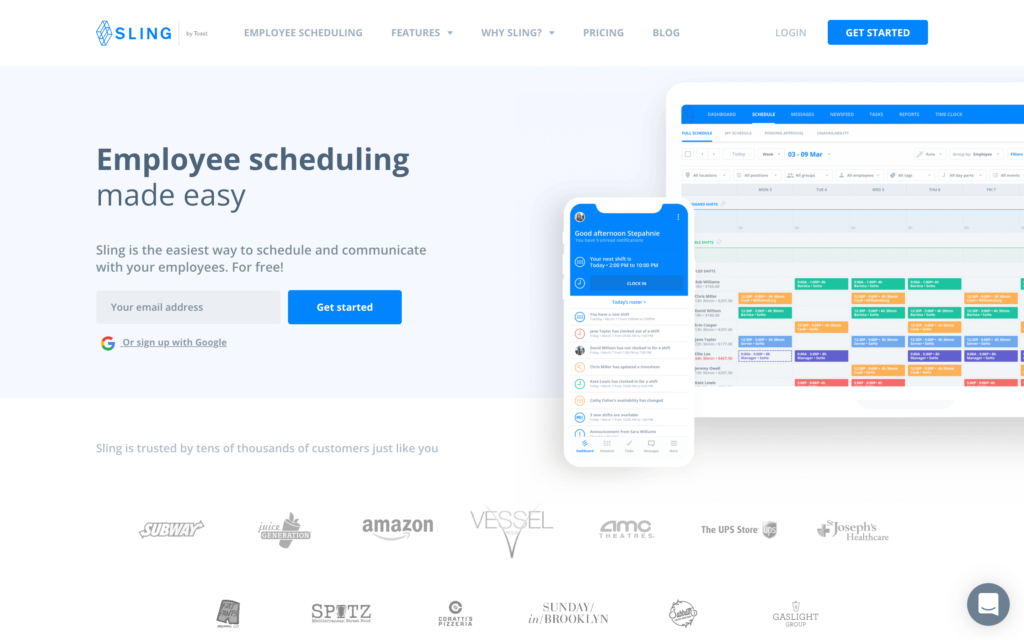
Sling is designed for teams who do not sit at desks or work from computers. Its key features include employee scheduling, time tracking, and communication tools.
Why I chose Sling: Sling’s features are practical and easy to use. Timesheets are neatly organised and colour-coded by approval status, which makes payroll much simpler to manage.
I also liked how straightforward the interface feels. Sling does not require any technical expertise and has a gentle learning curve that most people can handle comfortably.
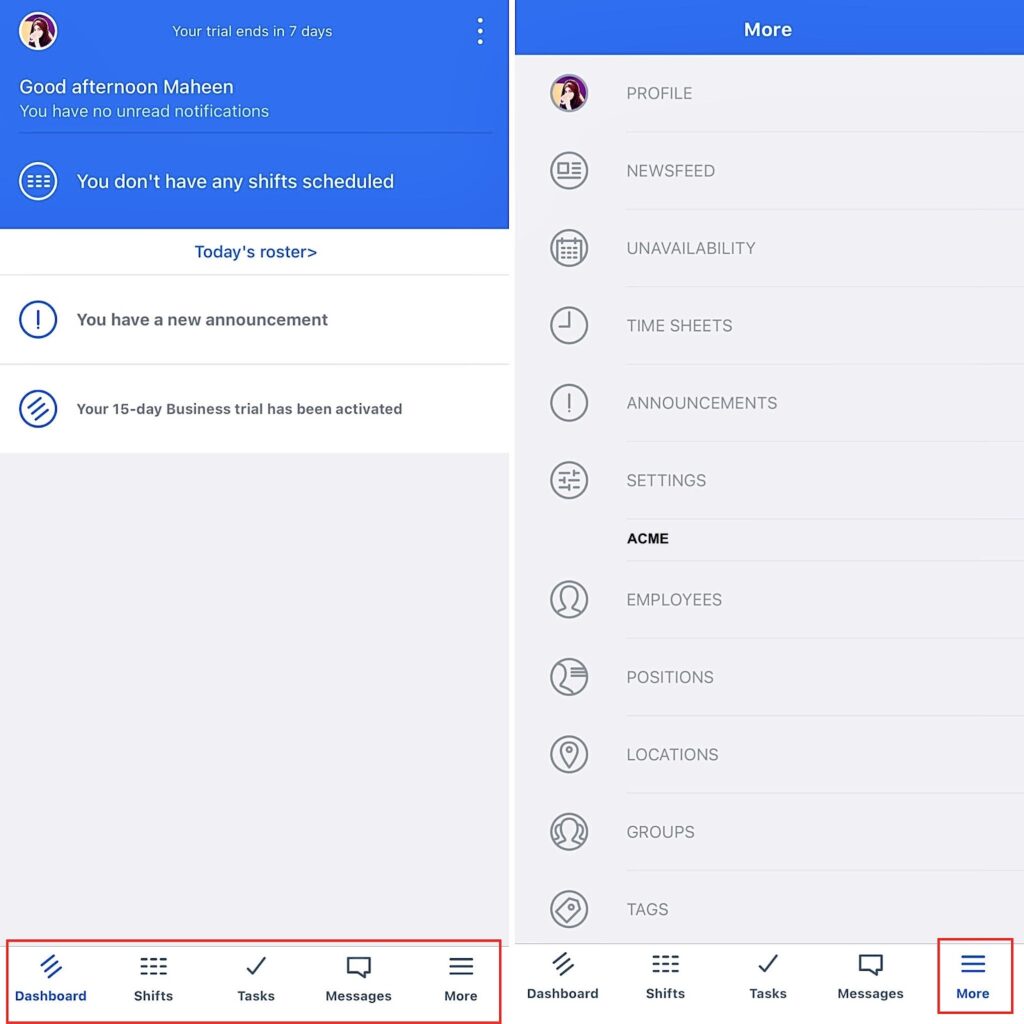
Sling’s mobile app employee dashboard Timesheets and labor cost tracking
One of the advantages of Sling is that its timesheet feature helps employers stay on top of labour costs. When employees clock in and out, the system automatically calculates regular hours, overtime, and breaks. You can track hours by shift or location and quickly see how much you are spending on labour.
The reporting tools provide useful insights. I tested daily and weekly summaries, overtime reports, and compliance reports, and found all of them detailed and easy to export. Being able to export reports in PDF format is particularly helpful.
These reports can highlight trends, help you optimise the roster, and reduce unnecessary overtime.
Time tracking
With the mobile app, employees can clock in and out from their phones, which suits businesses with mobile or remote teams. The GPS-enabled time clock confirms that staff are at the correct location when they start or finish work, adding accountability. From an employee’s perspective, the time clock is simple to use and records time accurately.
Notifications for missed clock-ins or clock-outs are another useful feature because they help reduce errors. You can also set up geofencing so employees can clock in only when they are at the approved worksite.
The interface is clean and easy to navigate. Employees can view their clock-in and clock-out times, while managers can access detailed labour reports to track costs.
I also liked that you can set weekly and monthly labour budgets. Sling sends alerts when you exceed your limits, which helps you stay within your spending targets. Another helpful function is the automatic shift-end feature, which stops shifts before employees hit overtime. Sling also prevents early clock-ins to help keep payroll under control.
Integrations
Some of Sling’s integrations include:
- Shopify
- Toast
- Gusto
- HarborTouch
- Square
- POSitouch
Everything about this product streamlined what we were already doing in a way that increased productivity and decreased time bleed.
0Key Features
- Labour cost control
- Automated timesheets
- Employee scheduling
- Employee time clock
- Team communication
- Task management
Pros
- Simple user interface
- Multiple integration options
Cons
- Notification system can be overwhelming
- High per-user pricing for larger teams
Pricing
Starts at $1.7/user/month Trial: Yes — 15 days Free Plan: Yes — Up to 30 users
-

Toggl Track — Good for its customisable timesheet reports
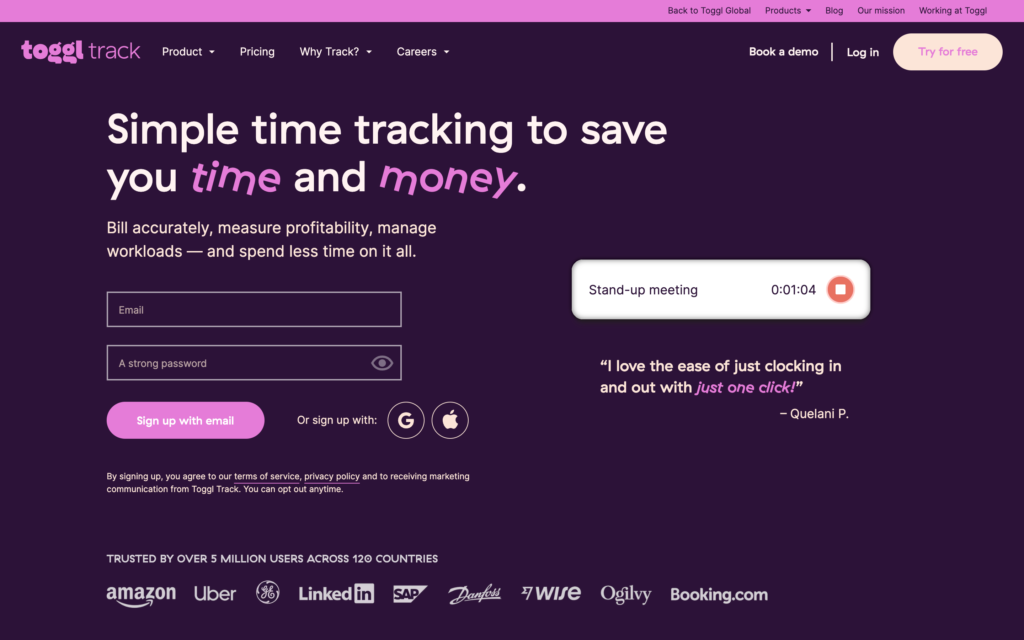
Toggl Track is a time management and timesheet app that includes manual time entry editing, one-touch clock on and off, project budgeting, and reporting and analytics tools. Users can also categorise their hours by project or task.
Why I chose Toggl Track: Toggl Track provides clear visual summaries of hours worked, leave balances, sick leave, and other key data, which suits people who prefer information presented visually. It also includes Pomodoro timers, project budgeting tools, and detailed analytics.
You can track time in real time or edit entries manually later. It is also important to note that, unlike some time tracking software, Toggl Track does not support any form of employee surveillance. The company avoids screen recording, location tracking, keystroke tracking, or other monitoring tools.
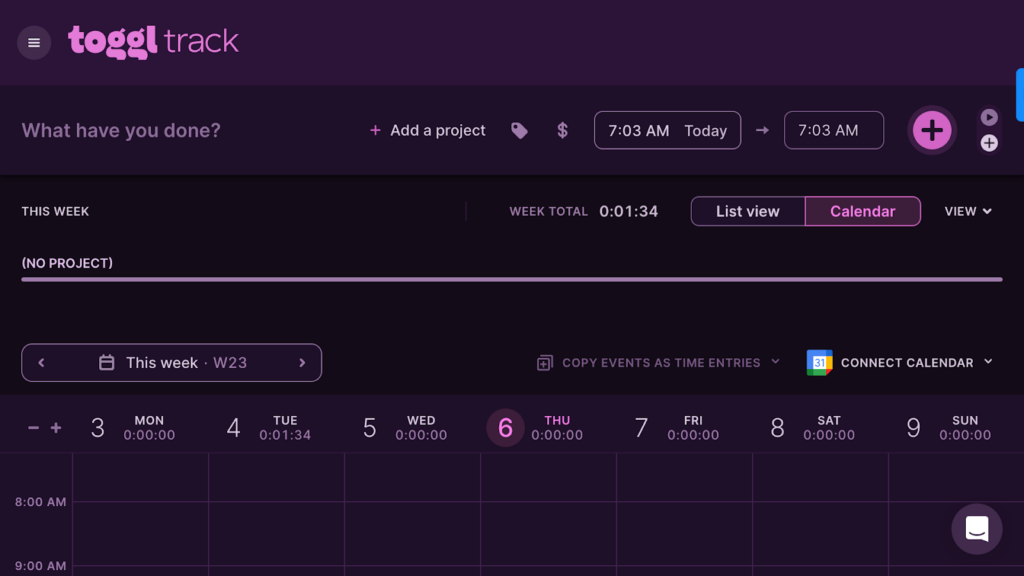
Toggl Track’s timer feature has a calendar view and a custom top bar. Employee timesheets
During testing, I found Toggl Track’s timesheets clear and comprehensive. They give you a full view of tracked hours and can be customised to show daily, weekly, or custom time ranges. This helps you understand how employees are spending their work hours and can be valuable when identifying productivity patterns or improving workflows.
Tracking billable and nonbillable hours
A feature I found particularly helpful is the ability to tag and track both billable and non-billable hours. This is ideal for freelancers and small businesses that need accurate invoicing.
You can assign tags to tasks or projects, which makes it simple to separate client-billable work from internal tasks. This helps ensure all billable hours are captured and reduces the risk of missing time when preparing invoices.
I did notice that the desktop version has fewer features than the mobile and web apps, and managing multiple projects at once can sometimes be confusing.
Integrations
Some of Toggl Track’s integrations include:
- Asana
- Trello
- Jira
- Zendesk
- Google Calendar
- Zapier
- Quickbooks
Toggl is so easy to use! There is an auto function that gathers info on what you are doing on your computer and you can then review the items in 15 minute chunks; by app, by webpage or by document.
Key Features
- Categorise time spent on different tasks or projects
- Project budgeting
- Data and analytics tools
- Pomodoro timer
- Customisable timesheet reports
- Track billable and non-billable hours
Pros
- Free-to-use plan
- Visualisation of worked hours
Cons
- No GPS location tracking
- Most features hidden behind paywall
Pricing
Starts at $9/user/month Trial: Yes — 30-day Free Plan: Yes — For up to 5 users
-

Timely — Good for its Memory Tracker feature
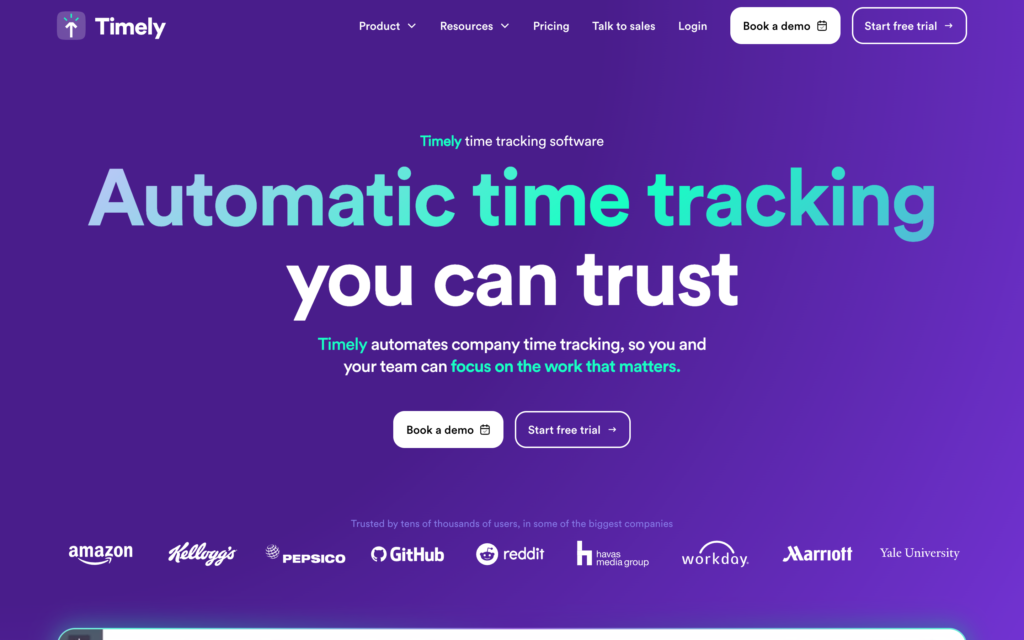
Timely is a time tracking and timesheet app designed to reduce the amount of administration required for payroll.
Why I chose Timely: Timely has a clean, modern interface and tracks employee time spent on projects across desktop, tablet, and mobile devices. I found the timesheets efficient and easy to read.
Timely’s Memory Tracker
Timely’s Memory Tracker automatically records employee activity across devices, which removes the need to manually log every minute of work. It captures websites visited, applications used, and tasks performed, and then presents this information as memories.
The tracker remembers what employees have been working on and begins timing as soon as they switch between tasks or projects.
I found the tagging system particularly useful. The Memory Tracker can tag and track both billable and non-billable hours, and it is easy to categorise time entries for accurate invoicing. This helps create clear records for client work and internal projects, and ensures no billable time is overlooked while still keeping an accurate record of non-billable activities.
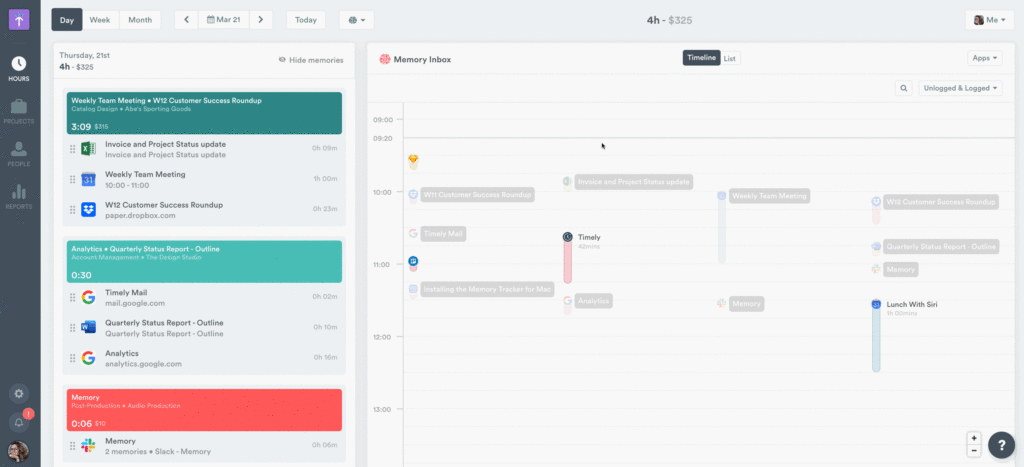
Timely’s Memory automatically captures everything your employees do on their computers. Employee timesheets
Timely’s timesheets are intuitive and straightforward. Employees can log hours manually or allow the Memory Tracker to capture them automatically. This dual method increases accuracy and helps reduce missed or incorrect entries.
Reviewing timesheets is simple. You can access a full breakdown of each employee’s hours, including total hours worked, project allocation, task details, activity insights, idle time, and approval status. This provides an easy way to assess productivity and make sure your team is following workplace policies.
Integrations
Some of Timely’s integrations include:
- Freshbooks
- GitLab
- Jira
- Expensify
- Salesforce
- Figma
- Quickbooks
- Filemaker
- Asana
Toggl is so easy to use! There is an auto function that gathers info on what you are doing on your computer and you can then review the items in 15 minute chunks; by app, by webpage or by document.
Key Features
- Customisable timesheets
- Records hours by project or team
- Integrates with popular payroll providers
- Reporting and analytics tools
- Time planning
- Memory tracker
Pros
- Automatically captures worked hours
- Free trial
Cons
- Limited customer support options
- No free-to-use plan
Pricing
Starts at $16/user/month, for 6-50 users Trial: Yes Free Plan: No
Compare the Best Timesheet Apps in Australia
| Topic |
 Start for free
|
|
|
|
|
|
|
|---|---|---|---|---|---|---|---|
| Reviews |
  |
|
|
|
|
|
|
| Pricing |
Starts at just $29/month for the first 30 users
|
Starts at $6.75/user/month
|
Starts at $34/month
|
Starts at $2.99/user/month
|
Starts at $1.7/user/month
|
Starts at $9/user/month
|
Starts at $16/user/month, for 6-50 users
|
| Free Trial |
yes
14-day
|
yes
31 days
|
yes
|
yes
|
yes
15 days
|
yes
30-day
|
yes
|
| Free Plan |
yes
Free Up to 10 users
|
no
|
no
|
yes
|
yes
Up to 30 users
|
yes
For up to 5 users
|
no
|
|
Best all-in-one timesheet app
|
Good for last-minute schedule changes
|
Good for in-field tradespeople
|
Good for teams or managers who work from computers
|
Good for its one-touch time clock
|
Good for its customisable timesheet reports
|
Good for its Memory Tracker feature
|
|
|
Web, iOS, Android, Windows, Mac
|
What Are Timesheet Apps?
Timesheet apps are software tools that help businesses manage employee work hours, reduce time theft, and prevent payroll mistakes. They are a digital alternative to paper timesheets. Most apps work on mobile devices, desktop computers, and web browsers, although some may be available only on mobile or desktop.
These apps allow employees to record their work hours and categorise entries by task, client, or project. They then generate timesheets automatically for each pay period. Any annual leave, sick leave, or break times are deducted from the total hours worked.
Managers can review and approve timesheets and export them for payroll. Past timesheets can also be stored for audit purposes.
Overall, timesheet apps make managing employee hours simpler and more efficient while helping reduce errors and improve productivity.
How Do Timesheet Apps Work?
Timesheet apps let employees track their hours using a digital clock, then automatically generate digital timesheets based on those entries.
Most platforms allow staff to manually add or edit time if they forget to clock on or off, or if they accidentally record their time early or late. Many apps also let employees categorise their hours by project, task, location, or client, which helps managers understand how time is being spent.
These apps usually track overtime, leave, and break times to support compliance with labour laws and ensure timesheets are accurate. This time is normally deducted automatically from an employee’s total hours.
Both employees and managers can review timesheets before payroll and request any updates. Once approved, managers can export the timesheets to their payroll provider, which helps streamline payroll processing.
The Benefits of Timesheet Apps
Reduced payroll errors
Keying errors can be time-consuming and expensive to fix. Timesheet apps accurately track employee hours, often down to the second, and then generate digital timesheets without manual mistakes.
If an error does occur, you can compare the timesheet with the original time entries and correct the issue before payroll is processed.
These automations remove the need to key in worked hours by hand, reduce the risk of incorrect entries, and help ensure employees are paid correctly.
Time savings
Timesheet apps remove the need for handwritten time cards or any kind of manual time tracking, which saves a significant amount of time. They can also send reminders to employees and managers about timesheet approvals, helping ensure payroll is processed on schedule.
Better compliance
This software can also improve compliance by ensuring you have an accurate record of employees’ working hours and break times. Apps can also automatically track and calculate overtime, helping you avoid penalties for non-compliance with labour laws.
Reduced time theft
Timesheet apps help minimise the risk of time theft using tools like biometric logins, GPS time tracking, and geofencing. In this way, they offer greater transparency, improve accountability, and make it more difficult for employees to cheat the system.
Paperless payroll processing
By eliminating the need for paper timesheets, timesheet apps can make the entire process digital (depending on what payroll provider your business uses).
Paperless payroll processing is environmentally friendly and reduces the amount of money you spend on supplies like paper, ink, and more. It also cuts down the risk of losing employees’ time cards, as all data is securely stored in one place and backed up in the cloud.
How Much Do Timesheet Apps Cost?
Timesheet apps usually charge per user, per month. However, some charge a set rate for a certain number of users, with an extra cost for additional users. Charging per user may be more beneficial for small businesses, while a flat fee can be more cost-effective for larger teams.
For example, Clockify charges USD$3.99 per user, per month, while Toggl Track costs USD$9 per user per month. This is relatively affordable for a small business of 10-15 workers. However, costs quickly add up for medium-sized and large businesses with 150-250 employees.
Connecteam offers better value for money compared to other timesheet apps. We offer a 100% free plan for small businesses with 10 or fewer employees. Bigger teams can sign up for one of our paid plans, starting at only USD$29 per month for up to 30 users. For all new customers, we offer a 14-day free trial.
The Bottom Line on Timesheet Apps for Small Businesses in Australia
Tracking employee working hours is essential to the smooth running of your business. But, with the potential for so many errors along the way, it’s important you find reliable and accurate timesheet software.
There are many options for timesheet software on the market today. We recommend Connecteam, the best all-in-one free timesheet app in Australia. Connecteam offers a range of features beyond just time tracking. These include automatic timesheet generation, overtime and break management, employee scheduling, and more.
Plus, it’s also the perfect free solution for small businesses with up to 10 employees, who can take advantage of Connecteam’s free-for-life plan.
Ready to see what Connecteam can do for your business? Try it free for 14 days.
FAQs
Connecteam is the best free timesheet app for small businesses with 10 or fewer employees. It’s an all-in-one timesheet app, making it great value for money for small businesses. Additionally, businesses with up to 30 employees can use Connecteam for USD$29 per month— that’s less than $1 per employee!
While there are many time tracking apps out there, Connecteam is the best. The all-in-one software is user-friendly and makes it easy for employees to clock in, log breaks, and view their timesheets. This will help you save time, reduce payroll errors, and so much more.
You can use a spreadsheet to track employee hours. However, using spreadsheets creates the potential for human errors when manually entering time data. A more efficient and accurate solution is to use dedicated timesheet software such as Connecteam.
You can export your current timesheet data into a spreadsheet, then import into the new app if supported. Make sure to clean up entries before you migrate. Many platforms, including Connecteam, offer setup assistance or templates to make the switch easy.
Look for tools that support award interpretation, overtime, penalty rates, and break rules in line with Fair Work standards. Apps designed for Australian businesses often include built-in award compliance settings or templates, so ask before you commit.
Keep onboarding short and focused, and use real examples to explain how the app makes their job easier. Highlight faster check-ins, fewer mistakes, and quicker pay.
Use a system with role-based permissions and multi-manager workflows, like Connecteam. Each manager can approve their team’s hours, while admins keep oversight. This reduces bottlenecks and makes approvals smoother across locations.
Most apps offer CSV exports that can be imported manually into payroll. Some support Zapier or API access for custom solutions. Check if the platform provides integration support on higher plans or through partners.
Yes, only enable tracking during work hours. Inform staff clearly and explain how GPS helps verify hours and protect lone workers. Use geofencing around job sites, not homes.
Export timesheet reports regularly in CSV or PDF format, and store them in secure cloud or internal systems. Before switching providers or during audits, ensure you’ve saved key data like time logs.
Before you upgrade, know what features you’re getting and don’t assume everything unlocks at once. Check for user or location caps, and run a trial if you can. Connecteam offers tier comparisons to help you scale smartly.
Choose an app with screen reader support, high-contrast modes, and mobile optimization. Ask vendors if they meet WCAG or accessibility standards. Pick an app with a clean, intuitive interface to benefit all users, not just those with specific needs.