


Managing crews, costs, and compliance across multiple sites is tough without the right tools.
Construction projects move quickly, and even small delays or mistakes can add up fast. From scheduling shifts to tracking budgets and staying on top of safety checks, managers need software that keeps everything connected.
Below, I review the seven leading construction management platforms used in Australia, outlining what each one does well and where it fits.
Our Top Picks
-
1

Best all-in-one construction management software in Australia
-
2

-
3

Good for budgeting
Why trust us?
Our team of unbiased software reviewers follows strict editorial guidelines, and our methodology is clear and open to everyone.
See our complete methodology
How I Chose the Best Construction Software in Australia
To give you a clearer look at how I narrowed down my list, these are the key functions and features I focused on when reviewing construction management software.
Must-have core features:
- GPS-enabled time clock: Track workers’ hours down to the second and view their real-time locations. This helps keep employees accountable and productive while also reducing time theft.
- Time off, breaks, and overtime management: Provide and manage time off and rest breaks in line with relevant laws and regulations. You can also track and prevent overtime by creating and applying custom rules in the platform.
- Employee scheduling: Create construction job or shift schedules with ease. Reduce scheduling conflicts and handle last-minute changes without stress.
- Task and project management tools: Assign tasks and monitor progress in real time. The best platforms let you attach notes, photos, and files so workers have everything they need in one place.
- Cost tracking and budget visibility: Monitor spending on labour, subcontractors, and materials in real time to help keep projects on budget.
I looked for usability features, like:
- User-friendly interface: Good construction software lets workers track time easily—often with a single tap.
- Remote access: Apps with remote access are ideal for managing off-site teams because workers can log in from anywhere.
- Mobile-first functionality: Tools must work smoothly on phones and tablets so site crews can log hours, complete forms, and share updates without relying on a desktop.
Other important features I kept an eye out for:
- Custom forms and checklists: These support incident reporting, inspections, audits, and more in real time. They also help ensure critical tasks are completed and allow you to respond quickly to emergencies.
- Internal communication tools: In-app chat helps you stay in touch with workers on the go, and a company newsfeed makes it simple to share updates with specific teams or your entire workforce.
- Training tools: These allow you to create and assign courses so workers can maintain and develop their skills and knowledge.
- Document management: Store and manage employee documents such as licences, certifications, and tax information in one secure place.
- Knowledge base: Keep all your company information organised and accessible so workers can find what they need anytime, anywhere.
The 7 Best Construction Management Softwares of 2026
-
Connecteam — Best all-in-one construction management software in Australia
I think Connecteam is the best construction management software in Australia. It helps construction crews track time, manage tasks, and stay connected across job sites.
Why I chose Connecteam: Its powerful time and location tracking tools give you complete visibility over how workers are spending time across job sites. Task management, digital forms, and checklists also help ensure work is completed safely and on schedule. The platform’s intuitive interface and excellent customer service make it stand out from other competitors.
Let’s dive into Connecteam’s main features.
Allocate resources efficiently with drag-and-drop scheduling
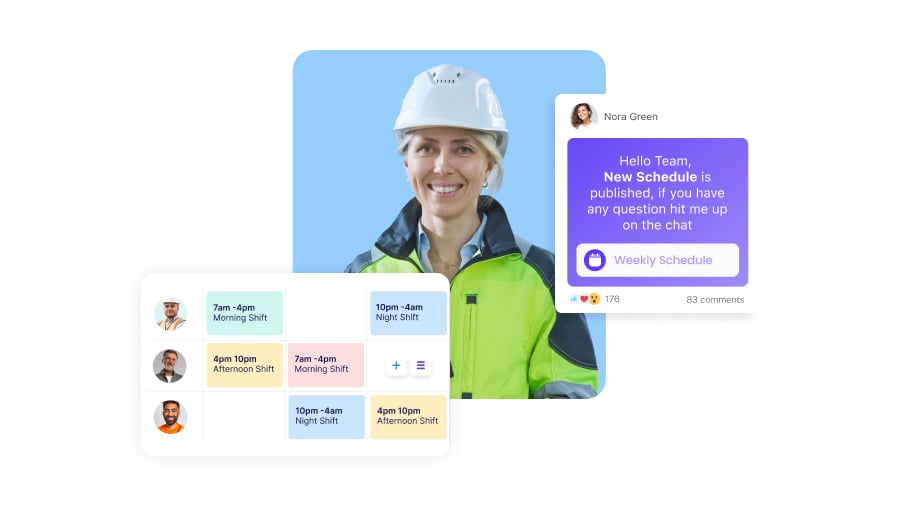
Connecteam’s drag-and-drop employee scheduler lets you create shifts and assign them to workers quickly. You can save time by using shift templates, recurring schedules, or importing rosters from Excel. Worker qualifications are easy to see while scheduling, so you can match the right people to the right projects.
Employees can indicate their availability and preferred locations. They can also pick up open shifts with or without approval, depending on your settings. For last-minute changes, you can swap shifts quickly and notify workers via push notifications. Employees can also swap shifts with co-workers, with or without your approval.
Smart groups are another useful feature. You can group staff by role, training level, or other criteria and use these groups to determine who is eligible for certain shifts. The scheduler will prevent you from assigning someone who is not qualified for a job.
The auto-scheduler is also a standout. Connecteam can automatically build rosters based on qualifications, availability, shift distribution, and more.
Monitor your projects and workers from anywhere with a GPS-enabled time clock
With Connecteam’s employee time clock, your workers can punch in and out of jobs or shifts with a single touch of their mobile devices. The real-time GPS tracker shows you workers’ locations in real time while they’re on the clock. You can ensure everyone is where they need to be and prevent buddy punching.
Connecteam’s geofence time clock also lets you set up geofences: virtual boundaries around job sites. Workers are restricted from punching in if they’re not within a geofence, thus preventing time theft. They’re also sent reminders to clock in and out when they enter or leave the geofenced location.
Using these time entries, Connecteam will generate automated timesheets for payroll. These also account for breaks, overtime, and more. Use these timesheets with Connecteam’s direct payroll integrations, which include Xero and MYOB, or export them to use with your business’s preferred payroll provider.
I also liked the GPS breadcrumbs feature, which can prove site attendance during audits or safety checks. For smaller contractors, this helps resolve disputes and reduces paperwork.
Stay productive and compliant with time off, break, and overtime management
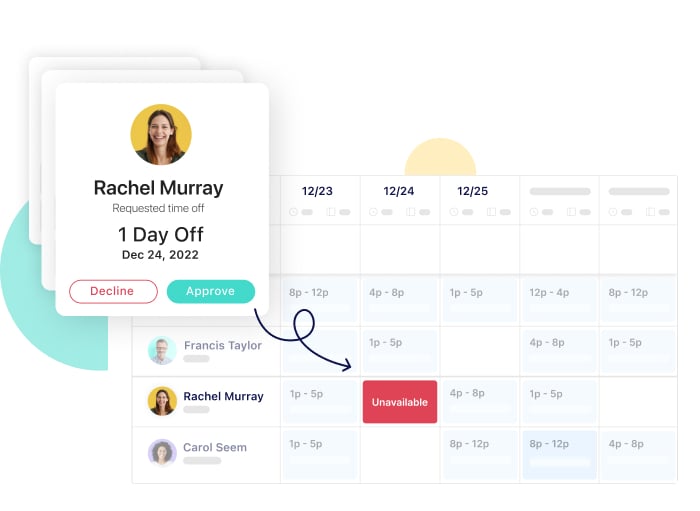
Connecteam’s time off tools let you create custom rules for leave, breaks, and overtime. You can easily see how much leave employees have remaining, and workers can request time off directly from the app. You can approve these requests in seconds.
Connecteam also works as break management software, allowing you to add rest breaks directly to schedules. You can set overtime rules so workers need approval before continuing past their scheduled hours. This is especially useful for tight-budget projects because it prevents unapproved overtime from affecting margins. It also supports compliance with Australian award requirements, where accuracy is essential.
Have full control and visibility of work progress with task management tools
Connecteam lets you create and assign tasks, including recurring tasks and subtasks. You can add notes, documents, images, due dates, and more so staff have everything they need to complete their work correctly.
Push notifications help remind workers of their tasks, and real-time tracking lets you identify delays or issues before they escalate. You can also attach tasks directly to shifts so workers see their responsibilities as soon as they clock in.
Adhere to safety regulations and laws with customizable forms and checklists
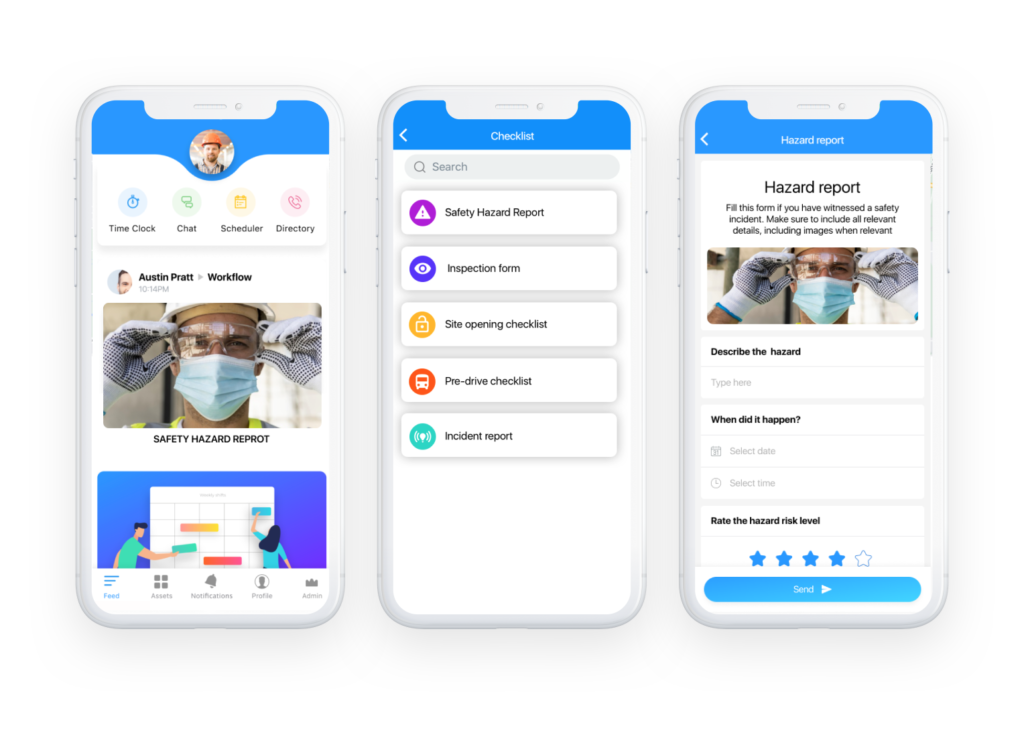
Connecteam makes it easy to stay safe and compliant with industry regulations with its digital forms and checklist feature.
You can create digital forms for incident reporting, client feedback, and other needs. Custom checklists help ensure site inspections, equipment checks, inventory audits, and similar processes are completed properly. You can add images, videos, time stamps, and e-signatures to ensure nothing is missed during audits.
Chat instantly with team members using the in-app chat, company directory
Your team can report incidents, ask questions, and share updates instantly using Connecteam’s team chat. You can create one-on-one chats or group discussions.
You can also speak to workers and their emergency contacts instantly using the company employee directory. Connecteam enables you to get in touch via email, telephone, or the chat feature.
Keep the team skilled and certified with training and document management tools
Construction teams rely on up-to-date skills, certifications, and licences. Connecteam’s training and document management tools make this easy.
I love how the training software for employees lets you create and assign courses that workers can complete easily from their mobile devices. The company knowledge base can house guides such as standard operating procedures and safety manuals.
Further, it can store images, videos, and audio clips—all without any limitations on storage or file size.
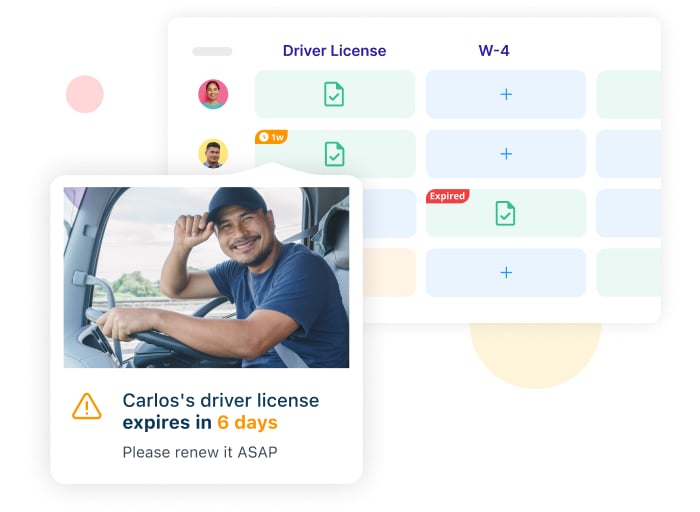
Connecteam also has a team documents management tool you can use to store employee licences, certifications, and more. You can set expiry dates so you never miss renewals. Automatic reminders help prevent issues like expired white cards or high-risk work licences that may cause costly delays.
Get customised reporting and so much more
Connecteam’s reporting tools give you insights into overtime hours, attendance, labour costs, task progress, project spend, and more.
You also get additional HR and team management tools, including surveys, a company newsfeed, field ticketing, digital ID cards for site access, and more.
To top it all off, Connecteam is very reasonably priced. Companies with fewer than 10 users can use the app completely free of cost—no strings attached. Paid plans start as low as USD $29 (~AUD $44) per month for up to 30 users.
Connecteam also offers a free-for-life plan – Try Connecteam here!
Connecteam also offers a free for life plan – Try Connecteam here!
Key Features
- Drag-and-drop shift scheduling
- Time clock with built-in GPS and geofencing
- Full-feature task management
- Customisable forms and checklists
- Training, licences, and certifications management
- Secure built-in team chat
Pros
- Knowledge and document centres with unlimited storage
- Push notifications and smart alerts
- Mobile app that can be accessed from anywhere
- All-in-one solution
Cons
- Needs internet or Wi-Fi access to work
Pricing
Free-for-life plan availablePremium plans start at $29/month for 30 users
14-day free trial, no credit card required
Start your free trial -
Procore — Good for large construction firms needing full project lifecycle control

Procore is a cloud-based construction management platform with tools for scheduling, time tracking, finance, and communication.
Why I chose Procore: It is known for giving large construction firms full control over the entire project lifecycle, making it one of the most comprehensive platforms in the industry.
Here are some of its key features.
Project management
Managers can upload drawings, log RFIs, and track issues directly in the platform. I found the project health dashboard particularly helpful. The colour coding clearly shows which projects are on track and which may be falling behind.
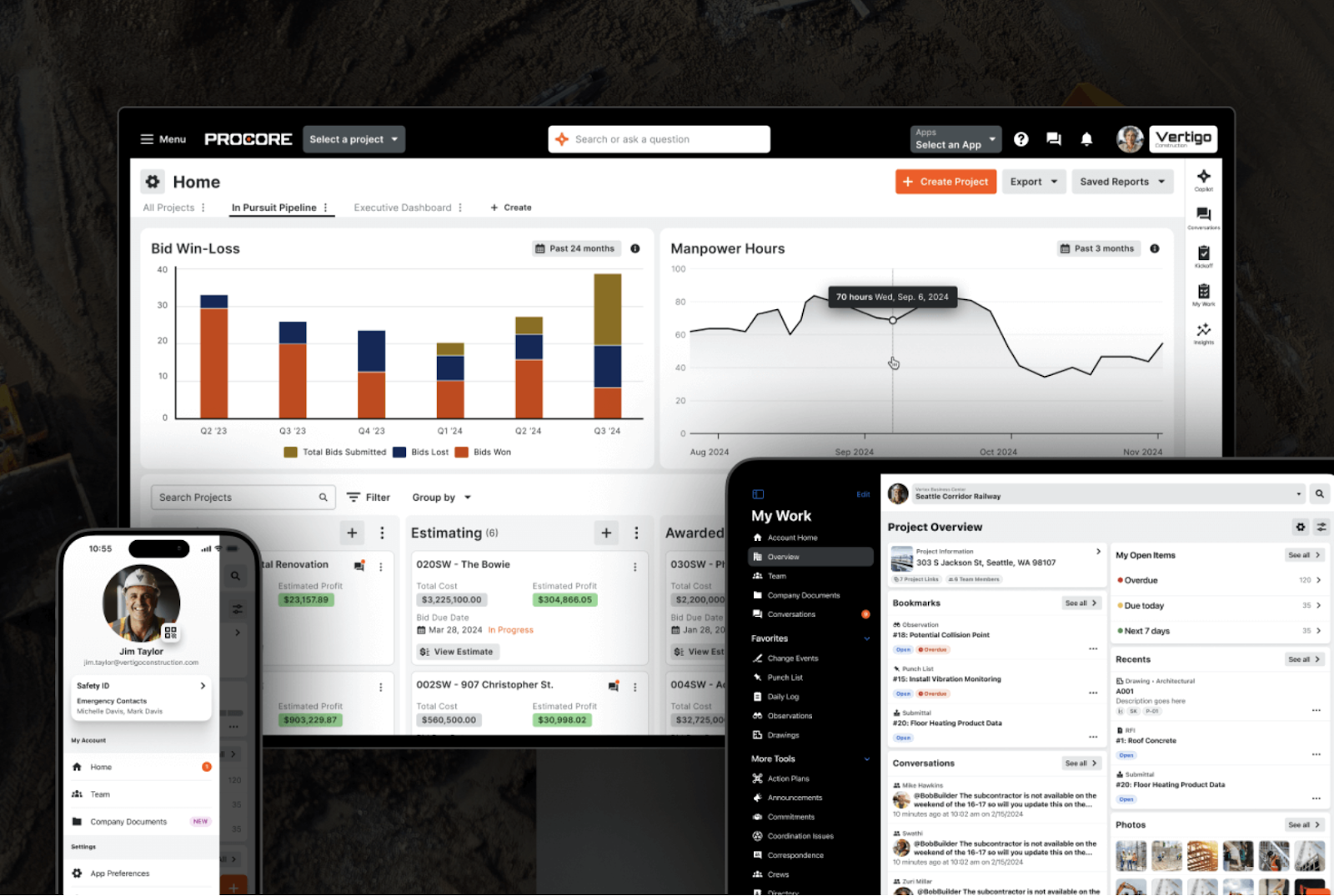
For field supervisors, the ability to file inspections, record incidents, and assign corrective actions within the app keeps safety and quality information in one place. Custom forms allow you to adapt checks to meet local compliance requirements.
However, when our team looked more closely at the platform, we found several user reviews (including the one below) that mentioned the learning curve can be steep and the number of features overwhelming.
Time tracking
Procore’s time tracking tools are very detailed. Employees can clock in and out from their phones, log breaks, and tag each entry to a specific project, cost code, or location. This level of detail helps managers link labour hours directly to project costs.
Geofencing is also available, which reminds crews to clock in or out as they enter or leave job sites.
Scheduling
Procore’s scheduling tools also function as a form of resource management. Managers can assign the right crews and equipment to the right tasks at the right time. You can drag and drop assignments, tag employees based on skills, and move staff around easily when plans change.
I also liked the labour request feature. If a site suddenly needs extra hands, managers can send out a request, and available workers can respond—cutting down on phone calls and manual coordination.
One drawback is that Procore does not offer schedule templates or auto-scheduling. These features can save time on repetitive work, and their absence may be challenging for smaller contractors without large admin teams.
Finance tracker
Procore’s finance tracker is set up like a clean, organised spreadsheet. It displays budgets, variations, pending changes, and spending in real time. I liked that it connects with payroll data from time entries, helping ensure labour costs remain accurate. For construction businesses running multiple projects, this makes it easier to monitor cash flow and avoid overspending.
What users say about Procore
It is a great software to use as a central repository for submittals, photos, etc. It makes it much easier to provide reviews, feedback and approve purchases, and well as to download drawings and other documents.

For businesses that don’t have dedicated project management teams or tech experts, navigating through Procore’s interface can feel like a full-time job.
Key Features
- Project workflows with tasks and documents
- Gantt scheduling with linked dependencies
- RFIs and submittals tracking
- Budgeting and change order management
Pros
- Strong construction project management workflows
- Good scheduling for multi-trade jobs
Cons
- Steep learning curve for new users
- Overpriced and overpowered for smaller contractors
Pricing
Contact vendor for price Trial: No Free Plan: No
-
Nexvia — Good for Australian builders and fit-out specialists
Available on
- Web
- iOS
- Android
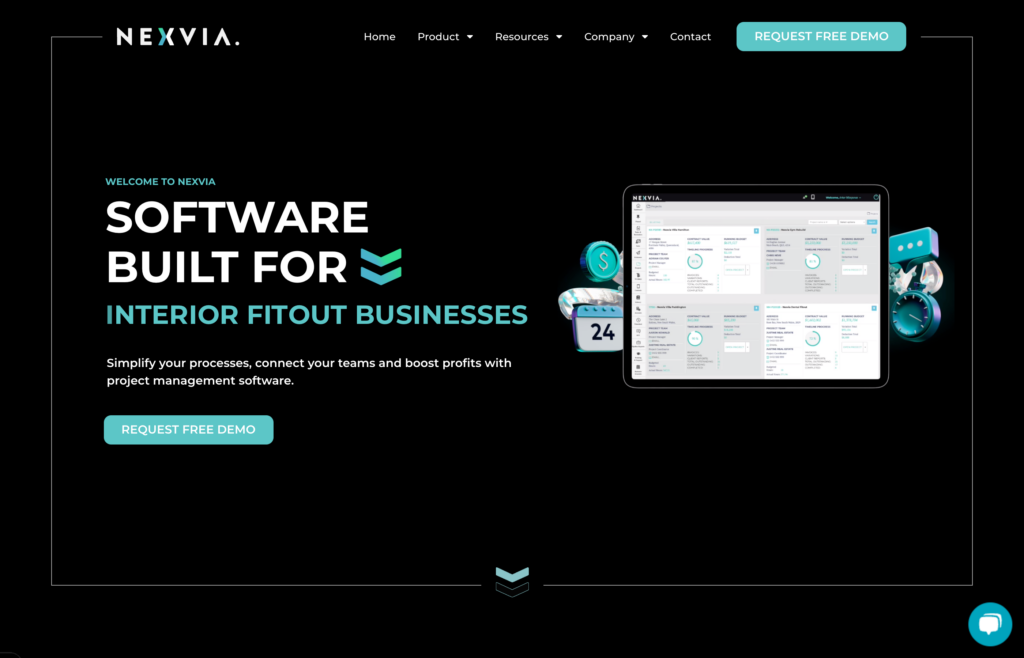
Nexvia is a cloud-based construction management platform designed for builders in Australia and New Zealand.
Why I chose Nexvia:I selected Nexvia because it is built specifically for local builders, including home builders, fit-out specialists, and small-to-mid commercial builders. It brings together estimating, financials, field tools, and client or contractor access in a way that suits teams doing repeatable interior, renovation, or trade-focused work.
Estimating and tendering
Nexvia lets you prepare estimates and manage tenders directly in the platform. Before a project even begins, you can track quotes, compare bids, and set budgets. For small business owners, this means faster, more accurate scoping and less switching between different tools.
Because cost information is set up early in the system, it also helps prevent unexpected overruns later in the project.
Budget tracker
The live budget tracker displays real-time spending, variations, and defect-related costs in a single view. I like that errors or inconsistencies are flagged early so you can correct them quickly.
The only trade-off is that using this tool effectively requires consistent data entry. For businesses with limited admin capacity, keeping everything updated may become time consuming.
Site & field tools
Nexvia provides time tracking (manual or real-time), a site register, and QR-code check-ins for contractors. You can also log defects, upload photos, complete safety audits, and submit requests for materials or labour straight from your phone.
For foremen and crew leaders, this means less paperwork and fewer miscommunications, because information flows directly back to the office.
Project management & collaboration
Nexvia gives staff, clients, and contractors access to one shared platform, which helps ensure communication and updates are not lost. With mobile access, site teams can input data directly into dashboards and reports, while managers monitor timelines, budgets, and tasks in real time.
I like how this reduces the constant cycle of emails, calls, and spreadsheets, making it easier to keep everyone aligned and up to date.
What users say about Nexvia
It has a library function. We put all the unit price for each item and quickly search for the price whenever we needed to.
Sometimes our team uses the same project. When we use the same line item, it clashed and takes time to refresh.
Key Features
- Estimating and tender management
- Real-time budget and variation tracking
- Time tracking with QR check-ins
- Defect and safety audit logging
Pros
- Portals keep clients informed
- Suited for Aussie fit-out firms
Cons
- May feel complex for small jobs
- Limited global integrations
Pricing
Contact vendor for price Trial: No Free Plan: No
-

Sitemate — Good for streamlining site compliance and mobile form workflows
Available on
- Web
- iOS
- Android
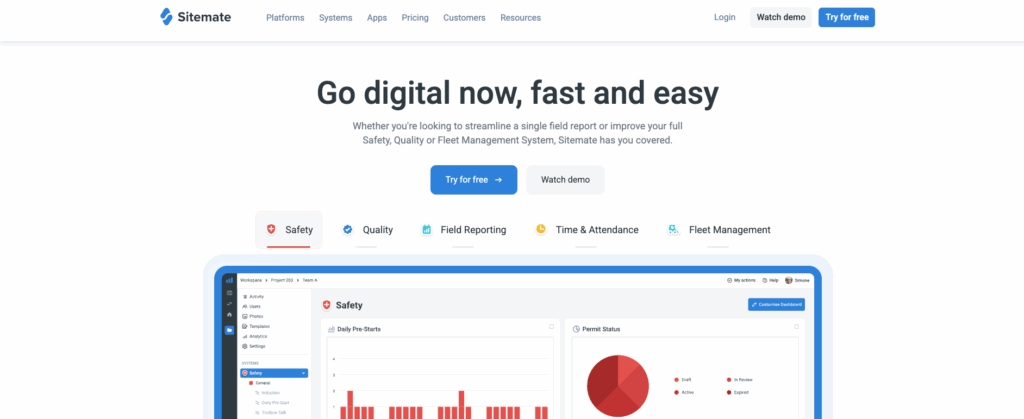
Sitemate is a no-code construction management platform designed to digitise site processes and compliance tasks. Its core product, Dashpivot, acts as the tool for capturing, organising, and tracking real-time field data through custom forms and automated workflows.
Why I chose Sitemate: It focuses on simplifying compliance and form-driven tasks. For construction managers dealing with audits, inspections, and safety checklists, it offers a way to collect and manage this information digitally instead of on paper.
It focuses on simplifying compliance and form-driven tasks. For construction managers dealing with audits, inspections, and safety checklists, it provides a way to collect and manage this information digitally rather than on paper.
Digital forms and automated workflows
I like how Sitemate lets you build custom digital forms for daily reports, safety inspections, and site checklists. Instead of passing around clipboards, supervisors can collect data directly on tablets or phones, complete with photos, videos, signatures, and location tags.
Another standout feature is workflow automation. When a form identifies an issue—for example, during a safety inspection—it can automatically trigger the next step, such as sending the item to a manager for review or approval. This reduces manual admin, speeds up sign-offs, and gives managers real-time visibility into issues as they arise.
Document management and collaboration
Sitemate also centralises documents, photos, and site records in one searchable database. I think this is especially helpful for managers who need a reliable single source of truth for audits or compliance reviews.
Field teams can upload photos or forms directly from site, which keeps office staff updated and aligned with what is happening in the field.
Mobile tools and digital IDs
Because the platform is built with mobile use in mind, workers can continue submitting forms even when offline, with data syncing once they reconnect. I also liked the inclusion of digital IDs for workers and visitors. This feature allows for quick, contactless sign-offs and smooth entry approvals, which is practical for sites with rotating crews or multiple subcontractors checking in each day.
The main drawback is that Sitemate does not go as deep into project scheduling or cost management. It lacks advanced scheduling tools such as Gantt charts or resource allocation features. Its financial tools focus more on capturing data than offering comprehensive budget tracking or cost forecasting.
What users say about Sitemate
Very happy with Dashpivot and the service along with products they have to offer. Templates are within my understanding to edit, and complete on site, on the run.
UX is poor you cannot read and adjust the full name of worklots on the left side of the screen.

Key Features
- Custom digital forms and checklists
- Automated review and approval flows
- Centralised doc and photo storage
- Worker and visitor digital IDs
Pros
- Mobile offline mode with auto-sync
- Fully customisable forms
Cons
- Limited focus on scheduling and cost control
- Setup of workflows can be time-consuming
Pricing
Starts atStarts at $30/user/month Trial: Yes Free Plan: No
-
Buildlogic — Good for developers and contractors seeking a locally tailored all-in-one solution
Available on
- Web
- iOS
- Android
- Windows
- Mac
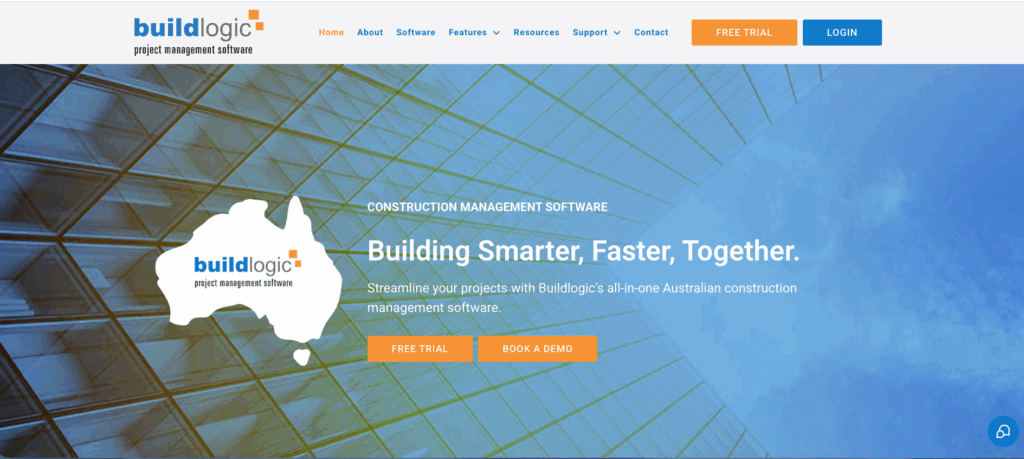
Buildlogic is an Australian-built construction management platform designed for contractors and developers who want project planning, document control, and contractor management in a single system.
Why I chose Buildlogic: It positions itself as an all-in-one tool tailored to the local market, making it appealing for contractors who want everything from planning to compliance in one place.
Project planning
I like how Buildlogic supports project planning through Gantt-style scheduling, resource allocation, and forecasting. Managers can build project timelines, assign tasks to trades, and visualise dependencies between activities.
For a site supervisor, this helps avoid clashes such as scheduling painters before the plastering is finished. Smaller contractors may find the planning tools more powerful than they need if they are managing only a few jobs at a time, but for firms juggling multiple sites, these features help keep work organised.
Document management
Buildlogic’s document management features stand out for keeping drawings, specifications, and site instructions in one controlled hub. I found the revision tracking particularly useful. When a drawing is updated, the system ensures everyone sees the most current version. For site crews, having the latest documents available on site reduces the risk of rework caused by outdated plans.
Contractor management
The contractor management tools allow you to track subcontractor compliance, insurance documents, and performance. This is especially helpful for developers managing multiple subcontractors and ensuring site access requirements are met.
Managers can quickly see which contractors are cleared to work and who still has outstanding paperwork, which saves time during site inductions and reduces delays.
Key Features
- Gantt project planning and scheduling
- Resource allocation and forecasting
- Central document version control
- Site instruction tracking tool
Pros
- Good for Aussie developers
- Tracks contractor compliance
Cons
- Lacks deep finance tracking
- UI feels a bit dated
Pricing
Contact vendor for price Trial: Yes — 14-days Free Plan: No
-

Evolve Construction — Good for managing contractor payments, claims, and project alerts
Available on
- Web
- iOS
- Android

Evolve Construction is an Australian software platform that focuses on the financial and operational side of construction management. It offers tools for contractor payments, claims, estimating, and onsite project coordination.
Why I chose Evolve Construction: Evolve stood out because it is designed for builders who want tighter control over contractor payments and claims, along with practical onsite tools for day-to-day project updates.
Contractor payments and claims
Evolve’s accounts payable software automates contractor payments. I like that managers can review claims, approve invoices, and release payments from a single place rather than juggling spreadsheets and bank platforms.
For project managers, this reduces missed or late payments. For contractors, it helps prevent disputes over what has or hasn’t been approved. One limitation is that its financial reporting is not as advanced as what you would find in larger ERP systems. It lacks features like fully customisable dashboards and detailed job costing reports.
Onsite project coordination
The onsite coordination tools let managers and crews log progress, track variations, and flag issues in real time. I think this is helpful for supervisors who need to send updates directly from site without waiting until the end of the day.
Crews can check instructions, upload photos, and mark tasks as completed, while managers in the office receive live alerts about delays or incidents. This feedback loop keeps jobs moving and helps avoid unpleasant surprises late in a project.
Estimating
Evolve’s estimating module connects to its financial tools, allowing builders to create detailed quotes and carry them through into live project budgets. I see this as especially valuable for firms wanting consistency between quoting and actual project costs. From an owner’s perspective, it helps prevent estimates drifting once work begins.
Sales and marketing
Evolve also includes a CRM-style tool for managing leads and client communication. For smaller builders, this can be useful for tracking prospects and tenders without needing a separate system. It won’t replace a full-featured CRM for larger companies, but it does help keep sales and marketing activities aligned with project management.
Key Features
- Contractor claims and payables
- Variation and task tracking
- Estimating tied to live budgets
- Client and lead management CRM
Pros
- Automates contractor payments
- Onsite alerts sync with office
Cons
- Reporting is less advanced
- Sales tools basic for big firms
Pricing
Contact vendor for price Trial: No Free Plan: No
-
Styck — Good for financial tracking, RFIs, and cost forecasting in Australia
Available on
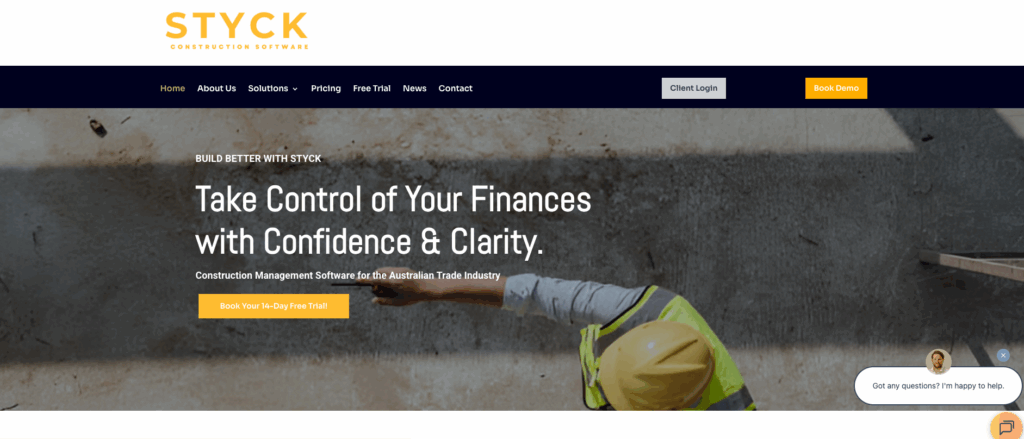
Styck is cloud-based construction management software built in Australia for local builders.
Why I chose Styck: It brings financial tracking, variations, RFIs, and cost forecasting together in a simple Australian-made package. It is ideal for builders who need detailed financial control without the complexity of enterprise-level systems.
Financial tracking and progress claims
Styck offers budget tracking, progress claim management, retention tracking, and variation control in one straightforward dashboard. Managers can see budgets versus actuals, track invoices, and manage retention payments without sorting through multiple spreadsheets.
For crew leads, this means more transparency around payment stages and fewer surprises when payments come through. The only drawback is that while Styck’s reports provide clear financial overviews, they do not include advanced features such as customisable dashboards or highly detailed reporting on individual project costs.
RFIs, variations, and retentions
Styck centralises RFIs, variations, and retention claims (the portion of payment held until project completion) in one system. Site teams can submit RFIs or variation requests directly, and managers can update contract terms with complete visibility. For smaller builders dealing with frequent scope changes, this reduces long email threads and keeps records tidy.
Cost forecasting and commitments
Styck’s cost forecasting tools, including committed cost tracking and progress claim visibility, provide real-time insights into how current spending compares with the original estimate. I liked that this allows managers to identify overspending early, before it becomes a bigger issue.
These forecasts help business owners make informed decisions about where to reduce or reallocate costs. Crews can also see which tasks are committed and which are still pending.
Key Features
- Budget tracking and progress claims
- RFI and variation management
- Retention and contractor claims
- Contact and project setup tools
Pros
- Combines RFIs and variations
- Forecasting helps spot risks
Cons
- Analytics are limited
- No scheduling or HR tools
Pricing
Starts at Trial: Yes — 14-days Free Plan: No
Compare the Best Construction Management Softwares
| Topic |
 Start for free
|
|
|
|
|
|
|
|---|---|---|---|---|---|---|---|
| Reviews |
 |
|
|
|
N/A
|
|
N/A
|
| Pricing |
Starts at just $29/month for the first 30 users
|
Contact vendor for price
|
Contact vendor for price
|
Starts atStarts at $30/user/month
|
Contact vendor for price
|
Contact vendor for price
|
Starts at
|
| Free Trial |
yes
14-day
|
no
|
no
|
yes
|
yes
14-days
|
no
|
yes
14-days
|
| Free Plan |
yes
Free Up to 10 users
|
no
|
no
|
no
|
no
|
no
|
no
|
|
Best all-in-one construction management software in Australia
|
Good for large construction firms needing full project lifecycle control
|
Good for Australian builders and fit-out specialists
|
Good for streamlining site compliance and mobile form workflows
|
Good for developers and contractors seeking a locally tailored all-in-one solution
|
Good for managing contractor payments, claims, and project alerts
|
Good for financial tracking, RFIs, and cost forecasting in Australia
|
|
|
Web, iOS, Android
|
Web, iOS, Android
|
Web, iOS, Android, Windows, Mac
|
Web, iOS, Android
|
What Is Construction Management Software?
Construction management software provides a range of tools that help site supervisors and construction managers streamline their work when planning, managing, and completing projects.
The software usually includes features for planning, organising, and tracking projects from start to finish. It often allows managers to create and assign jobs, track time, monitor progress, and manage important documents.
Quality platforms also include task management tools and custom forms for safety checks, incident reports, and other site processes. The best software offers communication features, such as an in-app chat, to keep teams informed and connected on every project. Advanced reporting tools provide clear visibility over project costs and revenue.
Together, these features help managers deliver projects on time, maintain high-quality standards, and stay within budget.
How Does Construction Management Software Work?
Construction management software works by using digital tools to streamline and automate project management in the construction industry. Contractors and managers can easily create, assign, and track jobs, as well as set rules for time off and breaks while allocating resources. Some platforms even include built-in training tools, allowing managers to create and assign custom courses so workers stay up to date with safety protocols and industry standards.
Workers can clock in and out of shifts to track their time and submit timesheets to managers for approval. In-app chat features make it easy for teams to communicate with each other and with supervisors about tasks. They can also complete and update forms and checklists in real time from their mobile devices.
Most construction management solutions are available on smartphones and tablets, making them ideal for teams who work on site and do not always have access to a desktop computer.
The Benefits of Construction Management Software
Maximised productivity through better resource allocation
You can assign staff to shifts more efficiently when you know their location and availability preferences. Clear visibility of workers’ planned time off also helps you fill resource gaps ahead of time so you are never understaffed. Managing time off, breaks, and overtime gives employees the downtime they need, helping them stay energised and productive on the job.
Improved compliance and reduced safety risks
Custom forms and checklists are a reliable way to ensure important tasks—such as safety inspections—are completed as required. With construction management software, you receive notifications once tasks are submitted, and e-signatures help keep workers accountable.
Instant messaging also allows staff to report safety incidents immediately. Software with a company directory stores details for all workers and their emergency contacts, saving valuable time during emergencies.
In addition, document management tools make it simple to store and organise employee licences, certifications, and other records. You can set expiry dates to ensure documents are renewed on time, helping your company stay compliant with industry regulations.
Better control over projects and workers from anywhere
Platforms with GPS-enabled time clocks allow you to track how and where employees spend their time while working. This supports accountability and helps identify inefficiencies such as time theft.
With strong task management tools, you can monitor team progress and address issues that might cause delays or missed deadlines.
Checklists also help you keep track of materials so you always know what stock you have on hand, reducing the risk of work stoppages due to missing supplies.
Finally, in-app chat tools keep your team connected, fostering a sense of community across job sites and helping improve engagement and retention.
How Much Does Construction Management Software Cost?
Most construction management software uses a per-user per-month pricing model, but costs can vary significantly. On the lower end, Sitemate’s Dashpivot starts at about USD $25 (AUD $39) per user per month. Styck sits in the mid-range with multi-user plans from about AUD $399 per month.
On the premium side, Procore is designed for large firms and requires a custom quote. It’s generally considered one of the most costly platforms on the market.
Connecteam uses a different approach that makes it more cost-effective for your company. Its basic plan starts at just USD $29 for up to 30 users—that’s around just AUD $44. It also has a small business plan. Companies with 10 or fewer workers can use Connecteam completely free forever. There’s even a free trial you can sign up for.
>> Get started with Connecteam for free today! <<
FAQs
Construction management software comprises a range of tools to streamline team and project management. Key features include time tracking, shift scheduling, forms and checklists, and task management. Not all software solutions have all these features, so it’s best to opt for an all-in-one platform like Connecteam.
Contractors can monitor their workers using construction management software. Time tracking tools show how workers spend time across projects. GPS software shows workers’ locations during working hours so contractors can ensure everyone is where they need to be. And project management tools show work progress in real time.
Connecteam is the best all-in-one construction management software. Its GPS time tracking and drag-and-drop scheduling maximise productivity. Customised forms and checklists ensure that workers are completing essential tasks and checks, while document management keeps licences and certifications secure and up to date. Lastly, the in-app chat keeps everyone connected across job sites. You might also want to read our in depth review of the best employee scheduling software in Australia 2025 (In-Depth Comparison)
The Bottom Line On Construction Management Software
Managing a construction business comes with many challenges. Contractors need to navigate industry laws and safety regulations. Sticking to budgets and deadlines is also tricky when you can’t physically monitor your workers and materials. Luckily, construction management software can help.
Connecteam is the best option for construction companies in Australia. Its GPS time clock gives you visibility into how your team is managing their time, and smart scheduling makes it simple to assign workers and ensure you’re appropriately staffed. There are task management tools to keep all projects on track, a chat feature to communicate with workers from anywhere, and so much more.