

Manual time tracking and scheduling take up valuable time and often lead to mistakes.
The result is missed deadlines, frustrated employees, and unhappy customers.
Fortunately, reliable workforce management software can automate these tasks and cut down on errors.
Below, I review five of the best workforce management tools available in Australia so you can make the switch with confidence.
Our Top Picks
-
1

Best all-in-one workforce management software solution
-
2

Good for hospitality, retail, and healthcare
-
3

Good for all-in-one workforce + payroll management
Why trust us?
Our team of unbiased software reviewers follows strict editorial guidelines, and our methodology is clear and open to everyone.
See our complete methodology
How I Chose the Best Workforce Management Software in Australia
Here are the key features and tools I looked for when choosing the best online workforce management software in Australia.
Core must-have features
- Time and attendance tracking: Allow employees to clock on and off using shared kiosks or their own devices.
- Geolocation tracking: Monitor employees’ locations while they are on the clock or set geofences to help prevent time theft.
- Digital timesheets: Convert time entries into timesheets so payroll runs accurately.
- Job scheduling: Create and assign shifts with built-in breaks, overtime rules, notes, and more.
- Time off management: Let employees view their leave balances and request time off, which you can approve or decline from your admin dashboard.
I also looked for these usability features:
- Mobile apps that teams on the move can use from anywhere.
- A user-friendly design that suits people with all levels of technical ability.
- Smart alerts that notify staff about missed time entries, overtime issues, published rosters, and similar updates.
Finally, some apps had these extras that took them from good to great:
- Task management tools to create, assign, and track tasks and subtasks.
- Digital forms and checklists to organise information in the format you need.
- In-app communication tools that help everyone stay connected no matter where they are working.
The 5 Best Workforce Management Software in Australia of 2026
-
Connecteam — Best all-in-one workforce management software solution
Connecteam is the best all-in-one workforce management solution.
Why I chose Connecteam: Connecteam’s clean, modern design, feature-rich mobile app, affordable pricing, and hands-on customer support make it a great fit for businesses of all sizes.
Here is a closer look at Connecteam’s key workforce management tools.
Time and location tracking
The employee time clock lets staff clock on and off from their desktops, tablets, mobile devices, or shared kiosks.
The platform also supports manual time tracking in case someone forgets to record their hours, and it allows employees to tag billable and non-billable time so you can easily explain any differences between timesheets and client invoices. You can also see employees’ live locations while they are on the clock to confirm everyone is where they should be.
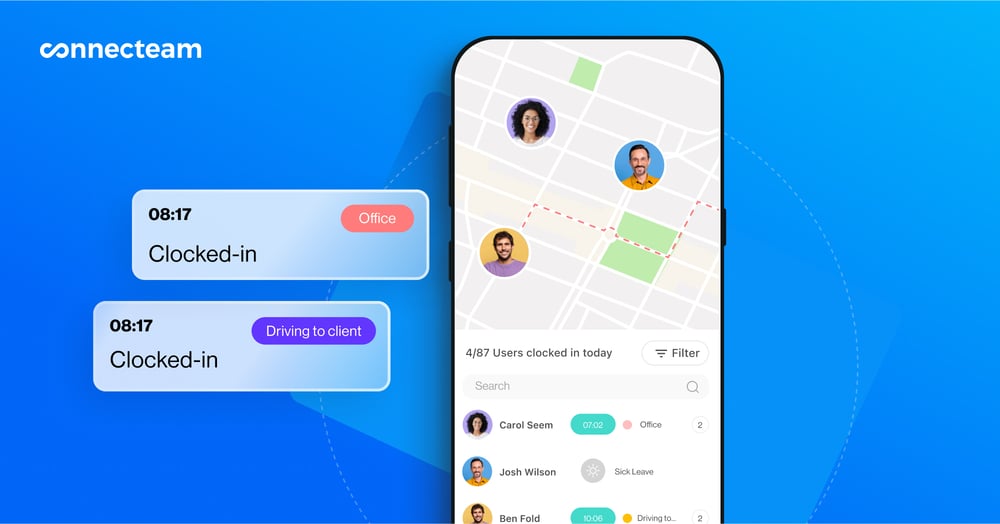
I like that you can set geofences, which prevent staff from clocking on unless they are inside the work zone. This is a reliable way to reduce time theft, such as buddy punching, where one employee clocks in for another. Connecteam also lets you set overtime limits or require overtime approval, which is helpful for managing labour costs.
Timesheets and payroll integrations
Connecteam automatically creates timesheets for payroll from employees’ time logs. You can view, edit, and approve these from your admin dashboard in just a few clicks before syncing them with payroll systems such as Xero, MYOB, and others.
Automated job scheduling
Connecteam’s job scheduling tools allow you to create shifts from scratch, use templates, copy previous schedules, or import them from Excel. You can also set recurring shifts for regular work.
Employees can share their availability, preferred locations, and shift preferences so you can consider these when building rosters.
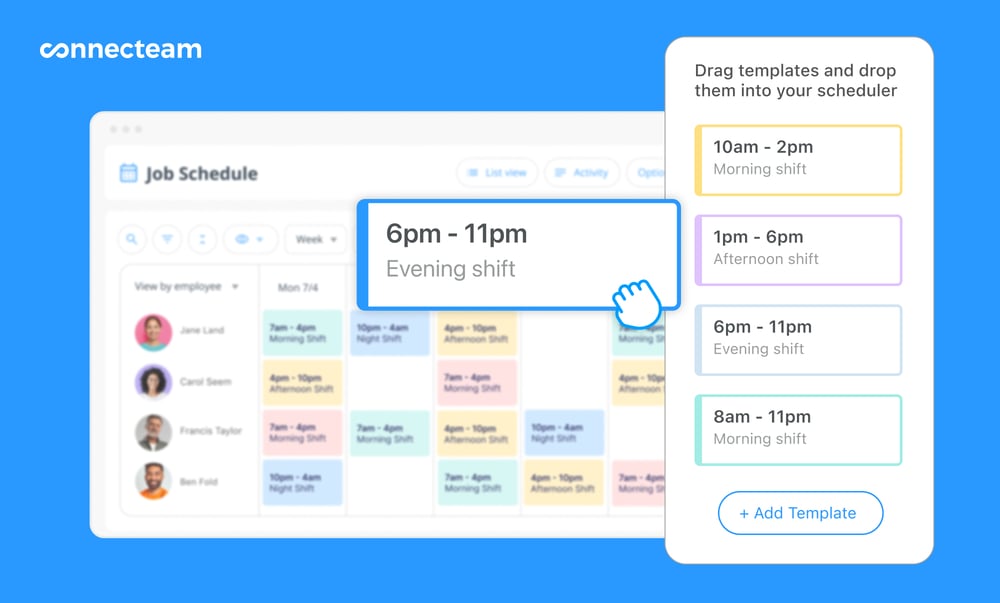
Alternatively, you can use my favourite function, the auto-scheduler, which assigns shifts automatically based on all the above and even considers skills and qualifications.
You can also build rest breaks and meal times into rosters to help ensure staff receive the downtime they need and that you stay compliant with labour requirements.
Employees can pick up open shifts with or without approval, depending on your settings, and they can swap shifts easily if something comes up. This makes last-minute changes much easier to manage and gives staff more flexibility.
Time off management
Connecteam’s leave management tools let you create custom leave types, each with its own rules for hours or days off, accruals, and carryovers.
Employees can request leave directly from the app. You can view balances and approve or decline requests from the admin dashboard.
User-friendly tasks, forms, and checklists
Connecteam goes beyond just time tracking and job scheduling.
You can create tasks and subtasks and assign them to team members. Add notes, images, videos, PDFs, due dates, and more so employees understand exactly what needs to be done. Task tracking lets you see progress and send reminders to prevent delays.
Digital forms and checklists help you collect information in a structured format. They are ideal for incident reports, safety checklists, customer feedback forms, and more.
Communications, training, HR, and more
Connecteam also includes internal communication tools such as an in-app team chat, a company newsfeed, surveys, polls, and a central knowledge base.
There are also tools for training and development, document management, an employee directory, and much more, making it a complete work management solution.
Key Features
- GPS time clock
- Digital timesheets
- Payroll reporting and integrations
- Automatic scheduler
- Task tracking
- Time off management
Pros
- Push notifications that remind staff to clock on and off
- Easy for everyone to navigate
- Fully mobile so you can do everything from anywhere
- All-in-one with task management, HR, and communication tools
Cons
- Doesn’t currently include accounting tools
Pricing
Free-for-life plan availablePremium plans start at $29/month for 30 users
14-day free trial, no credit card required
Start your free trial -
Deputy — Good for hospitality, retail, and healthcare
What’s new with Deputy
Deputy recently raised its base price from A$5 per user/month to A$6.75 per user/month with a minimum monthly spend of A$30 (on monthly plans) starting September 1, 2025.
Deputy is a time tracking and employee scheduling platform.
Why I chose Deputy: Deputy made my list of secure workforce management software for Australian businesses because it offers a wide range of workforce management tools, including helpful internal communication features.
Let’s take a closer look at Deputy’s workforce management features.
Job scheduling and time off management
Deputy’s scheduling feature is, in my view, one of its strongest tools. You can build rosters using drag-and-drop functionality or save time by copy-pasting previous shifts.
Even better, Deputy’s auto-scheduling tool handles much of the work for you by creating shifts based on demand, sales trends, labour budgets, and other factors. It assigns shifts automatically based on staff availability and qualifications, and it considers labour requirements such as overtime limits. It also helps ensure shifts are spread fairly across the team.
You can still assign shifts manually whenever needed, and you can mark some shifts as open so employees can claim them. Deputy also allows staff to request leave, and you can approve or decline requests directly in the app.
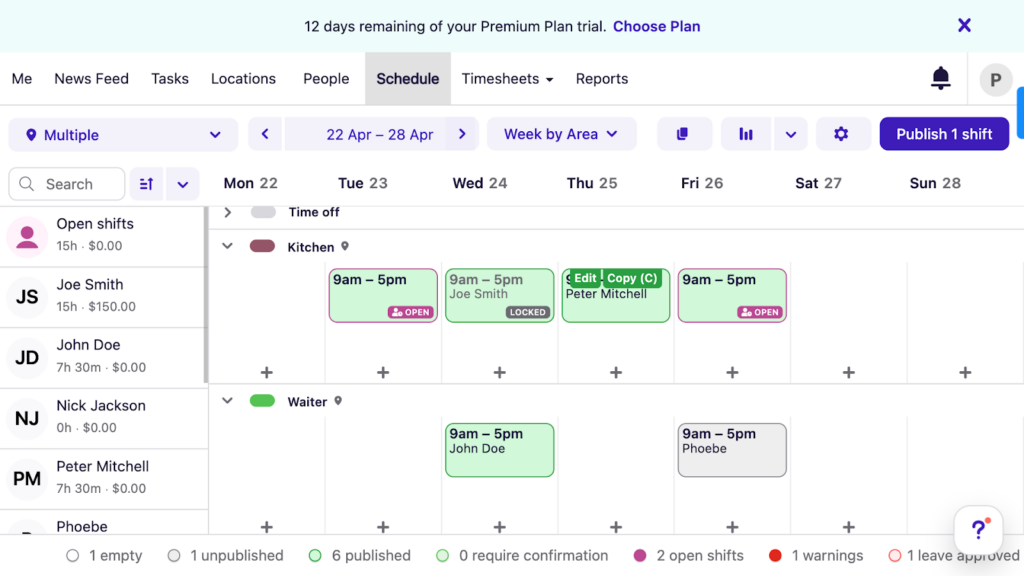
Deputy’s scheduler gives a clear overview of your staff and their scheduled work times. Time tracking, timesheets, and payroll
With Deputy, staff can clock on and off from their own devices or from a shared kiosk. There’s a geofencing feature that prevents clock-ons outside designated worksites, and a photo verification option that is particularly useful for preventing buddy punching.
When employees clock off, they can leave shift feedback and comments, which is a practical addition. I only wish they could flag comments as urgent so managers could respond more quickly to issues such as equipment failures that disrupt work.
All time entries are added to an online timesheet, which you can review and approve from your admin dashboard. Deputy automatically flags overtime and provides a breakdown of wages, including key award entitlements for each employee, such as penalty rates, overtime, and allowances.
Once timesheets are approved, you can export them to one of Deputy’s payroll partners, including Xero.
Task management and team communications
Deputy’s task management tools let you create tasks and subtasks, set due dates, and monitor progress in real time. I would like to see more customisation options, such as the ability to add images, videos, or detailed notes to tasks.
There is also a newsfeed that works well for posting announcements and sharing updates with the team.
What users say about Deputy
Deputy never gives me any trouble with logging in. I am able to quickly check my schedule whenever I need to, even outside of Wi-Fi.


My least favourite feature of Deputy is that not only does it tell you when your shift starts, but sometimes sends multiple notifications up to 12hrs before!

Key Features
- Time tracking and timesheets
- Shift scheduling, including auto-scheduling
- Payroll integrations
- Task management
Pros
- Award interpretation built for Fair Work compliance
- Built-in geofencing and photo verification boost timesheet accuracy
Cons
- Must choose the Premium plan to get both time tracking and scheduling
- You can’t add images or videos to task notes
Pricing
Starts at $6.75/user/month Trial: Yes — 31 days Free Plan: No
-
Roubler — Good for all-in-one workforce + payroll management
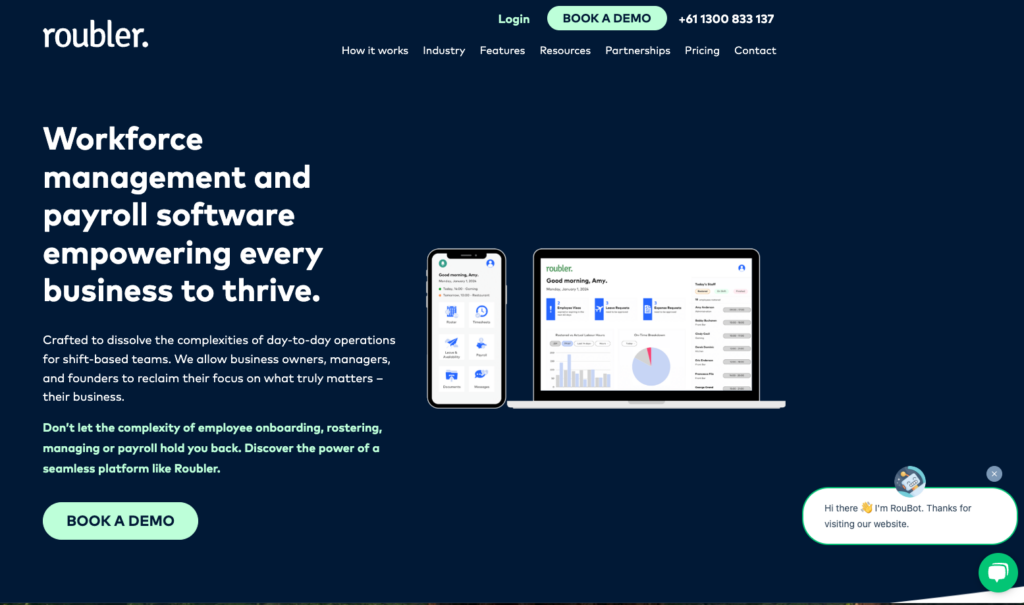
Roubler is a cloud-based workforce management system with tools for scheduling, time tracking, payroll, and onboarding.
Why I chose Roubler: The platform is designed to support large Australian businesses and includes a wide range of features that cover the entire employee lifecycle.
Here are Roubler’s key workforce management features.
Time tracking and payroll
What stood out most for me was Roubler’s flexibility with time tracking. Employees can clock in and out for work or rest breaks from their mobile devices or from a shared kiosk on-site. The kiosk’s built-in facial recognition tool is also a strong way to reduce buddy punching.
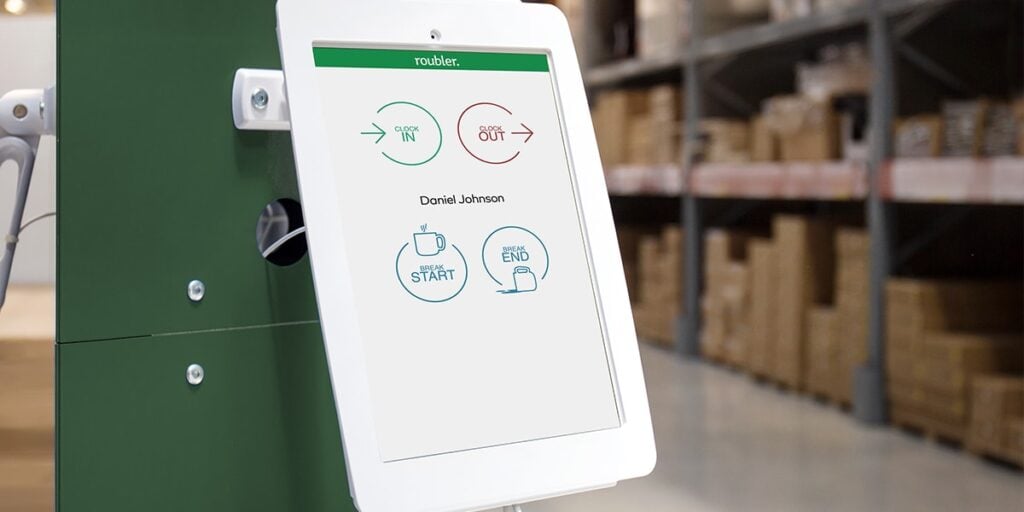
The Roubler kiosk app can be used by all employees at a worksite (Courtesy: Roubler) Timesheets are generated automatically, removing the need for manual entries. Roubler also includes built-in modern award interpretation to help ensure compliance when calculating pay rates.
You can integrate timesheets with payroll providers such as Xero and MYOB. However, Roubler does not offer as many integrations as some other platforms. That said, its managed payroll service is a good option if you prefer the Roubler team to handle payroll processing for you.
Scheduling and shift swaps
Roubler’s rostering tool includes AI capabilities that build schedules based on staff availability, work locations, leave, and compliance rules.
If you want to adjust the roster, you can easily edit shifts using drag-and-drop functionality, even after publishing. Employees can also swap shifts, and anyone affected receives instant notifications in their app.
That said, I found the scheduling tool lacked some refinement. For example, you cannot add shift-specific notes or link tasks directly to rostered shifts. Other platforms include these features to help employees understand what is required.
What users say about Roubler
It is a good application for small and medium-sized companies to manage their employees more efficiently.
Holidays are a mess in Roubler. The support team cannot get it right. I have been trying to get this sorted for well over 2 years now and I have problems each month that I have to report to support.
Key Features
- Time tracking and timesheets
- Payroll integrations
- Managed payroll service
- Rostering
Pros
- Biometric facial verification prevents buddy punching
- Deep compliance features for AU award interpretation
Cons
- No easy way to link shifts to tasks or add custom shift notes
- Lack of many payroll integrations can be limiting
Pricing
Contact vendor for pricing Trial: No Free Plan: No
-
Tanda — Good for compliance-heavy industries
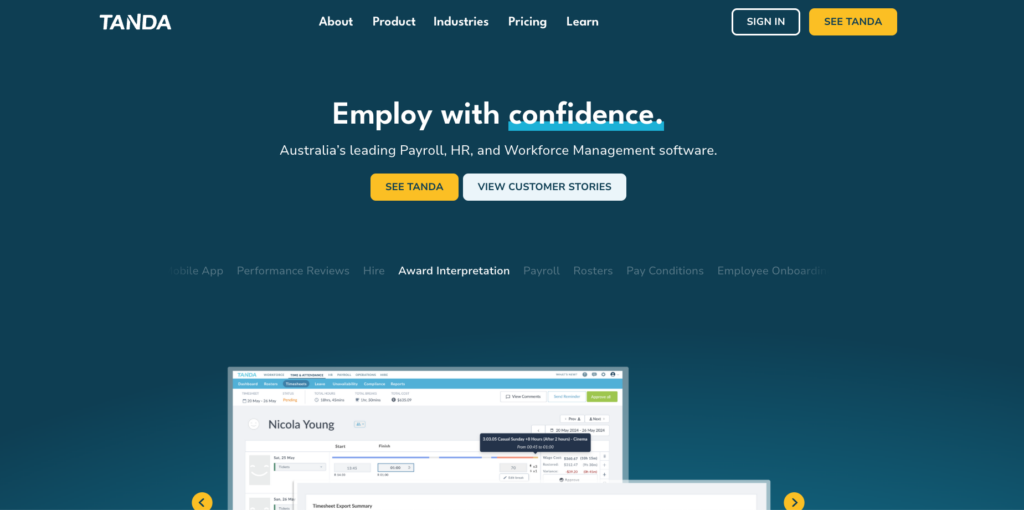
Tanda is a cloud-based software platform that offers a range of HR and workforce management tools.
Why I chose Tanda:While Tanda includes all the essential workforce management features, its compliance tools stand out to me.
Let’s look at Tanda’s core features and functionalities.
Time tracking and compliance
I found Tanda’s time clock simple and practical. Employees can clock in using individual PINs, and you can monitor their GPS locations and require photo verification at clock-in to help prevent timesheet breaches.
Tanda also removes much of the stress from compliance management. You can set rules for overtime, working hour limits, breaks, and other requirements to ensure you remain compliant with labour regulations. The system flags issues such as missed breaks or overtime, which helps you address problems early.
Tanda’s built-in award interpretation engine is a major advantage for Australian businesses with shift workers covered by modern awards. It automatically applies the correct pay rates, entitlements, and terms.
Payroll and rostering
Tanda creates timesheets automatically based on time clock data, and once approved, you can send them to payroll. However, some users have mentioned issues when integrating with third-party payroll systems like Xero.
On the positive side, any issues such as overtime or missed breaks are flagged before you sync the timesheets with payroll.
Tanda’s scheduler lets you create and assign shifts, add breaks, set hourly rates for different shifts, and more. There is also a Quick Build feature that allows you to use templates to speed up recurring roster creation.
Tanda does offer auto-scheduling, although I found it less comprehensive than some other platforms. It assigns shifts based on budgets and hours, but it does not take into account factors such as scheduled time off, qualifications, or equal workload distribution.
What users say about Tanda
Simple and easy to use. I like how the Dashboard gives you all an At-A-Glance view of important info.
There have been many glitches in the system with holiday accrual.
Key Features
- Time clock
- Built-in award interpretation engine
- Payroll integrations
- Rostering
Pros
- Excellent compliance and award interpretation
- HR features, including performance management
Cons
- Limited auto-scheduling and no shift-specific notes
- Issues reported with Xero integration
Pricing
Contact vendor for a quote Trial: Yes Free Plan: No
-

Humanforce — Good for large shift-based teams
Humanforce is a workforce management system with tools for time tracking, scheduling, payroll, and more.
Why I chose Humanforce: In addition to workforce management tools, Humanforce includes a Human Capital Management (HCM) system, which makes it well suited for large businesses wanting an all-in-one platform.
Let’s explore Humanforce’s key features.
Scheduling and demand planning
Humanforce’s scheduling tools are detailed and easy to navigate. You can build one-off or recurring shifts, save schedules as templates, and automatically fill rosters based on availability, qualifications, and custom rules.
Employees can accept or decline shifts, pick up open shifts, and submit shift swap requests. This is especially useful for businesses that engage contractors or freelancers because it reduces the need to chase people to find out who is available.
Once schedules are published, you can view them using filters such as role, department, or employment type.
I also appreciated the demand planning feature, which uses a traffic light system to show whether your staffing levels meet demand.
While the system is strong overall, there are a few drawbacks. By default, employees can see unpublished shifts unless you adjust your settings. Also, demand forecasting does not pull data from third-party platforms, so you need to enter forecasting information manually.
Time tracking and leave management
Staff can clock in and out from mobile devices, web browsers, or shared kiosks. Break management stood out to me—Humanforce lets you set reminders or enable automatic break deductions to help ensure compliance and prevent missed breaks.
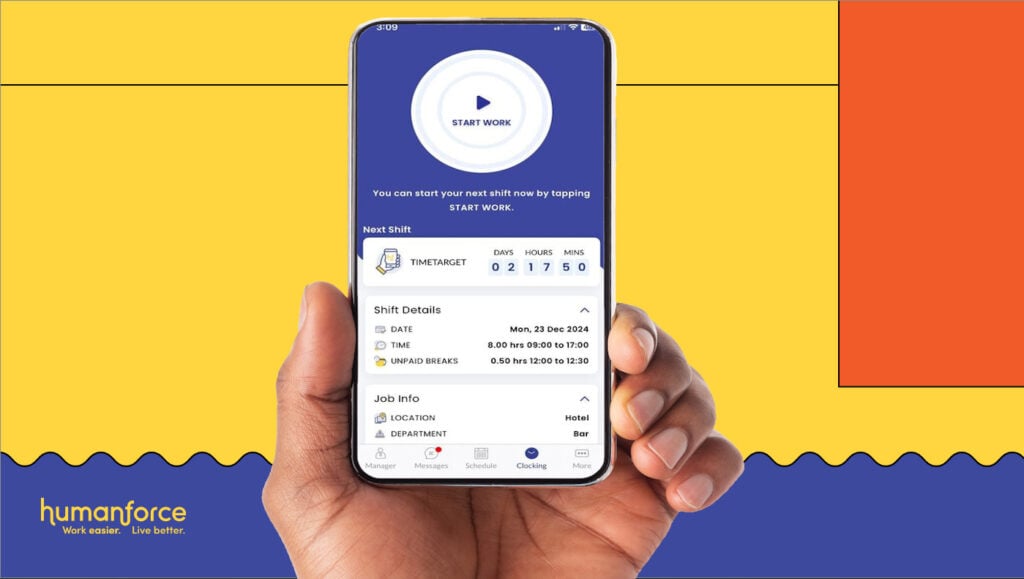
The Humanforce time clock lets you track overtime and breaks but lacks GPS breadcrumbs technology. (Photo ©Humanforce) Humanforce also offers facial recognition and a vein scanner, which verifies identity by reading the pattern of veins in the hand or fingers. GPS and geofencing options are also available for additional validation.
Once timesheets are created, you can set Humanforce to auto-approve entries that fall within a certain time range. This is a feature I have not seen in many other platforms and found particularly useful. You can then sync timesheets with Humanforce’s built-in payroll system or with third-party payroll solutions.
Leave management is another strength. You can create customised leave types, tailor public holidays based on location, add block-out periods where leave cannot be taken, and set minimum notice requirements.
I like these options because they balance employee flexibility with your need to plan ahead. The only drawback is that the initial setup takes time.
Communication tools
Humanforce includes an in-app chat that allows direct messages and group conversations. You can share attachments and GIFs and view read receipts to confirm messages have been seen. However, you cannot send voice messages or react to messages with emojis or quick responses, which makes communication feel less interactive.
You can also post updates on a digital noticeboard or send push notifications directly to employees’ phones.
What users say about Humanforce
It is very helpful for the managers or HRs to store and save the data of the employees in this software.
Customer service is not up to mark.
Key Features
- Scheduling
- Demand planning
- Time tracking
- Built-in payroll and payroll integrations
Pros
- Biometric facial verification prevents buddy punching
- Auto-approving timesheets can save time
Cons
- Employees can see unpublished shifts by default
- Lack of payroll integrations can be limiting
Pricing
Contact vendor for pricing Trial: No Free Plan: No
Compare the Best Workforce Management Software in Australia
| Topic |
 Start for free
|
|
|
|
|
|---|---|---|---|---|---|
| Reviews |
|
|
|
|
|
| Pricing |
Starts at just $29/month for the first 30 users
|
Starts at $6.75/user/month
|
Contact vendor for pricing
|
Contact vendor for a quote
|
Contact vendor for pricing
|
| Free Trial |
yes
14-day
|
yes
31 days
|
no
|
yes
|
no
|
| Free Plan |
yes
Free Up to 10 users
|
no
|
no
|
no
|
no
|
|
Best all-in-one workforce management software solution
|
Good for hospitality, retail, and healthcare
|
Good for all-in-one workforce + payroll management
|
Good for compliance-heavy industries
|
Good for large shift-based teams
|
|
What Is Workforce Management Software?
Workforce management software is a collection of digital tools that help businesses plan, track, and manage their teams. It simplifies tasks such as creating rosters, tracking employee hours, and staying compliant with labour laws by using features like time clocks, payroll integrations, and automatic scheduling tools.
How Does Workforce Management Software Work?
Company admins, usually business owners or HR, set up the system by inviting users, adding employee details, creating jobs, setting wage and compliance rules, integrating with payroll, and assigning permissions to managers.
From there, managers can build and publish rosters, check who is clocked on and whether they are at the correct locations, cover last-minute gaps in the schedule, respond to leave requests, and communicate with their team. Once employee timesheets are ready, managers can review, edit, and approve them before processing payroll.
Employees begin their week by checking their schedules. They can clock on and off for shifts and breaks each day to ensure they are paid correctly. They can also use self-service tools to view and download payslips, swap shifts, request leave, and more.
The Benefits of Workforce Management Software
Online workforce management software for Australian businesses offers several key advantages.
Reduces administrative burdens and human error
Employees can track their hours digitally, and you can create rosters, approve timesheets, and calculate payroll automatically instead of relying on pen-and-paper methods or spreadsheets. This saves time and helps prevent common mistakes such as data entry and calculation errors.
Keeps you compliant
Secure workforce management software in Australia often includes built-in award interpretation, rest break tracking, overtime alerts, and custom leave management. These tools help you meet labour law requirements and reduce the risk of legal or financial penalties.
Strengthens accountability and reduces time theft
GPS tracking, geofencing, and biometric verification help you verify who is at their worksite, when they arrived, and whether they took their required breaks.
This keeps operations running smoothly and reduces time theft, even when you are not physically on-site.
Boosts employee engagement and the employee experience
Most workforce management platforms offer self-service tools that let employees onboard themselves, request leave, view payslips, pick or swap shifts, and more. When staff feel empowered to manage their time and responsibilities without unnecessary approvals, they are more likely to stay engaged, motivated, and loyal.
How Much Does Workforce Management Software Cost?
Secure workforce management software in Australia varies widely in pricing and plan structure. Many platforms require you to contact their sales teams for exact costs.
For example, Deputy’s plans start at AUD 6.75 per user per month. Deputy also separates its time tracking and scheduling features into different plans, so if you need both, you’ll need the Premium plan at AUD 9.00 per user per month.
Connecteam is both transparent and affordable. It starts at just USD 29/month for up to 30 users (approx. AUD 43.50). It also offers a free plan for small businesses and a 14-day free trial.
FAQs
Connecteam is the best online workforce management software in Australia. It offers tools for tracking time, scheduling shifts, creating and assigning tasks, communicating with your workforce from anywhere, and much more.
Workforce forecasting is the process of predicting a company’s future staffing needs based on business goals, trends, and demand data to ensure the right talent is available when needed.
Most workforce management software comes at a steep price, but it can pay for itself by reducing labour costs, streamlining operations, and preventing mistakes. That said, some platforms, like Connecteam, have free plans and trials.
The Bottom Line on Workforce Management Software for Australia
Good workforce management tools help to run your business like a well-oiled machine and take the pain out of administrative tasks like time tracking, scheduling, and time off management. Ultimately, this boosts employee engagement, strengthens accountability, and keeps you compliant.
Among my top picks, Connecteam stands out as the best workforce management platform in Australia. In addition to its workforce management tools, it offers various other operations, communication, and HR management tools. Plus, it’s user-friendly and affordable.